User Profile

danny_grasso
Brass Contributor
Joined Aug 26, 2018


User Widgets
Recent Discussions
Re: remove intune based kiosk config
I've not seen this specifically but I see similar behavior in Intune. Removing the policy association doesn't always revert configuration, in much the same way that removing a GPO didn't. You could try Custom User Interface catalog setting to revert to default explorer and run a script such as the below to disable auto logon? # Disable AutoAdminLogon and clear credentials $regPath = "HKLM:\SOFTWARE\Microsoft\Windows NT\CurrentVersion\Winlogon" Remove-ItemProperty -Path $regPath -Name "AutoAdminLogon" -ErrorAction SilentlyContinue Remove-ItemProperty -Path $regPath -Name "DefaultUserName" -ErrorAction SilentlyContinue Remove-ItemProperty -Path $regPath -Name "DefaultPassword" -ErrorAction SilentlyContinue Remove-ItemProperty -Path $regPath -Name "DefaultDomainName" -ErrorAction SilentlyContinue138Views0likes0CommentsRe: Passwordless failing on Work Profile Authenticator
Thanks, this is a similar experience on one device that wasn't registered, so had applied an require app protection policy. On the other device it was marked as corporate so was excluded from the CA policy. We're migrating the second case to a new phone and just using the Authenticator App outside of the work profile for the time being.216Views1like0CommentsPasswordless failing on Work Profile Authenticator
Seeing an odd issue when attempting to enable passwordless using the Microsoft Authenticator app on an Android phone. The policy is definitely applying as we're seeing other indicators such as geo location and app information in the MFA request, but when we attempt to enable passwordless for that account it returns "Device not registered". Device is corporate in Intune and showing recent last checking time. When we use the Authenticator App outside of the work profile it works fine. Possibly an App Protection policy causing it to fail? Although I don't see Microsoft Authenticator in the list of apps targeted by App Protection policy. Also our CA policy indicates "one of" for corporate or require app protection policies and the device is definitely enrolled using work profile. Anyone else come across this or have ideas?357Views0likes3CommentsRe: Is it possible to allow MFA registration only in a work profile on a managed phone
The only way that I can think of accomplishing this (and I'll admit I haven't tried) is to have a conditional access policy that targets mobile devices and uses the Require app protection policy setting and require compliant device (require one of the selected). When someone attempts to sign in with their work account to the Authenticator app that isn't in the work profile then the App Protection policy will block sign in to the app?88Views0likes0CommentsRoadmap for TVM network devices?
I see that agent based scanning for network devices is being deprecated for Defender TVM in November this year. It's not clear what the replacement solution to this will be - while the product support is not exhaustive, for perimeter devices getting TVM information as part of the Defender for Cloud for Servers license is a valuable addition. Is there any roadmap information, or documentation that outlines how we'll be able to achieve the same outcome of TVM information for network devices for weaknesses and threats? I've been looking but cannot find a clear direction on this or whether I'll need to start looking at 3rd party for TVM on network devices.Automated Attack Disruption Testing
In the past I vaguely remember seeing attack simulation walkthroughs for MDE and there still is a link in the MDE onboarding to explore simulations and tutorials but that now just takes me to the XDR homepage. There are cases where we're talking to customers about the capability of Defender XDR and want to showcase in a safe way, without endangering demo devices. With Automated Attack Disruption announcements at Ignite 2024, I'd like to be able to showcase this particularly in the area of Ransomware protection, similar to the case study "protecting against ransomware when others couldn't" from the Ignite AI-driven Ransomware Protection session. Does anyone have an updated link to the attack simulation walkthroughs that were available and also any similar walkthoughs for Automated Attack Disruption?Re: Which Windows Licenses are required to manage BitLocker through Intune
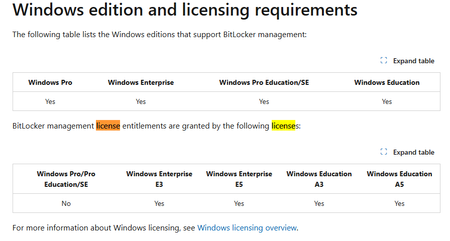
My take on this is from this document https://learn.microsoft.com/en-us/windows/security/operating-system-security/data-protection/bitlocker/ The note says "Licensing requirements for BitLocker enablement are different from the licensing requirements for BitLocker management." In the second document there is a table that shows the Windows editions support for BitLocker vs the BitLocker management license entitlements. https://learn.microsoft.com/en-us/windows/security/operating-system-security/data-protection/bitlocker/configure?tabs=common#windows-edition-and-licensing-requirements I.e. You can manually enable BitLocker because the OS supports it but cannot "manage" without the enterprise license104Views1like0CommentsRe: Android App for different enrolments
Hi JamesIVH, You could try a filter in the application assignment to exclude the BYOD devices based on either deviceOwnership or enrollmentProfile name. If the apps are required and you add the filter then they should not install on the devices that match the filter criteria. If you wanted that same app to be available with user choice, you could add a group to the available with or without enrollment assignment.160Views1like1CommentRe: Investigation Insights Workbook IP address Search
I figured out that this doesn't appear to be working (for me at least) when opening the workbook from the Sentinel integration to Microsoft 365 Defender/Defender XDR portal (security.microsoft.com). When I attempt to enter the data from this portal then the entry is ignored. I can enter the IP address and then click apply but the value remains as the unset. If I use the standalone Sentinel portal then this appears to be working fine for me when I just want to use the Investigate IP Address or Investigate Account options, and manually enter a value not associated to an incident or alert entity.107Views0likes1CommentInvestigation Insights Workbook IP address Search
Is there a way to roll back to a previous version of the investigation insights workbook? The new workbook from the content hub no longer allows you to enter an IP address without selecting entities and then IP addressees from the entity list. This was really useful when wanting to just search on an IP address that was suspect and related IOCs, Account sign in etc. Please provide suggestions for either rolling back the Investigation Insights workbook or other ways to achieve the same.261Views0likes5CommentsInvestigation state Queued
I see a number of messages in our Defender XDR Incidents with a status of Queued. What does this status mean? This appears to only be related to Defender for Office 365 incidents, usually email reported as junk/phish/notjunk etc type of incidents. Regardless of whether I investigate or change the status of the incident, in remains in the Incidents list as queued. I cannot find clear documentation on what this state means or what action is required to resolve/close the incident. Can anyone shed any light on the what the queued state means and how to resolve a queued incident.Find OpenSSL affected files using advanced hunting
While it's possible to view an individual devices software inventory in Defender XDR - this becomes an inefficient way of identifying and addressing vulnerable applications that use OpenSSL components. I am trying to use advanced hunting to find when an OpenSSL vulnerability exists and when a weakness is present on devices and supply the affected files. So far my query looks like this but I cannot figure out how to get the Weaknesses where count is >=1. DeviceTvmSoftwareVulnerabilities | join kind=innerunique (DeviceTvmSoftwareEvidenceBeta) on DeviceId | where SoftwareVendor contains "openssl"Re: Enable Bing Chat for Enterprise - Tenant Admin
I had this issue using Edge in in-private mode, using an account with necessary permission to the tenant. The shortened URL points to https://www.bing.com/business/bceadmin. On removing the bceadmin part of the URL, I received an error indicating unsupported browser. Opening on a standard session I signed out of my AAD standard account and entered the https://aka.ms/TurnOnBCE URL. On prompt to sign in I entered an account that had tenant permissions and was able to enable Bing Chat Enterprise. Either an issue with an in-private session or something Microsoft have fixed in the back end and this is purely coincidental.6.3KViews0likes1CommentCreate a device group based on system defined tag?
I am trying to create a device group for internet facing devices and there is already an internet facing system tag assigned to these devices. However, when I create a group trying to use the internet facing tag I get no members. If I manually assign a tag then the group populates. I'm trying to do this to create a notification for internet facing services that have a known vulnerability. Can anyone confirm whether this functionality is available?698Views1like0CommentsWorkbook formatting customization
Hi Azure Monitor Humans, I'm trying to find some information about advanced formatting in Azure Monitor (or any) workbooks. I'm getting a handle on grouping and visualizations but having problems with layout. I've looked at the Microsoft Documentation which is great to get started but can't find any advanced formatting guides or help. An example image is attached - what I'd like to do is format the labels to be in line with the pie charts and also center the data in the query item. Can anyone point me at some guides that either show how to do this in the editor or sample Advanced Editor commands that are available for formatting? I want my workbooks to look awesome and right now they're not 😞 Thanks Danny873Views0likes0CommentsNotify when new version of log analytics agent is available
Hi Azure Monitor Humans, I'm wondering if there is a way to determine when the Log Analytics agent or Azure monitor agent is below the current available version. I.e. if current version of the Windows agent is 10.20.18018.0 but agent version 10.20.18053.0 is available to install from the log analytics workspace, is there a way to create a query to determine this? Is this something that could be added to the Insights workbook? Although ideally we would like to alert when agents are out of date. Thanks DannySolved2.5KViews0likes4CommentsRe: Notify when new version of log analytics agent is available
Thanks for helping out with the query info - I was going to spend some more time on it today but you beat me to it! Results look much better. Really appreciate the assistance! 10.20.18053.0 Latest version 10.20.18053.0 Latest version 10.20.18053.0 Latest version 10.20.18053.0 Latest version 10.20.18053.0 Latest version 10.20.18053.0 Latest version 10.20.18001.0 Upgrade needed? 8.0.11072.0 Upgrade needed? 8.0.11049.0 Upgrade needed?2.3KViews0likes0CommentsRe: Notify when new version of log analytics agent is available
Getting some odd results! Apart from some very old versions in this environment, it doesn't seem to be detecting 10.20.18053.0 as the latest version. I don't understand what the first part of the query is doing before the Heartbeat command. Has something changed where we can't query the current version available to install? (Server names removed ) 8.0.11072.0 Latest version 10.20.18053.0 Upgrade needed? 10.20.18053.0 Upgrade needed? 10.20.18053.0 Upgrade needed? 10.20.18053.0 Upgrade needed? 10.20.18053.0 Upgrade needed? 10.20.18001.0 Upgrade needed? 8.0.11049.0 Upgrade needed? 10.20.18053.0 Upgrade needed?2.4KViews0likes2Comments


Recent Blog Articles
No content to show