User Profile

chris-thompson
Copper Contributor
Joined Mar 28, 2023


User Widgets
Recent Discussions
Re: See who did not take the survey in Microsoft Form
Hugo_Royen Yeah but that requires additional steps which could take some considerable time with a large list of people. It would seem pretty intuitive if you have the option to collect email addresses of those responding already, that it should be able to also very quickly generate a list of who has not yet responded. Simply put, why would anyone who is collecting email addresses in a form NOT be interested in who has not yet responded? This is a pretty big oversight (and I would imagine a very low hanging fruit for a developer) for something that would benefit nearly everyone who uses forms.9.1KViews0likes0CommentsRe: How to Split Multiple Columns Into Multiple Rows with Separate Groups of Columns
I appreciate the suggestions but none of them really address how I get from the data looking the way it does in the first table of my document, to the bottom table. That is what I need to be done.2.5KViews0likes4CommentsRe: How to Split Multiple Columns Into Multiple Rows with Separate Groups of Columns
Because PowerBI is not accessible to anyone outside of me (the organizations I serve will not have premium licenses), also, I know very very little about how to create a database, but I know a fair amount about Excel. In terms of your feedback, I have no idea what you mean. Could you clarify what you mean by "I know need data cleaning with regular expression"?2.5KViews0likes6CommentsHow to Split Multiple Columns Into Multiple Rows with Separate Groups of Columns
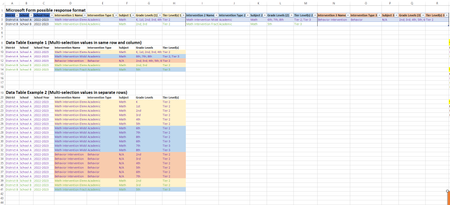
Hi all. I have a Microsoft Form that gathers all of the interventions that schools use with their students including specific information about each intervention (Type - Academic/Behavior; Subject - Math/Reading; Tier Level - Tier 1/2/3; and Grade Levels K;1st;2nd;3rd;4th;5th;6th;7th;8th;9th;10th;11th;12th). Each intervention (and it's associated characteristics) are in separate columns. How do I transform the data so that the data table looks like the third table below? (The image is also attached). I want to use PowerQuery and keep everything within Excel (not PowerBI or databases)Solved2.9KViews0likes9CommentsRe: See who did not take the survey in Microsoft Form
Although the steps laid out above seem like a potentially plausible workaround, it is a lot of additional steps that most common users of Microsoft products would not be aware of even exists let alone how to do it. This is not a complicated feature to add to the Forms application itself, and could really be used across all contexts. We gather input from a group but we need to know if the whole group has responded. The fact that this hasn't already been developed in the time that Forms has been in existence seems to be a huge oversight.20KViews4likes0Comments
Recent Blog Articles
No content to show