User Profile

erictribble
Copper Contributor
Joined Mar 28, 2023


User Widgets
Recent Discussions
Re: SUMIFS Function to calculate quarterly different VAT rates
MLT-CH Ok, so let me see if maybe I'm am getting what you need, correct first. So from your example table: Report ID Merchant Category Total VAT VAT paid Description Date Expense Report #4 Materials CHF44.53 0% 0 31-12-22 Expense Report #4 Materials CHF32.20 7.7% 2.3 30-12-22 Expense Report #4 Materials CHF14.75 0% 0 30-12-22 Expense Report #4 Materials CHF19.23 0% 0 30-12-22 Expense Report #4 Representation expenses CHF8.90 2.5% 0.22 30-12-22 Expense Report #4 Materials CHF82.15 7.7% 5.87 29-12-22 And your explanation: "I need a formula that will calculate the sum of each VAT rate per category (e.g. Materials Q1/22 7.7%, Material Q1/22 2.5%, Materials Q1/22 0% etc. per category." -------------------------------------------------------------------------------------------------------- Are you needing a total per quarter per category, end solution per the above example table: Materials Q4/ 15.4% [Line 2: Materials | 7.7% | 30-12-22] Plus [Line 6: Materials | 7.7% | 29-12-22] (since the other materials lines are at 0% VATS. OR Are you needing the result per line like: Category Total VAT VAT paid Date Total Materials CHF44.53 0% 0 31-12-22 Materials Q4/0% Materials CHF32.20 7.7% 2.3 30-12-22 Materials Q4/ 7.7% Materials CHF14.75 0% 0 30-12-22 Materials Q4/0% Materials CHF19.23 0% 0 30-12-22 Materials Q4/0% Representation expenses CHF8.90 2.5% 0.22 30-12-22 Representation expenses Q4/2.5% Materials CHF82.15 7.7% 5.87 29-12-22 Materials Q4/7.7%990Views0likes0CommentsRe: SUMIFS Function to calculate quarterly different VAT rates
MLT-CH Its a bit of a messy formula but here it is. First get the Quarter and Year in its own column. (since your date format is dd-mm-yy, I had to make it a bit long so you can keep your format) "Q"&INT((MONTH(DATE("20"&RIGHT(Table1[@Date],2),MID(Table1[@Date],4,2),LEFT(Table1[@Date],2)))+2)/3)&"-20"&RIGHT(Table1[@Date],2) Next column get the calculations in the format needed (again a bit long) =Table1[@Category]&" "&"Q"&INT((MONTH(DATE("20"&RIGHT(Table1[@Date],2),MID(Table1[@Date],4,2),LEFT(Table1[@Date],2)))+2)/3)&"/"&TEXT(SUMIFS(Table1[VAT],Table1[Category],Table1[@Category],[QTR-YEAR],[@[QTR-YEAR]]),"0.00%") Then pull the uniques from the calculations column to get your end values. =UNIQUE(FILTER(Table2[Calculation],Table2[Calculation]<>"")) Here is a excel with it in there. Hope its what you wanted and it helps.976Views0likes2CommentsRe: Advance Excel Graph Goal Line
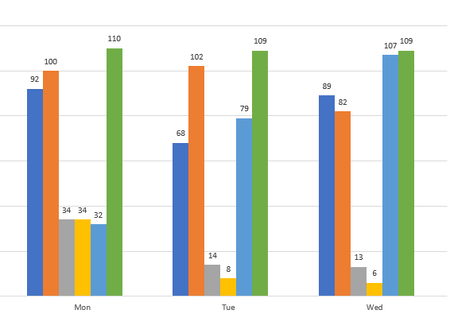
Riny_van_Eekelen So you in a sense, you added the weekday name and target (goal) to the data table, then pivoted the data table, then graphed the pivot table. Freaking genius, I overcomplicated the hell out of it lol. Quick side question though, how can I keep the week day names in order in the graph?2.8KViews0likes1CommentAdvance Excel Graph Goal Line
So I have a graph that my bosses want the days next to each other in order over a select time period, which I did. Week1-Mon, Week2-Mon, Week3-Mon | Week1-Tue, Week2-Tue, Week3-Tue | etc But they also want a Goal reference line on the graph, and the only way I can get it to work is to add a row of 7 (mon-sun) cells with identical values to create a goal line in the graph. which is impractical, there has to be a better way. I included the excel file with this post. Please let me know if there is an more efficient way to do this, because this is just for one part, I have to do this for 2 years of data and multiple milestones, so this way would just be impractical, there should be a better way to do it. https://1gtmit-my.sharepoint.com/:x:/g/personal/erictribble_gtmit_com/ETP62iov0nVJrqIugs8RS-cBBUMIOGOK4467F2GqhADORg?e=Iy8D9gSolved3KViews0likes3Comments

Recent Blog Articles
No content to show