User Profile

ShainaDay88
Copper Contributor
Joined Jan 12, 2023


User Widgets
Recent Discussions
XLOOKUP multiple lookup values and return checkbox if all return values <> a specified value!
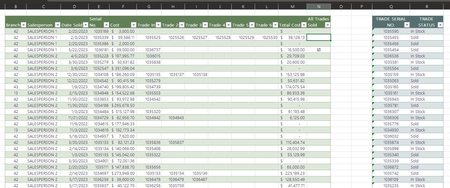
I have to be overthinking this, but I can't keep "spinning my wheels" - Any advice would be very much appreciated! I have two worksheets. I have attached an example with parts of the worksheets in two separate tables. I am trying to come up with a formula that will look up each of the "Trade In" values (columns G - L) from Green Table 1 (Used) in Blue Table 2 (Trades) and if all of the trades have a status of "Sold", I want a checkbox returned in "All Trades Sold" (column N) - I feel certain this can be done, but I am so frustrated trying to figure it out! I've attached an example workbook with the mentioned tables and a screenshot below for reference.1.8KViews0likes2CommentsRe: Excel - Nested formulas in conditional formatting - Nightmare!
I could not get this formula to work in conditional formatting - but I added a column with the COUNTIFS formula to return a value. Then, I added a new conditional formatting rule so if any value in the COUNTIFS column AD is greater than 0 - highlight it. Thank you so very much! I spent a ridiculous amount of time trying to figure this out!2.8KViews0likes0CommentsExcel - Nested formulas in conditional formatting - Nightmare!
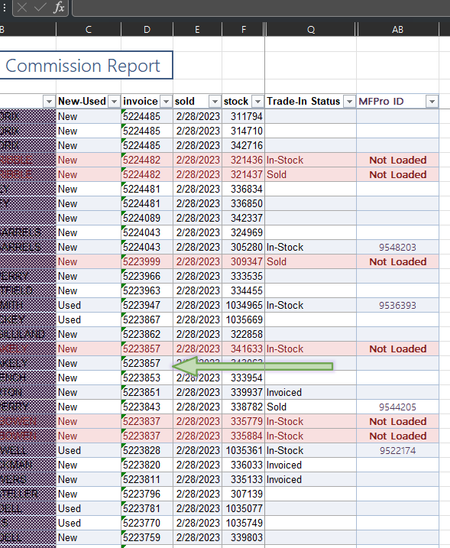
I can not figure out how to conditionally format other rows that match the value highlighted in column D. Column D is formatted by Column AB containing "Not Loaded" - I need to highlight the other rows of data that contain any matching values of highlighted cells in Column D. Basically, I am running commission for about 100 salespeople. A new policy requires salespeople to upload photos of product taken in on trade to a site. If not loaded, no commission on original deal until completed. To take out the entire deal would be to remove the same invoice number matching with Column AB containing "Not Loaded" - Please refer to screenshot for reference. I need to highlight the invoice number the green arrow is pointing to, and any other instances this occurs with different invoice numbers that are highlighted/Not Loaded. This data will be well over 20,000 rows in no time and I would like to come up with a solution while I'm still under 5k rows. You will be a lifesaver if you help me solve this!! Any and all comments will be appreciated! -SGSolved3.2KViews0likes7CommentsRe: Excel - Nested formulas in conditional formatting - Nightmare!
https://trigreeneq-my.sharepoint.com/:x:/g/personal/shainageorge_trigreen_com/EaN5LnPUV01ElXlMQE9L8mEBOVG6Gwrt5BVzoQkV2TlkvA?e=95HwZd Let me know if this link doesn’t work. I’m on my phone and I don’t see anywhere to upload an attachment of the partial spreadsheet. I will check again when I get home to see if I can add an attachment. Can you see the screenshot? Thank you for attempting it!3KViews0likes0Comments
Recent Blog Articles
No content to show