User Profile

cam8528
Brass Contributor
Joined Oct 13, 2022


User Widgets
Recent Discussions
Re: Bluetooth Profile Pack (Microsoft Store Update)
we're good. its up and running. I have a couple things to note: i got it working. i went into app settings for phone link, and there are 2 repair buttons. one repair button says it resets the app and keeps its settings. pressing that repair button did not work. the second repair button says it resets the app and -removes- user settings. i reluctantly clicked the repair button that removed my user settings (knowing i'd have to turn off Bluetooth on both my PC and Iphone, Forget device on my iphone bleutooth settings, Forget device on my PC Bluetooth settings, then go through the pairing process again with the link to windows app from the apple app store) The second repair button that removed my user data Worked. It Allowed the Phone Link update that was stuck in the windows store to Complete its Update. Furthermore in order to allow the devices to pair with each other using the link to windows app in the iphone store, you have to Go Into Bluetooth Settings In Both Devices And Forget Each Counterpart Device Before Trying To Pair Them Using Phone Link AND If your phone is already paired over the Link to Windows app on your phone, AND the Phone Link app on your pc, then why do you have to pair your phone a second time to activate the Dynamic Lock feature offered by windows defender? i fixed it. you have to set up dynamic lock FIRST, THEN set up the Phone Link app18KViews0likes2CommentsRe: Bluetooth Profile Pack (Microsoft Store Update)
Someone suggested to close the app last time (was it around this same time last year this was happening?) What would you have me do to close the app? Pressing terminate in settings does not remedy the issue allowing it to update.19KViews0likes7CommentsBluetooth Profile Pack (Microsoft Store Update)
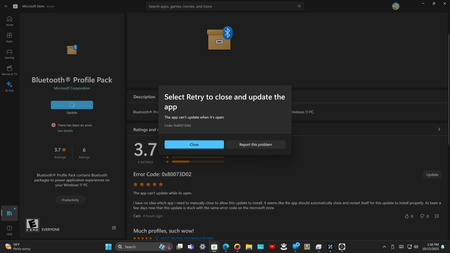
it has been several days now since an update for "Bluetooth (R) Profile Pack" is stuck in the update queue within the Microsoft store. a picture of the update is included in this post. there are no processes in task manager titled "Bluetooth profile pack" that i can End to resolve the error code: Code: 0x80073D02. neither does turning off the Bluetooth radio in control panel let the update finish installing.
Recent Blog Articles
No content to show