User Profile

WimVandierendonck
Brass Contributor
Joined Mar 12, 2018


User Widgets
Recent Discussions
Status of Roadmap item 145802: Improvements for document library version history limits
According to the Roadmap page, this feature would go in preview in november of 2023 - but it seems to be delayed. The Roadmap item was last-updated in july. Other than the Roadmap page, I can't seem to find any more info on this subject. Does anyone have any more info available? https://www.microsoft.com/en-us/microsoft-365/roadmap?filters=&searchterms=1458021KViews0likes0CommentsRe: LastContentModifiedDate using PowerShell not equal to actual date in SharePoint Admin
Istvan Ybema Apparently that date gets update by some kind of timer job. You can find the correct date with the LastItemUserModifiedDate property of the web object. $oWeb = Get-PnPWeb -Includes LastItemUserModifiedDate $oContentModifiedDate = $oWeb.LastItemUserModifiedDate9.2KViews1like1CommentRe: SP List, Expand Content Button
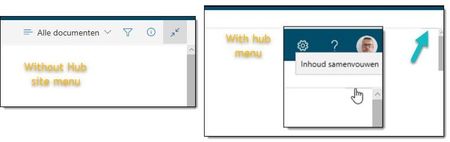
StephenBlack, , we have exactly the same issue. The Hub navigation hides the Action Bar when users use the Expand Content functionality. It is indeed possible to collapse when you click the lower part of the button which is just noticeable at the right below the Hub site menu.8KViews0likes0CommentsRe: Invite who you want in group calendars
Ethan Li, our users are experiencing the same issues as cbarroso described in this reply. A meeting is being planned in an Office Groups calendar using the desktop client and the group is explicitly not invited (removal of the group as organizer). The group members don't receive the initial invitation mail, but all members of the Office Group receive mails for updates of changes . When a meeting with a limited number of invitees is created in an Office Groups calendar via https://outlook.office.com/ only invited users receive updates, as expected. P.S. why did you stop replying to this post? Multiple people have indicated that this is an issue.12KViews5likes0CommentsRe: Can i publish content type from Created Hub Sites rather than Content Type Hub Site(default online)
Asesh Kumar Maity, I have no experience with the technique of Content Type Hub. But according to the following article you will need to activate the 'Content Type Syndication Hub' site collection feature: https://support.office.com/en-us/article/activate-a-content-type-syndication-hub-1d12ee7f-77e0-4b50-bf93-7628b8478bf6 To be clear the concept of 'Hub sites' and 'Content Type Hub' are not related in any way. Hub sites is a method to "connect and organize sites based on project, department, division, region", which has nothing to do with Content types. The 'Content Type Hub' is a central place for the management and publication of content types (as you already know). The term hub in 'Content Type Hub' does not refer to the concept of 'Hub sites', but refers to the centralized function of that special site. So, your new 'Content Type Hub' to be a 'Hub site' doesn't have to be configured as a 'Hub site'.1.5KViews0likes2CommentsShare site with 'send email' containing more than 500 characters fails silently in modern experience
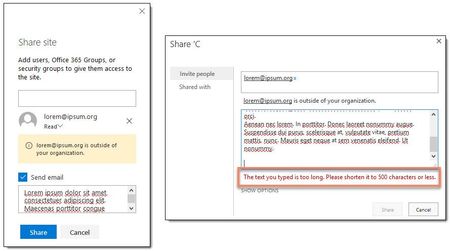
A user was experiencing issues while trying to share a Communication site with external users. When he tried to invite external users nothing would happen. No mail would get sent and the invitation itself didn't appear in the 'Access requests and invitations' overview. But when I demonstrated sharing with external users or when he did some testing there were no issues. The moment I tried to share by using the classic method and the same text as the user, the cause presented itself: ‘The text you typed is too long. Please shorten it to 500 characters or less.’ Further testing revealed that this was the reason why the real life sharing by the user failed each time. After shortening the text all issues disappeared. Does anybody know if this is a known issue?1.8KViews0likes1CommentRe: Office 365 Profile picture not displayed inside SharePoint People Web Part on Modern Site Page
We are experiencing the same issues. I even found an example where my own profile picture is shown and not shown on the same page in multiple instances of the People web part. In this example I was recently added to the instance where my picture is shown, the other instance hasn’t changed. The only working solution is to remove and re-add the persons from the web part and republish. But that’s not a workable solution for all our users. We have opened a support ticket refering to this discussion.56KViews0likes4CommentsRe: Classic site as Hub site (yes!) but multiple global navigation bars (so close)
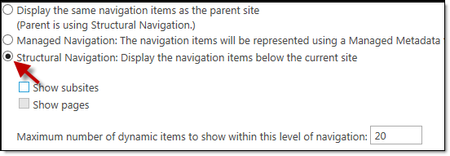
If you change the 'Global navigation' setting (Site Settings - Navigation) for each subsites from 'Display the same...' to 'Structural Navigation...' and leave the 'Global navigation' tree in the 'Structural Navigation: edit and sort' box empty, there will be no second menu anymore.4.8KViews4likes3CommentsPage management - Pages and news templates
According to the Microsoft 365 Roadmap https://www.microsoft.com/en-us/microsoft-365/roadmap?featureid=30559 is being rolled out. In the description there is no 'More info' link and I'm unable to find more info myself. Does anyone know where to find info, specifically about the 'Pages and news templates' feature?832Views1like0Comments
Recent Blog Articles
No content to show