User Profile

Luiz_H
Brass Contributor
Joined Jan 07, 2022


User Widgets
Recent Discussions
Re: Menu bar still hidden for Word in full screen (Monterey 12.1 Mac OS)
a1in-c Yes, you are right. I had not noticed. And yes again, MS takes a long time to fix bugs. I have already registered a report in the call center, but I have not received any response so far. Too bad.3.2KViews1like0CommentsRe: Menu bar still hidden for Word in full screen (Monterey 12.1 Mac OS)
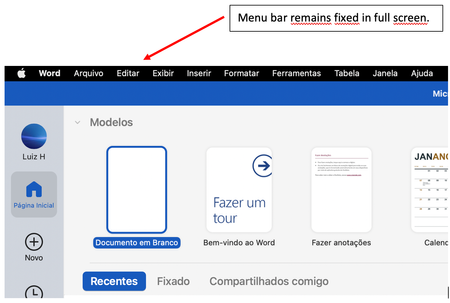
I noticed something different. In Word version 16.66 with Mac OS 12.6, the menu bar remained fixed in full screen for the first screen that appears when I access the Word (see image bellow). I don't remember if in past versions this already happened. I just watched it now. If it didn't, maybe it's already part of the solution. But, when I access a file, the menu bar become hidden again in full screen ....3.1KViews0likes2CommentsRe: Menu bar still hidden for Word in full screen (Monterey 12.1 Mac OS)
Hi JulienDFr! Exactly! We can not see time and battery. It is really annoying …. But, there is an important detail: as far as I can remember, although I am not absolutely sure, Monterey 12.0.1 did not have this issue with Word. Maybe, with Monterey 12.2, this issue could be fixed. So, we have to wait ….14KViews0likes5CommentsMenu bar still hidden for Word in full screen (Monterey 12.1 Mac OS)
Microsoft Word still hides menu bar in full screen on Monterey 12.1 Mac OS. I turned off this new feature of macOS 12 "Automatically hide and show the menu bar in full screen " in System Preferences. So, menu bar is supposed to remain fixed on full screen. All others programs, like chrome, adobe reader, powerpoint, excel, teams, show menu bar fixed in full screen. However, Word do not. I have opened a ticket in Apple Support. They told me since this problem only appears in Word, it seems to be a MS issue. Does anybody have any information? Anyone could help? Thanks!20KViews3likes36Comments
Recent Blog Articles
No content to show