User Profile

ismailulusoy
Copper Contributor
Joined Sep 02, 2021


User Widgets
Recent Discussions
Re: My Laptop Doesn't Connect to the External Monitor after the Latest Windows 11 Update 16.02.2023
I have solved my problem. Solution: Bios > Config > Thunderbolt (TM) 3 > Thunderbolt BIOS Assist Mode [Enabled] Security Level [User Authoriezed] (Default for me) Support in Pre Boot Environment: Thunderbolt (TM) device [Enabled] How I found (Solution Steps): I saw critical warning message on my product's webpage: https://pcsupport.lenovo.com/tr/en/products/laptops-and-netbooks/thinkpad-x-series-laptops/thinkpad-x1-carbon-6th-gen-type-20kh-20kg/solutions/ht508988 1) I've tried only Intel Thunderbolt software solution (uninstall, install) and that didn't help. 2) I've skipped Lenovo Vantage solution just because I don't need that software most of the time. 3) I saw "Firmware install requires that the Intel Thunderbolt IO Controller must be enabled in BIOS." on the same page. I thought latest Windows Update or Optional Updates caused some critical problems in Bios (like compatibility issues etc.) so I opened BIOS and changed some settings which I gave above. That's it. I hope this helps who face this problem. By the way, thanks for your effort to help me: Mark_Albin52KViews2likes1CommentMy Laptop Doesn't Connect to the External Monitor after the Latest Windows 11 Update 16.02.2023
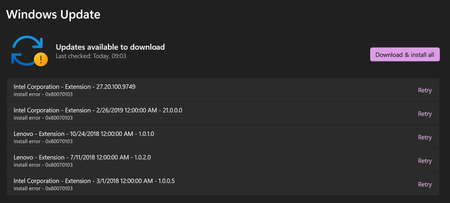
My Laptop Doesn't Connect to the External Monitor after the Latest Windows 11 Update as of date 16.02.2023 The system does not install these updates even though I have tried many times. It just goes into a "retry" loop. Device Lenovo x1 Carbon 6th Gen Device name xxx Processor Intel(R) Core(TM) i7-8550U CPU @ 1.80GHz 1.99 GHz Installed RAM 16,0 GB (15,9 GB usable) Device ID F051AA45-3004-4825-B8B5-FDB38ED7E52F Product ID 00330-80000-00000-AA193 System type 64-bit operating system, x64-based processor Pen and touch No pen or touch input is available for this display Edition Windows 11 Pro Version 22H2 Installed on 30.01.2023 OS build 22621.1265 Experience Windows Feature Experience Pack 1000.22638.1000.057KViews1like8Comments
Recent Blog Articles
No content to show