User Profile

dshawSLDC
Brass Contributor
Joined Jun 10, 2021


User Widgets
Recent Discussions
Report Running Sum for sub Groups.
I have a report that is broken up into 3 groups. District Student Service I am trying to get a running sum for each of them. If I select a textbox with runing sum over group it continues to sum past the group. Hopefully the folowing will explain what Im trying to do. District a >>> total Both studentt a and b Studenta >>> total services a and b Service a Service b StudentB >>> total services a and b Service a Service b Service c District b >>> total Both studentt c and d Studentc >>> total services a Service a Studentd >>> total services a , b and c Service a Service b Service c Currently it will total up all students regardless of what sub group there in. Is there a way to have it clear its self after each group so it starts over? Thanks for any help.575Views0likes1CommentRe: Let statement display multiple results in separate columns
Thanks everyone. I was able to get it to pull and display correctly the following is the final Let Statement. =LET( List,SORT(IF(ISBLANK(EducationData!B72:B239),"Empty",EducationData!B72:J239),1,1), List2,SORT(IF(ISBLANK(AdminData!B4:B35),"Empty",AdminData!B4:L35),1,1), List3,SORT(IF(ISBLANK(TherapiesData!C87:C291),"Empty",TherapiesData!C87:M291),1,1), Fltr,FILTER(List,INDEX(List,0,1)<>"Empty"), Fltr2,FILTER(List2,INDEX(List2,0,1)<>"Empty"), Fltr3,FILTER(List3,INDEX(List3,0,1)<>"Empty"), FltrCol,CHOOSE({1,2,3,4,5,6,7},INDEX(Fltr,,1),INDEX(Fltr,,2),INDEX(Fltr,,5),INDEX(Fltr,,4),INDEX(Fltr,,6),INDEX(Fltr,,7),INDEX(Fltr,,8)), FltrCol2,CHOOSE({1,2,3,4,5,6,7},INDEX(Fltr2,,1),INDEX(Fltr2,,2),INDEX(Fltr2,,5),INDEX(Fltr2,,10),INDEX(Fltr2,,7),INDEX(Fltr2,,8),INDEX(Fltr2,,11)), FltrCol3,CHOOSE({1,2,3,4,5,6,7},INDEX(Fltr3,,1),INDEX(Fltr3,,2),INDEX(Fltr3,,5),INDEX(Fltr3,,3),INDEX(Fltr3,,7),INDEX(Fltr3,,8),INDEX(Fltr3,,10)), NumCols, COLUMNS(FltrCol), RowsA, ROWS(FltrCol), RowsB, ROWS(FltrCol2), RowsC, ROWS(FltrCol3), SeqCol, SEQUENCE(RowsA+ RowsB+ RowsC), SeqRow, SEQUENCE(1, NumCols), Result, IF(SeqCol <= RowsA, INDEX(FltrCol,SeqCol, SeqRow),IF(SeqCol <= (RowsA + RowsB),INDEX(FltrCol2,SeqCol - RowsA, SeqRow),INDEX(FltrCol3,SeqCol-(RowsA + RowsB),SeqRow))), Result )2.4KViews0likes0CommentsRe: Let statement display multiple results in separate columns
I might have found away. but i have hit a little snag. Does anyone know how to reference a column inside an array in a let statement? =LET( List,CHOOSE({1,2,3,4,5,6,7},EducationData!B72:B239,EducationData!C72:C239,EducationData!E72:E239,EducationData!F72:F239,EducationData!G72:G239,EducationData!H72:H239,EducationData!J72:J239), ListEmp,SORT(IF(ISBLANK(List),"Empty",List),1,1), ListEmp) In the ListEmp Variable where it references the list variable. How do I specify a specific column instead of the whole array. Thanks2.5KViews0likes4CommentsRe: Let statement display multiple results in separate columns
Yes I agree I can do that but I was hoping to have it spill with the other formula. So I can reference the spill data elsewhere if I do the xlookup and drag down in the second column and the original data get larger I will have to continue to drag down every time the data changes.2.5KViews0likes5CommentsLet statement display multiple results in separate columns
Hello, Thanks to any one who can help. I Have a Let formula that pulls data from 3 separate sheets and stacks it in one column on a separate sheet. I also want to add another variable to the let formula that uses xlookup on the first array. Basically its a list of names it would display a rate that's associated with that name from another sheet and the final result of the let statement would display 2 columns original being the names and second being the rate. The following is the let formula that pulls the names. Its the addition of the second column that I'm having issues with any help would be appreciated. =LET( List,SORT(IF(ISBLANK(EducationData!B72:B239),"Empty",EducationData!B72:C239),1,1), List2,SORT(IF(ISBLANK(AdminData!B4:C35),"Empty",AdminData!B4:C35),1,1), List3,SORT(IF(ISBLANK(TherapiesData!C87:D291),"Empty",TherapiesData!C87:D291),1,1), Fltr,CONCATENATE(FILTER(FILTER(List,INDEX(List,0,1)<>"Empty"),{1,0}),", ",FILTER(FILTER(List,INDEX(List,0,1)<>"Empty"),{0,1})), Fltr2,CONCATENATE(FILTER(FILTER(List2,INDEX(List2,0,1)<>"Empty"),{1,0}),", ",FILTER(FILTER(List2,INDEX(List2,0,1)<>"Empty"),{0,1})), Fltr3,CONCATENATE(FILTER(FILTER(List3,INDEX(List3,0,1)<>"Empty"),{1,0}),", ",FILTER(FILTER(List3,INDEX(List3,0,1)<>"Empty"),{0,1})), NumCols, COLUMNS(Fltr), RowsA, ROWS(Fltr), RowsB, ROWS(Fltr2), RowsC, ROWS(Fltr3), SeqCol, SEQUENCE(RowsA+ RowsB+ RowsC), SeqRow, SEQUENCE(1, NumCols), Result, IF(SeqCol <= RowsA, INDEX(Fltr,SeqCol, SeqRow),IF(SeqCol <= (RowsA + RowsB),INDEX(Fltr2,SeqCol - RowsA, SeqRow),INDEX(Fltr3,SeqCol-(RowsA + RowsB),SeqRow))), Result )3.3KViews1like10CommentsRe: Add multiple records in a form with calendar type design.
Wow that calendar form looks amazing. What I am trying to create is a attendance database for our therapist. I think that calendar form is pointing me in the correct direction. I will try to take from it and make mine work. I will keep you updated.2.3KViews0likes0CommentsRe: Add multiple records in a form with calendar type design.
Wow I think this might be what i have to do. Im willing to put in the work. Do you have any examples of this cause other than creating the temp table I will need some assistance in how it is done. What do you mean by more conventional, less work interface. If something like this would get me the same out come I would definitely be interested in those. Thanks for your assistance with this.2.4KViews0likes1CommentRe: Add multiple records in a form with calendar type design.
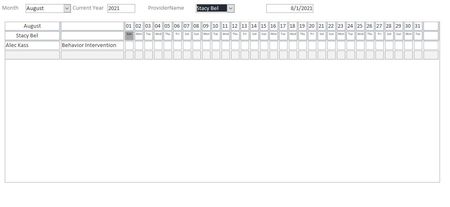
By crosstab query you mean a query that pulls data from multiple Tables? If so then yes it is using a crosstab query and no I wasn't aware it would make it read only. If that's the case I'm not sure what the solution will be. From the picture above each square would be a numerical value (Minutes) the DateValue would be the date the square is associated to . if you follow the column down 1 would be august 1st 2 would be august 2nd ..... Do you see any solution?2.5KViews0likes1CommentAdd multiple records in a form with calendar type design.
Hello and thank you for anyone who can assist me with this problem. I'm trying get a form that brings up data in a calendar type design. To record data based on what date they input on. the following is the design of the form. Under each date you would input how many minutes. The table Structure base is ID, Name, TimeValue, TimeDate. not sure how to get the TimeDate and display Multiple TimeValues on one Form. Thanks again for any assistance.2.8KViews0likes11CommentsRe: Print macro to check if data is there before printing
This is what Im working with now but I am getting errors. Sub check() With Sheets("invoice pg.2") If WorksheetFunction.CountA(Sheets("Invoice pg.2").Range("B14")) = 0 Then Sheets("Invoice").Select Sheets("Invoice").Activate ActiveWindow.SelectedSheets.PrintOut Copies:=1, Collate:=True Else With Sheets("invoice pg.3") If WorksheetFunction.CountA(Sheets("Invoice pg.3").Range("B14")) = 0 Then Sheets(Array("Invoice", "Invoice pg.2")).Select Sheets("Invoice").Activate ActiveWindow.SelectedSheets.PrintOut Copies:=1, Collate:=True Else With Sheets("invoice pg.4") If WorksheetFunction.CountA(Sheets("Invoice pg.4").Range("B14")) = 0 Then Sheets(Array("Invoice", "Invoice pg.2", "Invoice pg.3")).Select Sheets("Invoice").Activate ActiveWindow.SelectedSheets.PrintOut Copies:=1, Collate:=True Else Sheets(Array("Invoice", "Invoice pg.2", "Invoice pg.3", "invoice pg.4")).Select Sheets("Invoice").Activate ActiveWindow.SelectedSheets.PrintOut Copies:=1, Collate:=True Sheets(Array("Invoice", "Invoice pg.2", "Invoice pg.3", "Invoice pg.4")).Select End If End If End If End With End Sub Can anyone point me in the right direction?865Views0likes0CommentsPrint macro to check if data is there before printing
Hello, So I am using a macro to print specific sheets in a workbook. These sheets are filled based on a let Formula. I am trying to figure out hot to make it check if there is data before it prints. this is what I currently have it works well the only down side is that it prints all sheets even if there is no data. Thanks for any assitance. Sub PrintAllDistricts() Dim xRg As Range Dim xCell As Range Dim xRgVList As Range Set xRg = Worksheets("Report Select").Range("B1") Set xRgVList = Evaluate(xRg.Validation.Formula1) For Each xCell In xRgVList xRg = xCell.Value Call Module1.PrintDistrict Next End Sub Here is the module it calls. Sub PrintDistrict() Sheets(Array("Page1", "Page2")).Select Sheets("Page1").Activate ActiveWindow.SelectedSheets.PrintOut Copies:=1, Collate:=True Sheets(Array("Page1", "Page2")).Select Sheets("Report Select").Activate Range("B1").Select End Sub Also attached is an example.943Views0likes1Comment- 3.2KViews0likes0Comments
Re: Excel Spill Row Split
@Sergei Baklan So just in case this is what I have so far. I was able to get it to print all but it also prints the ones that are blank. is there away to tell it if it does not have data to not print that page? Sub PrintAllDistricts() Dim xRg As Range Dim xCell As Range Dim xRgVList As Range Set xRg = Worksheets("Report Select").Range("B1") Set xRgVList = Evaluate(xRg.Validation.Formula1) For Each xCell In xRgVList xRg = xCell.Value Call Module1.PrintDistrict Next End Sub Sub PrintDistrict() Sheets(Array("Page1", "Page2")).Select Sheets("Page1").Activate ActiveWindow.SelectedSheets.PrintOut Copies:=1, Collate:=True Sheets(Array("Page1", "Page2")).Select Sheets("Report Select").Activate Range("B1").Select End Sub2.7KViews0likes0CommentsRe: Excel Spill Row Split
SergeiBaklan Yeah that did it. Much more elegant than my solution. LOL. Have you ever messed with macros? I'm working on the same file trying to create a print button that will cycle thru each district and print the sheet if there are names returned. So far I have the buttons created and can print the single district. But I'm struggling on the code to make it cycle thru the district list. I attached the example If this is something you are able to assist me in. or pointing me to the right direction. Thanks again for your help.2.6KViews0likes3CommentsRe: Excel Spill Row Split
SergeiBaklan I think i did it. I used this as my work around. There is probably a better solution but this works for now. =LET( columnsToShow, {1,5,6,0,4,0,7,8}, columnNameTotal, 8, lmaxs,1, mins, 1, maxs,6, selectedDistrict, $A$7, array, SORT(FILTER(TableHLP,TableHLP[District]=selectedDistrict)), districts,SORT(FILTER( FILTER(TableHLP,TableHLP[District]=selectedDistrict), {1,0,0,0,0,0,0,0})), suc, UNIQUE(districts), af, MATCH(districts,suc,0), cn, IF((af>=mins)*(af<=maxs),INDEX(suc,af),"remove"), cnt, FILTER(cn,(INDEX(cn,0,1)<>"remove")), c, ROWS(cnt), cnm, IF((af>=mins)*(af<=lmaxs),INDEX(suc,af),"remove"), cntm, FILTER(cnm,(INDEX(cnm,0,1)<>"remove")), cm, ROWS(cntm), arrayR, ROWS(array), cntseq, SEQUENCE(arrayR,,0,1), minK, IF(lmaxs=1,mins,cm+1), maxK, MIN(c, arrayR), namecount, ROWS(suc), removeArray, IF((cntseq>=minK)*(cntseq<=maxK), INDEX(array,cntseq,{1,2,3,4,5,6,7,8}), "remove"), trunkArray,FILTER(removeArray, (INDEX(removeArray,0,1)<>"remove") + (INDEX(removeArray,0,1)= "Name")), arrayRows, ROWS(trunkArray), names, INDEX(trunkArray, SEQUENCE(arrayRows),1), distinct, UNIQUE(names), distinctRows, ROWS(distinct), startPos, IF( distinctRows=1, 1, INDEX( XMATCH(distinct, names), SEQUENCE(,distinctRows-1,2)) + SEQUENCE(,distinctRows-1,0) ), enumPos, SEQUENCE( COLUMNS(startPos),,1,0), k, SEQUENCE(arrayRows+distinctRows-1), i, k - MMULT(--(k>startPos), enumPos ), emptyPos, IF(distinctRows=1, SEQUENCE(arrayRows,,0,0), MMULT(--(k=startPos), enumPos ) ), v, INDEX(trunkArray, i, columnsToShow), vPrev, INDEX(trunkArray, i-1, columnsToShow), vNext, INDEX(trunkArray, i+1, columnsToShow), res, IF( emptyPos, "", IF( columnsToShow=0, "", IF( (vPrev=v)*(columnsToShow=1)*(i<>1), "", IF( i < arrayRows, IF( (vNext=v)*(columnsToShow=columnNameTotal), "", v), v) ) )), singlerow, ROWS(array), rowseq, SEQUENCE(singlerow+2,,0,1), minsingle,IF(lmaxs=1,mins,cm+1), maxsingle, MIN(c, singlerow), arrayrowseq, INDEX(array,rowseq,columnsToShow), xPrev, INDEX(array,rowseq-1,columnsToShow), xNext, INDEX(array,rowseq+1,columnsToShow), ressingle, IF( (rowseq>=minsingle)*(rowseq<=maxsingle), IF(columnsToShow=0, "", IF( (xPrev=arrayrowseq)*(columnsToShow=1)* (rowseq<>minsingle), "", IF( rowseq<maxsingle, IF( (xNext=arrayrowseq)*(columnsToShow=8), "", arrayrowseq ), arrayrowseq ) ) ), "remove"), Singleres,FILTER(ressingle, (INDEX(ressingle, 0, 1) <> "remove")+(INDEX(ressingle, 0, 1) = "Name")), Final,IFERROR(IF(namecount<>1,res,Singleres),"None Available"), Final)2.4KViews0likes5CommentsRe: Excel Spill Row Split
SergeiBaklan So I put that code in and this is what its doing. Page 1. Name Amount Rate Service Total Name Total Tom Davidson .Main Introduction 12 $167.00 $2,004.00 Tom Davidson .Main Introduction 12 $167.00 $2,004.00 Introduction To Hello World 90 $109.00 $163.50 I attached the example also. Im not sure why its doing this.2.6KViews0likes0Comments
Recent Blog Articles
No content to show