User Profile

SvenSieverding
Bronze Contributor
Joined Mar 17, 2021


User Widgets
Recent Discussions
Re: Prevent creation of sharepoint list record if criteria is met?
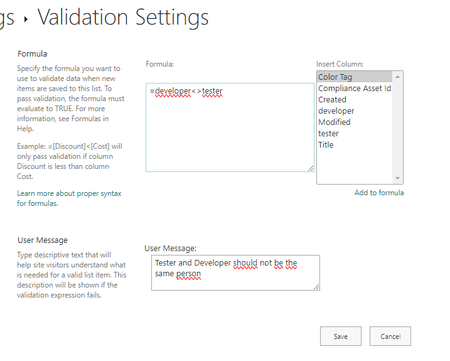
Steveeast You could go List Settings->Validation Settings and enter a Formula like this =[developer]<>[tester] (given the two fields are called developer and tester). But this only works, if both columns are simple columns like "text" or "choice", not for "person" fields Best Regards, Sven304Views0likes0CommentsNotifications for SharePoint news on desktop teams client - Best Practices?
Hello Community, I have a customer that has a SharePoint Intranet . They have many, many sites and a home site. On the home site the news from all sites are aggregated. This works fine. They also see the news in viva connections. This works fine. They get notifications about new news on their mobile phones. This works fine. But they don't get any notifications in the activity feed in teams if there is a new SharePoint news on any of the sites. (Like you get a notification if someóne sends an announcement in Viva Engage) I did not find any information about such a feature. I mean I could alway build a flow or something like that. This would be easy, if I only had one SharePoint site with news, but I have many sites. And the customer does not want the news to create teams messages, but just to create an activty item. I am pretty sure this is doable with a flow, but that seems to be quire complicated. For the Requirement: "Notify me in teams if there is a new SharePoint news" How would you deal with such a requirement? Any Ideas? Best Regards, SvenSolved1.4KViews0likes1CommentRe: Full Width in Modern SharePoint Team Site
Hi ySharif955 ; Sure.... I created a sample at https://github.com/pnp/sp-dev-fx-webparts/tree/main/samples/react-advanced-iframe In order to have a webpart that can be added into a "Full-Width" section, you need to set the property "supportsFullBleed" to true in the manifest file for the webpart https://github.com/pnp/sp-dev-fx-webparts/blob/main/samples/react-advanced-iframe/src/webparts/advancediframewebpart/AdvancedIFrameWebpart.manifest.json Best Regards, Sven26KViews1like8CommentsRe: How can I create multiple site columns in SharePoint using PowerShell?
Hi StephanieDuryHydro , yes, you would have to create such a script and call one of the commands for each of your columns. If you just need to create 64 columns once then I personally would create the columns manually though the UI. If I need to re-create multiple site columns repeatedly, then I normally create a "PnP Provisioning Schema" / Site Template XML File like this <?xml version="1.0"?> <pnp:Provisioning xmlns:pnp="http://schemas.dev.office.com/PnP/2022/09/ProvisioningSchema"> <pnp:Preferences Generator="ME" /> <pnp:Templates ID="CONTAINER-TEMPLATE-MyColumns"> <pnp:ProvisioningTemplate ID="TEMPLATE-MyColumns" Version="1" BaseSiteTemplate="SITEPAGEPUBLISHING#0" Scope="RootSite"> <pnp:SiteFields> <Field Type="DateTime" DisplayName="MyDateColumn" Description="Description" Required="TRUE" EnforceUniqueValues="FALSE" Indexed="FALSE" Format="DateOnly" Group="MyCustomColumns" FriendlyDisplayFormat="Disabled" ID="{e8468b37-b2cc-4384-bef7-5c4c96fc50be}" SourceID="{site}" StaticName="MyDateColumn" Name="MyDateColumn"> <Default>2024-01-01T00:00:00Z</Default> </Field> <Field Type="Text" DisplayName="TextTextColumn" Description="My Description" Required="TRUE" EnforceUniqueValues="FALSE" Indexed="FALSE" MaxLength="255" Group="MyCustomColumns" ID="{a2d0bf3c-515b-445d-b884-d09e6e71a811}" SourceID="{site}" StaticName="TextTextColumn" Name="TextTextColumn"> <Default>MyDefaultValue</Default> </Field> <Field Type="Number" DisplayName="MyNumberColumn" Description="Description" Required="FALSE" EnforceUniqueValues="FALSE" Indexed="FALSE" Group="MyCustomColumns" ID="{fd928d5a-41bc-4ced-8350-7a95910f76f3}" SourceID="{site}" StaticName="MyNumberColumn" Name="MyNumberColumn"> <Default>234</Default> </Field> <Field Type="Choice" DisplayName="MyChoiceColumn" Description="Description" Required="TRUE" EnforceUniqueValues="FALSE" Indexed="FALSE" Format="Dropdown" FillInChoice="FALSE" Group="MyCustomColumns" ID="{3fd4367d-80b8-44f1-8af6-8aa164814d55}" SourceID="{site}" StaticName="MyChoiceColumn" Name="MyChoiceColumn"> <Default>Enter Choice #1</Default> <CHOICES> <CHOICE>Enter Choice #1</CHOICE> <CHOICE>Enter Choice #2</CHOICE> <CHOICE>Enter Choice #3</CHOICE> </CHOICES> </Field> </pnp:SiteFields> </pnp:ProvisioningTemplate> </pnp:Templates> </pnp:Provisioning> And then apply that to a site using Invoke-PnPSiteTemplate -Path template.xml In the XML file you have all the information about all site columns to be provisioned. If you want another i.e. "Number Column", then just copy the Element '<Field type="Number" .... </Field>' and replace the attributes with your values. You need a new and different GUID for each ID column. Best Regards, Sven2.6KViews1like1CommentRe: How can I create multiple site columns in SharePoint using PowerShell?
Hi StephanieDuryHydro , you could use PnP Powershell and the "Add-PnFPield" command Add-PnPField -Type Choice -Choices "PnP","Parker","Sharing Is Caring" -DisplayName "My Test Column" -InternalName "MyTestCol" -Group "MyGroup" -Required https://pnp.github.io/powershell/cmdlets/Add-PnPField.html If you specify the "-List" Parameter then this command creates a list column on that list and a site column otherwise. Best Regards2.8KViews1like0CommentsRe: Create dynamic navigation link to each user's personal page in SharePoint
Hi Vincent1230, you could do this: 1) Create a new list "MyPages" and add a new hyperlink column "link" and a people column "person" to it. 2) Now add all of your users to that list and link to the mypage. 3) Then create a new gallery view that filters the items to only display those items that have the current user in the "person" column. 4) Format that view using this formatting sheet { "$schema": "https://developer.microsoft.com/json-schemas/sp/v2/tile-formatting.schema.json", "height": "40px", "width": "100px", "hideSelection": true, "formatter": { "elmType": "a", "txtContent": "My Page", "attributes": { "class": "sp-card-defaultClickButton", "role": "presentation", "target": "_blank", "href": "=[$Link]" }, "style": { "padding": "10px", "height": "32px", "margin-right": "8px", "margin-botton": "10px", "font-size": "14px", "border-radius": "2px", "border": "none", "font-weight": "600", "background-color": "#0078d4", "cursor": "pointer", "color": "white", "text-decoration": "none", "text-align": "center", "width": "80px" } } } The result should look like this 5) Use the list view webpart to embed this on your homepage Best Regards, Sven2.6KViews1like1CommentRe: Tab Spacing in Text Web Part
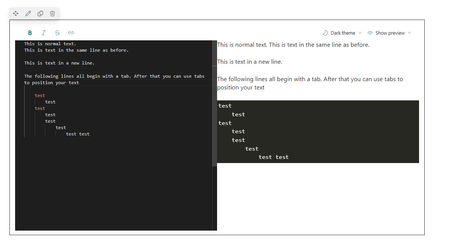
Hi nickf76 why exactly are tables not suitable? Are tables too complicated to create or do you have an example where a table does not work? Alternatively, you could try the markdown webpart and enter your documentation as markdown Best Regards, Sven PS: Markdown contains all the formatting instructions in the text itself, so for example this This is **bold** text results in "This is bold text" Perhaps there is an option in Adobe Indesign or somewhere else in your publishing process to export the whole documentation as markdown. Then you can just copy&paste it into this webpart.2KViews0likes1CommentRe: Unable to add form to Sharepoint
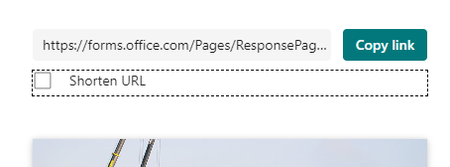
Hi Bd2023-b , I understand that you created a Microsoft form and want to embed that into SharePoint using the Form Webpart. You did copy the link to the form and paste it into the "Form web address" field and get the error message "Form Id is invalid. Please try to copy a form from Microsoft Forms." Does the link you copied start with https://forms.office.com/Pages/ResponsePage.aspx?...... or with https://forms.office.com/Pages/Designpagev2.aspx?.... Did you copy the complete Url from Forms? That "Form Id is invalid" error can happen if you did not copy the whole url and the id at the end of the url gets messed up. Otherwise try to check the "Shorten URL" flag and try to use the short url. Best Regards, Sven5.6KViews0likes0CommentsRe: Flow runs successfully but does not create item in SharePoint List
Hi JHingst , ok, in that case we can check a few more things; 1) Are any draft item settings turned on (Gear->List Settings->Versioning Settings)? 2) Are Item level permissions set to anything other than "Read all items"? (Gear->List Settings->Advanced Settings)? 3) Has the "All Items" view a filter (Gear->List Settings->Scroll down to "Views"->All Items-> Scroll down to "Filter")? Best Regards, SvenRe: Flow runs successfully but does not create item in SharePoint List
Hi JHingst , how many items are in your SharePoint list right now? More than 5000? (You can check that by looking at the "Items" column in "Site Contents"). Does that number update if you run the flow again? Perhaps the items are being created in your list, but the list view exceeds 5000 elements. So you don't see them in your views. Best Regards, SvenRe: User to not be notified unless they are assigned an item
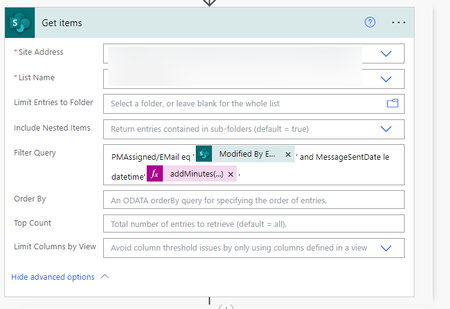
Hi bryanfrumkin47, I understand that you want to make sure that your users should not be notified twice within 15 minutes if an item has been assigned to them. In that case you could create a new column "MessageSentDate" and set that to the current utcNow() whenever your Workflow has sent a message to a user. Then query the SharePoint list for all items where the the current user is the assignee and where that date is less than the current date minus 15 minutes. If that returns an element, then do not sent an email PMAssigned/EMail eq '@{triggerOutputs()?['body/Editor/Email']}' and MessageSentDate le datetime'@{addMinutes(utcNow(),-15)}' length(outputs('Get_items')?['body/value']) Best Regards, SvenRe: Calculated formula not working
Thomasw1964 wrote: sad face , So I'll need to write some json for this? Hi Thomasw1964 , You can try this Json formatting: { "$schema": "https://developer.microsoft.com/json-schemas/sp/v2/column-formatting.schema.json", "elmType": "div", "txtContent": "=if(floor((Number(@currentField)-Number(Date((getMonth(@now)+1)+'.'+getDate(@now)+'.'+getYear(@now))))/(60*60*24*1000))>-30,'Phase 1',if(floor((Number(@currentField)-Number(Date((getMonth(@now)+1)+'.'+getDate(@now)+'.'+getYear(@now))))/(60*60*24*1000))>-365,'Phase 3','Phase 2'))" } Best Regards, Sven14KViews0likes1CommentRe: Calculated formula not working
Hi Thomasw1964 , This should work: IF([Start Date]>TODAY()-30, "Phase1",IF([Start Date]>TODAY()-365, "Phase2", "Phase3")) But remember: Calculated columns only update themself if the item is updated. They don't recalculate automatically if just a day has passed. If you want that, then you need to apply a custom column formatting. Best Regards, Sven14KViews0likes4CommentsRe: Shared file not updating
Hi AdamCook1996 "I can see the changes that one group is making to one sheet on the file. Another group is updating another sheet, however no one can see their changes except locally on their computer. When you try to save and exit, it deletes all their data. " Are these users using Excel Online or the Excel App? Did they turn off "Automatic saving" at the top left of their Excel App? Best Regards, Sven48KViews0likes0CommentsRe: Can we add the same templates on multiple document libraries
Hi john john , you can automate that if you use PnP Powershell. First modify the "New" menu of one document library like you want them all to look. Then execute these Powershell commands # Get the template Connect-PnPOnline https://<tenant>.sharepoint.com/sites/<site> -UseWebLogin $listname="Name of the base document library" $view = Get-PnpView -List $listname | Where-Object {$_.DefaultView -eq $true} $template=$view.NewDocumentTemplates This will load the configuration of the "New" menu inside of the variable "$template". Keep the PowerShell window open and enter these lines # If the library is on a different site than the other library #Connect-PnPOnline https://<tenant>.sharepoint.com/sites/<site> -UseWebLogin $listname="Name of the documentlibrary you want to apply the template to" $view = Get-PnpView -List $listname | Where-Object {$_.DefaultView -eq $true} $view.NewDocumentTemplates = $template $view.Update() Invoke-PnPQuery That will apply the same "New" Menu to that other document library. It will not upload the document templates a second time but will configure both libraries to use the same template file. Best Regards, Sven2.4KViews1like1CommentRe: Hyperlink an excel cell to a word document in sharepoint as a new copy each time.
Hi johngallagher , you could create a new page and add a button to it. Create the button url like this https://<mytenant>.sharepoint.com/sites/<mysite>/_layouts/download.aspx?SourceUrl=<link to file> so for example https://tenant.sharepoint.com/sites/mysite/_layouts/download.aspx?SourceUrl=https://tenant.sharepoint.com/sites/mysite/Documents/MyReport.xlsx You will get something like this: If you press the button, your Excel File will be downloaded by the user and not opened directly. Best Regards, Sven794Views0likes1CommentRe: Cannot edit column types
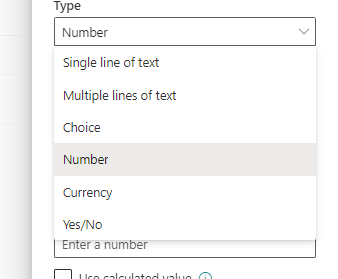
Hi BeakalSebsebe , this is a "Lookup" column and you cannot change the type of a lookup column to another type. You will have to delete and re-create that column You can only change types between the following column types Single Line of Text Multiple Lines of Text Choice Number Currency Yes/No These are the "simple" column types that internally more or less work the same.... The other types like "Lookup" and "Managed Metadata" Fields store data differently internally and have more possible settings. For example are two fields created if you create one "Managed Metadata" field - the managed metadata column and a hidden multiline text field. That is why you cannot easily map back from them to a "simple" column type. Best Regards, Sven Best Regards, Sven875Views0likes0CommentsRe: Help with sorting Sharepoint List
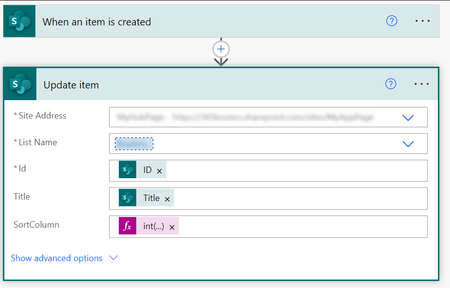
Hi zalik22 you could create a new numeric column "SortColumn" and sort by that. Then use a PowerAutomate Flow to set values for the "SortColumn" like this (Assuming your original values are in the "Title" column): Use the formula int(replace(replace(replace(replace(replace(replace(replace(replace(replace(replace(replace(replace(replace(replace(replace(replace(replace(replace(replace(replace(replace(replace(replace(replace(replace(replace(replace(replace(toUpper(triggerOutputs()?['body/Title']),'A',''),'B',','),'C',''),'D',''),'E',''),'F',''),'G',''),'H',''),'I',''),'J',''),'K',''),'L',''),'M',''),'N',''),'O',''),'P',''),'Q',''),'R',''),'S',''),'T',''),'U',''),'V',''),'W',''),'X',''),'Y',''),'Z',''),',',''),' ','')) for the SortColumns. Best Regards, Sven PS: I could not get this calculation to work with a calculated column, which would be much better. But replacing multiple instances of a string in another string is not that easy..... If your string would have a pattern like "<Character><Character><Character><Number>" then we could try to develop a formula that just strips the first three characters from the string or something like that.2.4KViews0likes0CommentsRe: Rest API filter by two and more columns
Hi buszi99 It works if you use "and" instead of "&&" $URL = "/_api/web/lists/GetByTitle('$varList')/items?`$select=Title,Modified,ContentType,ID,Created&`$filter=ContentType eq 'Site Page' and Modified lt '2023-06-09'" Best Regards, Sven12KViews0likes0Comments


Recent Blog Articles
No content to show