device management
1525 TopicsWin11 Home - 24H2 Virtual Workspaces
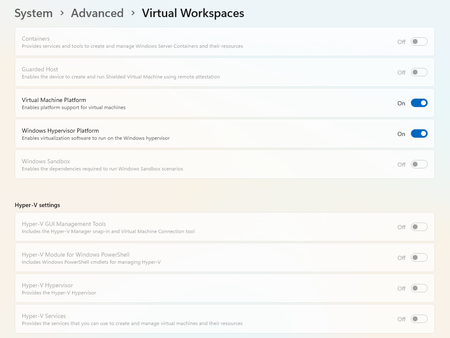
Hi Community, I am unable to turn on settings for virtual workspaces as it has been greyed out. Please suggest how to turn them on now by referring to the screenshot attached: I am facing issues while running docker due to this. Regards, Siddhartha Sharma4Views0likes0Comments
The file is too large for the destination file system for usb transfer
I got this error when trying to copy a few movies from Windows 11 laptop to USB drive. The file is too large for the destination file system for usb transfer These are blu-ray HD videos and some of them are more than 5GB. Is this problem? I tried multiple suggestions but none of them worked. By the way, it is a fast USB 3.0 flash drive with 64GB storage.99Views0likes7CommentsPlease help - incredibly slow computer
First, let's start with the fact that I know nothing about computers despite having used them for 30 years for basic stuff like Word/Excel or browsing the internet. I'm at my wits' end with my home setup - I got rid of a 10-yr old HP desktop because it was so slow, taking 10 minutes to boot up and 30-60 seconds to open webpages. I thought it was because the computer was so old. Last fall I replaced it with a new Dell Inspiron desktop with Intel Core i3 CPU, 932GB storage, 8GB RAM, running Windows 11 Home. I loaded up all my old files on to the new computer, files and programs which consists of almost nothing but photos (more than 30,000 of them, about 100 GB), plus my old iTunes library, which I still use with my ancient but still working iPods. Plus a program called HAP which allowed me to load a few thousand CDs worth of music onto an external hard drive Sony player. That's it - a total of about 250GB of data on this brand-new 900GB machine. No gaming, no performance-hogging programs of any kind, not even Word or Excel on this computer. Yet as soon as I copied it all onto the Dell, the Dell started behaving just like the old HP - taking literally 10-15 minutes to boot up (especially if I haven't turned on the computer in a few weeks). When I click on the Edge browser shortcut, it might take 30-60 seconds to open a webpage. To switch to another website might take 10-25 seconds. It is intolerable - like the early days of dialup internet. So I called Dell and they went through a number of diagnostics and said there was absolutely nothing wrong with the computer or its performance, and it had to be something with the Windows operating system. But it's impossible to reach Microsoft and they'll just direct me to these forums anyway. I wondered if it was somehow related to Windows Updates or Norton Antivirus. A friend said I could delete Norton because Defender is just as good, so I did that, but that did not improve the performance. I have all the automatic updates turned on, so it's not like Windows is way out of date. Now I wonder if maybe it's the 20-year-old iTunes software or other legacy crap that I transferred from the old computer that is clogging up the system, but I have no way of figuring it out. I'm happy to pay somebody to dig into all the systems and hidden files to figure out what is slowing things down and fix it, but I can't find anyone to do that who I'm confident knows Windows 11 cold and is a legitimate problem-solver who isn't just going to rip me off. Does anyone have any idea how I can find somebody who can get to the bottom of this, someone reputable who can remotely diagnose the problem and figure out why it is happening? There's no way I can figure this out on my own, as I don't understand anything about software or even know what programs may be running other than those I mentioned. I've pretty much stopped even using this new computer because it is so hopeless, and all it does is sit there storing my photos and iTunes (which is impossible to use because it's so slow). Any ideas appreciated, but I need someone who can dive into the computer and find out why this happened. Thanks for any advice.52Views0likes3Comments
Automatic spacing occurs when typing in Windows 11 (Outlook and 3ry part Messenger + Edge)
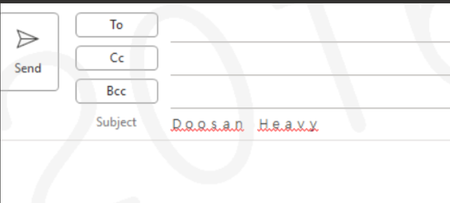
* Issue -Issue with spacing when entering text (same for English and Korean) -This spacing issue occurs not only in Outlook but also in third-party messengers and the Edge browser when entering text. Action details - Full/Half (F) -> Half size (H) change -For keyboard layout, if Hancom IME is selected, change it to "Microsoft IME". * Issue Details The issue recurs even after performing the above settings It returns to normal after restarting Outlook *Additional measures -It appears that the ctfmon.exe process restart is not proceeding normally. -Disable Microsoft Input Method Deletion -There are cases where the problem is not resolved and recurs even after changing IME settings, removing Hancom Input Method, or switching between full-width and half-width input. -DISM /Online /Cleanup-Image /RestoreHealth sfc /scannow26Views0likes1Comment
Windows 11 Pro, my PC will wake itself back up when sleeping & start itself back up when shut down
This issue started about a year ago. It's annoying, as I am currently living offgrid and need to conserve power to my battery backups easily. I have tried replacing the GPU and the CPU. I have tried adjusting the power saving settings, but I don't know of any settings that are supposed to have this effect anyways aside from waking up for network, and it does this even if starlink is unplugged. Please help me go through troubleshooting steps.54Views0likes4CommentsFeature Request: Allow Custom User Profile Folder Name during Microsoft Account OOBE Setup
Currently, when setting up Windows 11 using a mandatory Microsoft Account (MSA), the operating system automatically generates a truncated 5-character folder name in "C:\Users" based on the first five letters of the user's email address. For professionals using high-end workstations, this behaviour is problematic for several reasons: Professionalism: Truncated names like "siddh" instead of "Siddharth Shankar" look unprofessional in file paths and environment variables. Scripting and Development: Many automated scripts and terminal-based workflows rely on consistent, predictable naming conventions that align with the user's actual identity. Accessibility: Users should have agency over their local directory structure without needing to resort to OOBE\BYPASSNRO hacks or post-install Registry edits, which can be risky and time-consuming. Request: Please provide an "Advanced" or "Edit" option during the "Who is going to use this PC?" screen that allows users to manually define their local folder name while still signing in with their Microsoft Account. This change would align Windows 11 with modern UX standards of personalization and user control.30Views0likes3Comments