security
5534 TopicsWindows App Updates: Reliability, Productivity, and Security Improvements
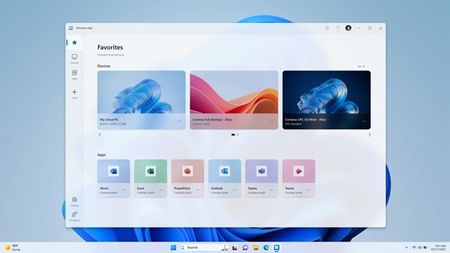
The Windows App has seen a significant year of investment, with updates focused on improving connection reliability, usability, and customer‑driven capabilities. In 2025 and early 2026, we delivered split screen for Web, deep linking, Start menu integration, and reliability upgrades powered by RDP multipath and next gen transport intelligence. As we approach the March 2026 end‑of‑support date for the Remote Desktop client, Windows App continues to evolve as the primary supported access experience for Windows in the cloud.6.1KViews3likes6Comments
BitLocker encrypted fixed drives after BIOS update with no warning
OS: Windows 11 Pro 25H2 Build 26200.8037 M/B: Asus TUF Gaming B850M-Plus Wifi I had been running a BIOS version which is about 1 year old on a fairly recent motherboard model. I have always had an issue show up where PCR7 binding was not possible. I only run under a local account and did not want BitLocker on anyway so no big deal. The few days ago, I updated the BIOS to a later version (not the latest). Yesterday I happened to notice that my drives were all encrypted XTS-AES 128, although BitLocker was not set up. Checking the event viewer, I saw BitLocker-API messages to confirm that starting right after the BIOS update Windows decided, with no warning or indication, to encrypt all my drives. I went to the Settings Drive encryption page (which was not even available before the BIOS update) and say Drive encryption was on. So I turned it off. The BIOS update must have fixed the PCR7 issue. Microsoft does know about this machine since I use a subscription to Microsoft-365, but Windows is only running under a Local account. So is this expected behavior that Windows would just willy-nilly encrypt my drives without telling me? What I read tells me it should not have. What's the best way to prevent this?42Views0likes0CommentsHow do I completely uninstall microsoft edge in windows 11?
Hi, The Microsoft Edge browser has been consuming a lot of CPU and RAM on my Windows 11 computer lately, even when only a few tabs are open. It's starting to slow things down, especially during multitasking, and the built-in browser keeps running in the background. Tried removing it through windows 11 settings and control panel, but the uninstall option is greyed out for system app like edge. Is there a reliable way to completely uninstall microsoft edge browser from Windows 11, or at least stop it from running and using resources?202Views0likes8Comments
M365 only admin locked out MFA error 53003
I am learning this the hard way....so here it goes. Currently I am locked out of as the only admin on the tenant with error 53003. I was updating some Microsoft MFA default policy settings in Entra and mistakenly deleted the admin user from the exclusions list, and got locked out. Thankfully I have another tenant, not as big the one locked out. Initiated several support tickets for which everyone calls, and despite of subline mentioning the issue says that they have to assign this ticket to Entra. Then the ticket gets updated and noone has been assigned every since. I have initiated severity A support tickets from Azure portal but no one has called in last 24 hours to help. We area business with Business Premium licenses with over 20 users, and now completely locked out. I have looked almost everywhere online. There is no phone number that takes you to a support agent - PLEASE HELP........45Views0likes2Comments
DNS-over-TLS on Windows 11: why does the DNS client negotiate TLS 1.2 instead of TLS 1.3?
Hi, We have configured DNS-over-TLS (DoT) on Windows 11 (latest version, 25H2) using: netsh dns add encryption server=<ip> dothost=<hostname> autoupgrade=yes After capturing and analyzing DNS traffic, we noticed that the DNS client always sends a TLS 1.2-only Client Hello, with no supported_versions extension offering TLS 1.3. This causes connection failures with DoT servers that require TLS 1.3. While researching this behavior, we found a Microsoft Q&A discussion mentioning that applications using the legacy SCHANNEL_CRED structure cannot negotiate TLS 1.3, while applications using the newer SCH_CREDENTIALS structure can. Could you confirm whether the Windows DNS client still uses SCHANNEL_CRED for DoT connections? If so, is there a plan to update it to SCH_CREDENTIALS to enable proper TLS 1.3 support? Thank you.41Views0likes1CommentWhat makes windows 11 system files get corrupted ?
From few days my windows 11 refused to load but I was able to use commands like DISM, chkdsk, sfc /scannow and it return to load again. But I wonder what is the most common cause to make windows 11 files get corrupted like this ?. Causes like Improper Shutdowns or Power Loss , Failing or Faulty Storage Drive, Malware or Virus Infections are not responsible for me so what is the most probably cause for this ?639Views0likes4CommentsCelestia: visualize the Milky Way on your PC
Celestia is open-source software (under the GNU GPL license) for real-time 3D simulation of space, which is not limited to Earth but to the entire Milky Way. Programmed in OpenGL (100,000 lines of code), this software which runs on Windows, Linux and Mac OS, is the work of four programmers. Making extensive use of bump-mapping to draw the relief of the surface of the planets, the program allows free movement in space, and really impresses with the notion of scale that it makes clear (the rendering of each planet taken separately not being the most impressive compared to other simulations). It is based on NASA data, guaranteeing a real simulation. A software you absolutely must try!30Views1like3Comments
SmartScreen false positives
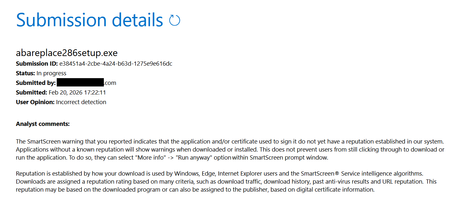
Hello, I'm a developer of https://www.abareplace.com/ Unfortunately, Microsoft SmartScreen blocks https://www.abareplace.com/download/ of my application and multiple attempts to contact Microsoft about this case were in vain. The app is clean on VirusTоtаl, has a valid digital signature, and is published to MS Store. However, users see the SmartScreen warning when trying to run the installer downloaded from my website: Windows protected your PC Windows Defender SmartScreen prevented an unrecognized app from starting. Running this app might put your PC at risk. Other developers report exactly the same problem and it https://www.reddit.com/r/Windows11/comments/1pz8qww/windows_code_signing_is_broken_for_indie/ It has no sense from the security point of view to block something that is already published on Microsoft Store. I submitted a ticket to https://www.microsoft.com/en-us/wdsi/filesubmission?persona=SoftwareDeveloper one month ago. The ticket was "In progress" for many weeks, then was silently closed. I opened a new ticket one week ago and it's still "in progress". I also submitted the file via Report this file as safe > I am the owner or representative of this website and I want to report an incorrect warning about it button in Microsoft Edge several times, but received no confirmation email that you should receive after submitting the form. I know that the times when Steve Ballmer shouted: "Developers! Developers! Developers!" are long gone, but can Microsoft make live at least a bit easier to independent software vendors? Thank you.213Views1like4Comments