networking
943 Topics
Server 2025 not accepting Ricoh scans
The scanner has stopped scanning to their server since I upgraded the server OS from Windows Server 2022 to 2025. • Installed the Ricoh drivers for both the scanner and printer (from Ricoh’s web site) • Created a new simple share/filepath for the scanner to send to (\\SERVER2022\Scans) • Used IP address (10.1.10.2) instead of server name in file (UNC) path • Entered admin credentials with or without server name (it is a workgroup server, not a DC) • Created another user and tried all above with that new admin • With either server share and/or user, tried different permissions on the shared folder • Tried disabling/enabling inherited permissions on the shared folder • Disabled the Advanced Firewall entirely for testing – no change either way • Double checked incoming ports/programs on the firewall – all required were open • Activated SMB1 on server, tried with or without SMB2/SMB3 disabled • I was able to create a share on two other computers; one running Windows 10 and one running Windows 11. They both worked.95Views0likes1CommentWhat to Expect from the Copilot & AI Sessions at Microsoft 365 Community Conference
AI isn’t a side conversation at the Microsoft 365 Community Conference—it’s at the center of how work is changing. The Copilot, Agents, & Copilot Services Sessions are designed for anyone who wants to move beyond curiosity and into real-world application. This is an opportunity to learn how Copilot works today and how agents extend it. You will also explore how organizations can govern, scale, and operationalize AI across Microsoft 365. Questions these sessions will help answer: How do we move from experimentation to real value? How do we scale AI responsibly? How do agents fit into the way we already work? What skills do teams need next? Business leaders, IT pros, developers, and community practitioners will join sessions to find practical insights into how AI shows up in your daily work, and what it takes to deploy it responsibly and effectively. There will also be a focus on change management, champion programs, and adoption frameworks, because deploying AI isn’t just a technical decision, it’s a cultural one. From Copilot to Agents: The Shift from Assistance to Action One of the biggest themes across the sessions are the evolution from AI as a helper to AI as an active participant in work. If you’re curious about what “agentic AI” actually means in practice, attending these sessions will make it concrete. Join your peers as you learn how Microsoft 365 Copilot is being extended through agents that reason, act, and automate. Learn about agent orchestration across tools like Copilot Studio, SharePoint, Teams, Planner, and Power Platform. Discover new agent patterns including declarative agents, multi-agent configurations, workflows agents, and computer-use agents. In these sessions you’ll explore how agents can: Take action on your behalf and do more than suggest content. Work across apps, data sources, and workflows. Participate alongside humans as part of the team. Real Adoption Stories (Not Just Demos)! Go beyond feature walkthroughs to focus on how organizations are actually adopting Copilot and agents at scale. In these adoption stories you’ll hear: How Microsoft uses Copilot and agents internally as Customer Zero. What adoption looks like across large enterprises, frontline environments, and regulated industries. Lessons learned from early adopters—what worked, what didn’t, and what they’d do differently. Governance, Trust, and Control Are Front and Center AI adoption only works when people trust it—and trust is built through strong governance. Learn how organizations are balancing innovation with oversight and enabling teams to build and use agents while maintaining enterprise-grade guardrails. A significant portion of the Copilot & AI track is dedicated to: Agent lifecycle management. Security, compliance, and data protection. Preventing oversharing and managing risk. Observability and control using tools like Agent 365, Microsoft Purview, and Copilot Control System. This is especially valuable for IT and security leaders who are being asked to “move fast” without compromising standards. Building with Copilot: No-Code, Low-Code, and Pro-Code Paths No matter where you sit on the technical spectrum, there’s a clear path to learning how to build responsibly and effectively. Not everyone builds the same way and organizations need prompt engineering that delivers results. In these sessions you’ll learn how to choose the right agent type for the job, extending Copilot with enterprise data, and designing agents that are production ready—not just impressive in demos. These sessions are tailored to: Business users and makers getting started with Copilot Studio Low-code developers extending Copilot with workflows, connectors, and prompts Pro developers building advanced agents using APIs, MCP servers, Microsoft Graph, SharePoint Embedded, and Azure AI Copilot in the Flow of Everyday Work Rather than abstract AI concepts, you’ll see end-to-end workflows that demonstrate how Copilot helps people save time, reduce manual work, and focus on higher-value outcomes. The emphasis in these sessions is on practical impact, not hype showing how AI is grounded in real work. These sessions will showcase Copilot and agents embedded into: Meetings, chats, and channels. Task and project management. Content creation and knowledge management. Business processes and frontline operations. Why the Copilot and AI track matters If AI is part of your roadmap, or already part of your day, this track will show you how strategy can meet execution. Join us to explore clear mental models for Copilots and agents, see real examples you can apply to your work, and gain a better understanding of what’s now—and what’s coming next. Each year, #M365Con26 is built around one simple idea: bringing our global community together to learn, grow, innovate, and get hands-on with the technologies shaping the next era of work. This year’s conference delivers our most expansive program yet, including: 200+ sessions, workshops, and AMAs, covering Microsoft 365 Copilot, Teams, SharePoint, OneDrive, Copilot Studio, and more. 100+ Microsoft-led sessions, giving you unprecedented access to the people building the apps and AI capabilities you use every day. A keynote lineup featuring Microsoft leaders including Jeff Teper, Charles Lamanna, Vasu Jakkal, Rohan Kumar, Jaime Teevan, and many more. Deep-dive workshops to elevate your skills with real-world scenarios and hands-on learning. Exclusive attendee parties and networking events where you can connect with peers and icons. You’ll also get the chance to meet hundreds of Microsoft executives, engineers, and product leaders—ask questions, share feedback, and help shape the roadmap of the technologies you rely on. Register now, save $150 with code SAVE150 - https://aka.ms/M365ConRegister220Views0likes0CommentsGoogle fiber being blocked??
I’m on Google fiber and can't download the newest ISO. I get a msg that says some block of IPs is being blocked because they are not who they say they are. Likewise, I have no anonymizer running and my ip is my own on google fiber. error msg; message code 715-123130 and b64dd3c8-ed16-4d46-87ac-a871691f1c41.Solved719Views5likes9Comments
Did Microsoft make a mistake? WinServer 2022 Standard and up.
Microsoft removed functionality of Windows Deployment Service. I know their are ways to to get around this but they either are hackjobs or deploying your own windows with PE. as far as i know of writing this. I know I could go linux. they have a simple cd to follow. Or Mac has their own version for macs. but not microsoft. They THREW it away for some stupid reason. Do I really have to do a VM or worse ditch DNS & DHCP?29Views0likes0Comments
Network connectivity test TCP Connection results unreliable
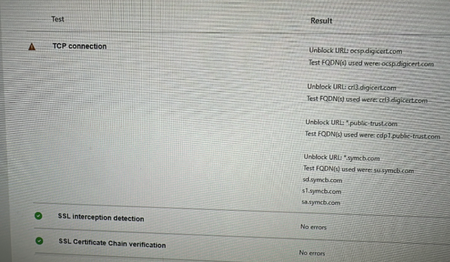
My team has spent the last 2 business days trying to get the https://connectivity.office.com/ TCP connection test to complete successfully to appease the Microsoft Unified Support Team. They don't want to take our MS Teams crash diags until they see SSL Interception Detection and TCP connection tests passing successfully. We can't get TCP connection tests to pass, we get one of the following: Success Attempt #1 Success, Attempt #2 Failure Any number of errors to unblock URLs such as (but not limited to) ocsp.digicert.com,ocspx.digicert.com,ocsp.omniroot.com,su.symcb.com,sr.symcb.com,sd.symcb.com,s1.symcb.com,sa.symcb.com We figured it was something with the corporate network but that's not the case. Last night we had about 50 employees try this test from their home (personal) computers that have no connection to our corporation. The TCP Connection test fails on home (consumer) PCs. What's the story with this TCP Connection check?592Views1like2Comments
Zero Trust DNS is Here: Elevating Enterprise Security on Windows 11
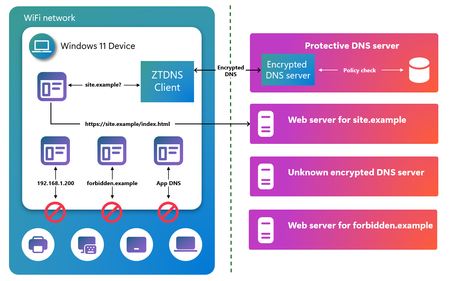
When attackers target an enterprise today, they rarely begin with a blunt smash-through-the-front-door intrusion. They begin quietly by resolving a domain. In most cases, modern malware, phishing kits, and human-operated ransomware operators rely on DNS as the entry point to discover infrastructure, beacon command-and-control, and exfiltrate data. Thus, it is becoming even more important to secure DNS to help protect against increasingly frequent, complex, and expensive cyberattacks. Enterprises have invested heavily in Protective DNS services with cutting-edge threat intelligence to identify and block malicious domains in real time but if an endpoint device can simply bypass them, the entire Zero Trust posture is weakened. Today, Microsoft is closing that gap. Introducing Zero Trust DNS (ZTDNS) We are excited to announce that Zero Trust DNS (ZTDNS) is now generally available on Windows 11 Enterprise and Windows 11 Education editions. ZTDNS is a new enterprise security feature in Windows that helps ensure DNS policy configured on the enterprise DNS server is enforced on the device. This is an important advancement for organizations working to enable that outbound connectivity on managed Windows devices aligns with enterprise authorization and policy. ZTDNS provides device-level enforcement of an enterprise’s DNS policy, in-box on Windows 11 helping ensure devices only communicate with destinations the organization intends. It doesn’t require installing and managing additional agents or maintaining a “best effort” block list on each endpoint device. With ZTDNS, the enterprise DNS resolver becomes the policy source of truth and Windows becomes the enforcement point. For more information, check out our documentation. This can be particularly useful for organizations in highly regulated industries, or where compliance with NIST standards is of paramount importance. Without ZTDNS, the system DNS client could be pointed to a network-provided malicious DNS server, which can resolve unapproved domains and return incorrect resolutions to redirect the system to attacker’s endpoint. If the malicious DNS server uses encrypted DNS, IT administrators won’t be able to analyze the DNS traffic to prevent or mitigate potential attacks. Applications can use their own DNS client to completely bypass system policies. Also, system remains vulnerable to in-network attackers. ZTDNS protects against these attack vectors by mandating the use of Windows DNS client and only sending encrypted DNS queries to the trusted DNS servers. Since ZTDNS blocks all outbound connections and local name resolution by default, the system is protected against in-network threats. Why is ZTDNS needed? In enterprise scenarios, DNS is no longer just a lookup mechanism but a policy decision point. However, without device-level enforcement, attackers can hijack device DNS to: Redirect DNS queries from the device to a malicious or compromised DNS server Use their own encrypted DNS client and bypass system DNS client Bypass DNS completely with direct IP connections In such cases, organizations lose the ability to control which network destinations the endpoint is allowed to reach even if a Protective DNS service is used. ZTDNS addresses this by only allowing outbound connections to IP addresses that were resolved by the trusted DNS server for a query issued by the Windows DNS client. More importantly, it achieves this without terminating end-to-end encryption. How does ZTDNS work? ZTDNS integrates the Windows DNS client with the Windows Filtering Platform to help enforce domain-name-based network lockdown using encrypted DNS. ZTDNS is off by default and can be configured on a Windows 11 device with an enterprise-approved DNS over HTTPS (DoH) or DNS over TLS (DoT) server. When enabled, ZTDNS blocks all outbound IP-based connections by default and only allows outbound connections to IP addresses resolved by the trusted DNS server or those added to the manual exception list by the IT administrator. It mandates the use of encrypted DNS (DoH or DoT) and only trusts the DNS resolutions initiated by the Windows DNS client and answered by the trusted DNS server to create outbound allow exceptions. This helps provide a strong, enforceable control that aligns with Zero Trust principles: all destinations are untrusted by default unless specifically permitted. In a nutshell, when configured and enabled, ZTDNS will have the following effects on your Windows 11 device: Encrypted DNS enforcement (DoH or DoT) Default deny for outbound IPv4 and IPv6 traffic Dynamic allow listing of IP addresses returned by trusted DNS servers Static allow listing of IP addresses approved by the IT administrator via manual exceptions Centralized logging of permitted and blocked connections Deploying ZTDNS ZTDNS is available in the latest builds of Windows 11 Enterprise and Windows 11 Education. To deploy ZTDNS, enterprises can configure and enable it via: netsh commands JSON configuration We are also actively developing a Microsoft Intune experience for ZTDNS and we will share more information when the details are available. For detailed deployment guidance, check out our official documentation. Connect with us For customers attending Microsoft Ignite 2025, please join us at session BRK258: Inside Windows Security, from client to cloud to learn more about ZTDNS. Alternatively, you can also visit the Windows Resiliency Initiative & Windows Security booth to discuss ZTDNS in depth. For customers who are unable to attend Microsoft Ignite 2025, we would still welcome the opportunity to connect. If you have questions about Zero Trust DNS, deployment considerations, or would like to share feedback from your evaluation, please contact us at ztdnsteam@microsoft.com. Securing the Present, Innovating for the Future Security is a shared responsibility. Through collaboration across hardware and software ecosystems, we can build more resilient systems secure by design and by default, from Windows to the cloud, enabling trust at every layer of the digital experience. The updated Windows Security book is available to help you understand how to stay secure with Windows. Learn more about Windows 11 and Copilot+ PCs. To learn more about Microsoft Security solutions, visit our website. Bookmark the Security blog to keep up with our expert coverage on security matters. Also, follow us on LinkedIn (Microsoft Security) and X (@MSFTSecurity) for the latest news and updates on cybersecurity.1.8KViews0likes1CommentMicrosoft 365 Community Conference: A Beacon for Builders, Innovators, and Icons of Intelligent Work
You’re passionate about what you do, and we’re passionate about empowering your potential. Microsoft 365 Community Conference - is your chance to keep up with AI, build game-changing skills, and take your career (and business) even further. With over 200 sessions, workshops, keynotes, and AMAs, you’ll learn directly from the experts and product-makers who are reimagining what’s possible in the workplace. Conference Details Join us in Las Vegas April 21-23. 2026 for the premier Microsoft 365 community event. We want to help you get the most out of the tools you use every day, so we’re bringing back the conference you know and love—with even more opportunities to learn, connect, and level up. Here’s what you can expect: Meet one-on-one with the people who create Microsoft products—ask questions, share feedback, and discover real-world solutions Explore Microsoft’s latest product updates and learn about what’s on the horizon Build and sharpen skills you can use immediately to be more productive, creative, and collaborative with the Microsoft tools you use every day Grow your network, dive deep, and have fun with the best community in tech How to Register Register today and get ready to transform the way you work. Save $150 with our exclusive customer code SAVE150. https://aka.ms/M365ConfWebsite Explore Sessions and Workshops There’s plenty of breadth—and depth—to the learning opportunities at the Microsoft 365 Community Conference. No matter your role or experience level, we've got something for everyone! https://aka.ms/M365ConfSessionsWebPage Meet the Speakers Our lineup of speakers includes some of the brightest minds behind the most powerful Microsoft innovations. You’ll hear from experts like: Jeff Teper | President, Collaborative Apps and Platforms Charles Lamanna | President, Business Apps and Agents Vasu Jakkal | Corporate Vice President, Microsoft Security Business Rohan Kumar | Corporate Vice President, Microsoft Security, Purview & Trust The Microsoft 365 Community Conference is more than an event. It’s the gateway to what’s next for your career, community, team, customers, and business—and for work itself. Claim your front-row seat to the future of work today!392Views0likes0Comments
NPS network policy with multiple Client ip4 addesses
I have a wireless policy on my NPS server with the primary wireless controller added using a Client IPv4 address entry in the policy. I want to add the backup controller as well but it seems it is adding it as a and condition. I need it to be added as an or condition when the primary controller is unreachable. How can I add multiple Client ip4 addessess in a Network policy with an or condition? An and condition would require both to be reachable. thanks.50Views0likes0Comments