microsoft graph
447 TopicsHow to Use Scoped Graph Permissions with SharePoint Lists
This article explains how to use scoped Graph permissions to restrict app access to lists and list items in SharePoint Online and OneDrive for Business sites. It's a follow-up to other articles covering how to restrict app access to SharePoint Online sites and files. Scoping app access to specific objects is important because otherwise apps can access everything in SharePoint Online, and that isn't good. https://office365itpros.com/2026/02/25/scoped-graph-permission-lists/13Views0likes0CommentsAutomating Microsoft 365 with PowerShell Second Edition
The Office 365 for IT Pros team are thrilled to announce the availability of Automating Microsoft 365 with PowerShell (2nd edition). This completely revised 350-page book delivers the most comprehensive coverage of how to use Microsoft Graph APIs and the Microsoft Graph PowerShell SDK with Microsoft 365 workloads (Entra ID, Exchange Online, SharePoint Online, Teams, Planner, and more). Existing subscribers can download the second edition now free of charge. https://office365itpros.com/2025/06/30/automating-microsoft-365-with-powershell2/712Views2likes9CommentsUsing Dev Proxy with the Microsoft Graph PowerShell SDK
Dev Proxy is a Microsoft tool built to help developers figure out the most effective way of using Microsoft Graph API requests. On the surface, Dev Proxy doesn’t seem like a tool that would interest people who use the Microsoft Graph PowerShell SDK to write scripts for Microsoft 365. But all tools have some use, and Dev Proxy can help. https://office365itpros.com/2026/02/19/dev-proxy-graph-sdk/17Views0likes0CommentsHow to Use Scoped Graph Permissions to Access SharePoint Files
Scoped permissions grant apps granular access to files and folders in SharePoint Online and OneDrive for Business sites using the Files.SelectedOperations.Selected Graph permission. The permission allows apps to access specific files or all the files in a folder. It’s a great way to make sure that apps don’t have unfettered access to confidential documents. Not that any app would try to have that kind of access… https://office365itpros.com/2026/02/18/scoped-access-files-and-folders/30Views0likes0Comments
Is principalId Always a GUID in Microsoft Graph ??
{ "error": { "code": "Request_BadRequest", "message": "Invalid GUID:HR", "innerError": { "date": "2026-02-13T06:44:24", "request-id": "87678d90-1d94-4131-a705-4356ad3568a4", "client-request-id": "63569c7b-1dea-42d4-8d72-aa3668c78418" } } } We’re encountering an issue with the Microsoft Graph API response for directoryRole Recently, one of our Graph API calls started returning a response where the principalId value appears to be a custom string instead of the expected GUID. In our code, we loop through each id from the delta response, assuming it will always be a valid GUID. However, we are now getting errors because one of the returned principalId values does not match the expected format. Our questions: Is it possible for Microsoft Graph API to return a custom string instead of a GUID for principalId? Has anyone experienced similar behavior with delta queries for directoryRole or any other object? Are there any known scenarios where the principalId format differs from the standard GUID? Any insights would be appreciated.12Views0likes0CommentsHow to Deactivate an Entra ID Application
This article explores how to deactivate applications (aka disable apps) in Entra ID. Everything is done through PowerShell and the Microsoft Graph PowerShell SDK because the feature isn’t currently available in the Entra admin center. We’ve even included a fully functional example script to show you how the process works. Feel free to fix or enhance our code in GitHub! https://office365itpros.com/2026/02/11/deactivate-application-entra/51Views0likes0CommentsMicrosoft Unified Tenant Configuration Management
Unified Tenant Configuration Management (UTCM) is a new tenant configuration management solution that can monitor changes to over 300 resource types found within Microsoft 365 tenants. Currently accessible via Microsoft Graph beta APIs to all tenants, UTCM offers an alternative to Microsoft DSC and third-party configuration management products. No details are available yet about an admin UX, licensing, or availability. https://office365itpros.com/2026/02/03/utcm-beta/591Views0likes1CommentMicrosoft 365 & Power Platform product updates call
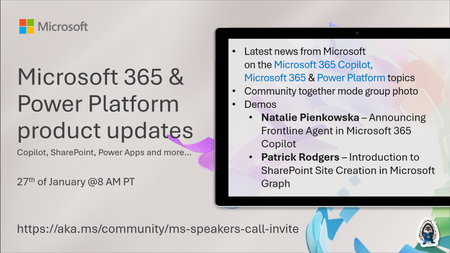
💡Microsoft 365 & Power Platform product updates call concentrates on the different use cases and features within the Microsoft 365 and in Power Platform. Call includes topics like Microsoft 365 Copilot, Copilot Studio, Microsoft Teams, Power Platform, Microsoft Graph, Microsoft Viva, Microsoft Search, Microsoft Lists, SharePoint, Power Automate, Power Apps and more. 👏 Weekly Tuesday call is for all community members to see Microsoft PMs, engineering and Cloud Advocates showcasing the art of possible with Microsoft 365 and Power Platform. 📅 On the 27th of January we'll have following agenda: News and updates from Microsoft Together mode group photo Patrick Rodgers – Introduction to SharePoint Site Creation in Microsoft Graph Natalie Pienkowska – Announcing Frontline Agent in Microsoft 365 Copilot 📞 & 📺 Join the Microsoft Teams meeting live at https://aka.ms/community/ms-speakers-call-join 👋 See you in the call! 💡 Building something cool for Microsoft 365 or Power Platform (Copilot, SharePoint, Power Apps, etc)? We are always looking for presenters - Volunteer for a community call demo at https://aka.ms/community/request/demo 📖 Resources: Previous community call recordings and demos from the Microsoft Community Learning YouTube channel at https://aka.ms/community/youtube Microsoft 365 & Power Platform samples from Microsoft and community - https://aka.ms/community/samples Microsoft 365 & Power Platform community details - https://aka.ms/community/home190Views0likes0CommentsWhy Entra ID attributes don’t always appear on Microsoft 365 profile cards
While working with Microsoft Entra ID and Microsoft 365 profile cards, I ran into a behavior that often causes confusion: attributes like EmployeeType can exist in Entra ID and Microsoft Graph, yet not appear consistently on Microsoft 365 profile cards. This post breaks down why this happens, what’s actually happening behind the scenes, and what you can realistically expect when working with profile card attributes in real environments. Profile cards should be treated as a presentation layer, not a guaranteed real-time reflection of every Entra ID attribute. If you’ve seen similar behavior with other attributes or workloads, I’d love to hear how you’ve approached it in your environments.139Views1like1CommentGenerate a Weekly Report of Role Assignments
This article explores how to use Entra ID audit records to create a weekly report about role assignment additions and deletions. After deciphering the information contained in the audit records, it’s easy to generate a report showing who made the assignments and if any critical role assignments are in the mix. We can then email the report to interested parties, all with some relatively simple PowerShell. https://office365itpros.com/2026/01/21/role-assignment-weekly-report/50Views0likes0Comments