microsoft 365
5141 Topics
MC1269241 - Can't turn off antropic for agentmode
Hi, I’m trying to figure out how to turn off the new feature where Anthropic is enabled by default for everyone in the EU for agent mode in excel and powerpoint, as described in the Message Center news in the title. It is not possible to press Save when you have unchecked the setting unless you also consent to the terms of use, it is greyed out. Since we want the feature turned off, we do not want to agree to any terms of use. Has anyone found a solution? This seems to be misconfigured.10Views0likes0Comments
Broken Account Recovery (discontinued product)
Hello everyone, We have the MSFT Office Family plan which has the now discontinued custom domain support that used to be an option as a "Premium" feature. Back in August we upgraded the phone of one of the account members on the family plan and lost connection to their MS Office account with the only device that was accessing to the account (the phone with access was reset as part of the upgrade/trade in process). I have tried the account recovery form and it simply doesn't work. I have tried to explain to MSFT support that the tool is broken but can't get anywhere. For the account in question we have an Outlook email client (with non working password) that has a cache of all of the email until loss of access occurred. So when I do the account recovery form, I have name, DOB, region, past passwords and data for all fields including sent email Id's and send subjects, But every time the MSFT recovery mechanism says "Unfortunately, we have determined that the information provided was not sufficient...". WTF. Every time I contact MSFT support I get the same answer, an explanation of the point system used to reset the the account. Same steps to recover....based on this, the recovery should work...yet it doesn't. I have tried somewhere 50+ attempts now over the last 9 months. I even have a contact who is VP level at MSFT who sponsored a support ticket internally but that just ended up with the support person sending me a link to the account recovery form and closed the ticket without looking in the details of the ticket. I can't modify / add a new account as MSFT has as a discontinued product no longer allow members to add/change id's. So I'm locked at the current user set. I have created another email address by saving the cached data to OLM file and importing via the Outlook client but that doesn't restore use of the @mydomain.com for that person. I even retained a lawyer who send a demand to MSFT legal...but the email address didn't go anywhere so at the point of needing to do this on headed paper/send via snail mail. Does anyone have any idea how to get through to MSFT explain the recovery tool is broken? I assume there are so few accounts using custom domains pin family plans that they simply don't test this recovery path. At this point without some internal guidance is a) lawyer and force a demand for password reset b) give up, ditch all of the users using the custom domain, configure an alias for all of the accounts and then change my MX record to a company doing email forwarding and then forward to the new/old legacy accounts (i.e. the ones with the mailto:email address removed for privacy reasons).26Views0likes1CommentMicrosoft 365 & Power Platform Community call
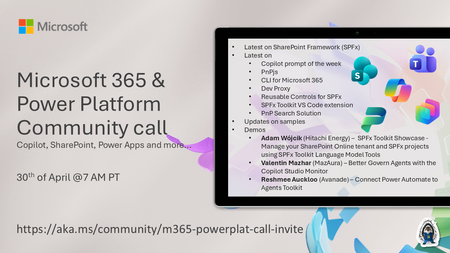
💡 Microsoft 365 & Power Platform Development bi-weekly community call focuses on different use cases and features within the Microsoft 365 and Power Platform - across Microsoft 365 Copilot, Copilot Studio, SharePoint, Power Apps and more. Demos in this call are presented by the community members. 👏 Looking to catch up on the latest news and updates, including cool community demos, this call is for you! 📅 On 30th of April we'll have following agenda: Latest on SharePoint Framework (SPFx) Latest on Copilot prompt of the week PnPjs CLI for Microsoft 365 Dev Proxy Reusable Controls for SPFx SPFx Toolkit VS Code extension PnP Search Solution Demos this time Adam Wójcik (Hitachi Energy) – SPFx Toolkit Showcase - Manage your SharePoint Online tenant and SPFx projects using SPFx Toolkit Language Model Tools Valentin Mazhar (MazAura) – Better Govern Agents with the Copilot Studio Monitor Reshmee Auckloo (Avanade) – Connect Power Automate to Agents Toolkit 📅 Download recurrent invite from https://aka.ms/community/m365-powerplat-dev-call-invite 📞 & 📺 Join the Microsoft Teams meeting live at https://aka.ms/community/m365-powerplat-dev-call-join 💡 Building something cool for Microsoft 365 or Power Platform (Copilot, SharePoint, Power Apps, etc)? We are always looking for presenters - Volunteer for a community call demo at https://aka.ms/community/request/demo 👋 See you in the call! 📖 Resources: Previous community call recordings and demos from the Microsoft Community Learning YouTube channel at https://aka.ms/community/youtube Microsoft 365 & Power Platform samples from Microsoft and community - https://aka.ms/community/samples Microsoft 365 & Power Platform community details - https://aka.ms/community/home 🧡 Sharing is caring!12Views0likes0CommentsMicrosoft 365 & Power Platform product updates call
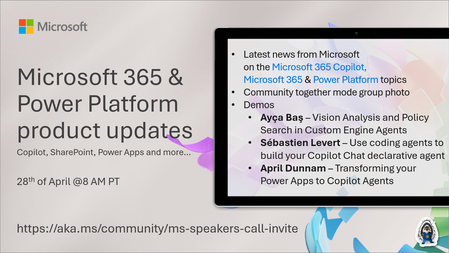
💡Microsoft 365 & Power Platform product updates call concentrates on the different use cases and features within the Microsoft 365 and in Power Platform. Call includes topics like Microsoft 365 Copilot, Copilot Studio, Microsoft Teams, Power Platform, Microsoft Graph, Microsoft Viva, Microsoft Search, Microsoft Lists, SharePoint, Power Automate, Power Apps and more. 👏 Weekly Tuesday call is for all community members to see Microsoft PMs, engineering and Cloud Advocates showcasing the art of possible with Microsoft 365 and Power Platform. 📅 On the 28th of April we'll have following agenda: News and updates from Microsoft Together mode group photo Ayça Baş – Vision Analysis and Policy Search in Custom Engine Agents Sébastien Levert – Use coding agents to build your Copilot Chat declarative agent April Dunnam – Transforming your Power Apps to Copilot Agents 📞 & 📺 Join the Microsoft Teams meeting live at https://aka.ms/community/ms-speakers-call-join 🗓️ Download recurrent invite for this weekly call from https://aka.ms/community/ms-speakers-call-invite 👋 See you in the call! 💡 Building something cool for Microsoft 365 or Power Platform (Copilot, SharePoint, Power Apps, etc)? We are always looking for presenters - Volunteer for a community call demo at https://aka.ms/community/request/demo 📖 Resources: Previous community call recordings and demos from the Microsoft Community Learning YouTube channel at https://aka.ms/community/youtube Microsoft 365 & Power Platform samples from Microsoft and community - https://aka.ms/community/samples Microsoft 365 & Power Platform community details - https://aka.ms/community/home 🧡 Sharing is caring!11Views0likes0CommentsAutopatch - Microsoft 365 Apps Update Rings
I’m trying to understand how the UpdateDeferredVersions registry value is updated in an Intune Autopatch scenario, specifically the version and FileTime values. Registry path: HKLM\SOFTWARE\Microsoft\Office\ClickToRun\Updates Example value: UpdateDeferredVersions = 16.0.19725.20170:13420719560293 | 16.0.19822.20180:13421142577563 I’ve observed the following and would appreciate any clarification: When I modify deadline or deferral settings via Autopatch (policy changes), the FileTime value does not update. Is there a delay or specific trigger (e.g., policy refresh, scheduled task, CDN sync) that updates this FileTime? How exactly is this FileTime calculated? Is it tied to when the build was released, assigned, or when the policy was applied? Is there any supported way to force or influence this FileTime update? Or is this value simply tracking when the build cap was issued, with deferral logic calculated relative to that timestamp? Additionally, I’ve noticed that updates only seem to apply when the FileTime is approximately 4 days behind the current date, is this expected behavior with Autopatch deferral logic? I was able to successfully test this updating FileTime 4 days behind ((Get-Date).AddDays(-4)).ToFileTime(). Any insights into how this mechanism works under the hood (especially with Click-to-Run + Autopatch interaction) would be really helpful. Below is Autopatch group settings for Microsoft 365 update rings that we set in our environment: Test - Deferral 0 - Deadline 0 Ring 1 - Deferral 1 - Deadline 0 Ring 2 - Deferral 2 - Deadline 0 Last - Deferral 4 - Deadline 1 Thanks in advance!19Views0likes0CommentsNOW ON DEMAND | Microsoft Loop Learning Series [Six webinars]
Are you ready to learn more about Microsoft Loop? We have five upcoming Loop events for you – numerous opportunities to see Microsoft Loop in action, to learn about upcoming roadmap items and Copilot/AI innovations, ask questions, get time-saving tips and tricks, and provide direct feedback to the Loop product team.87KViews6likes8Comments