how-to
3234 Topics
Making Teams start on Secondary Monitor
Is there a way to force Teams to start on my secondary monitor (Screen 2)? Every morning I start Teams, it comes up on Screen 1 and I have to move it over to Screen 2 so I can do my work while still seeing the chat/calls windows. I checked settings in Teams as well as looking in Windows (Apps & Features, and Properties) but can't find anything that can set it to start on the secondary monitor instead of primary. It does not appear to retain the last screen position on exit.Solved43KViews2likes8Comments
Auto-saving transcription files in a folder?
I'm currently working in a project which requires the usage of meeting transcription files (not recordings!), and I couldn't find a foulder at OneDrive, or Sharepoint that contains the transcription files (.vtt), I know I can manually download it at the meeting recap but manually downloading it would make my project kinda pointless, is there any way that I can configure it to automatically save the transcription file at a folder like it happens with recordings? Thank you!Solved485Views0likes2Comments
Question about Teams Phone licensing
Hi everyone, I have a question about Teams Phone licensing: If I have some users who have Teams Phone to make and receive external calls, when one of them receives an external call, can they transfer it to another user who only has a regular Teams license but not a Teams Phone license? Or does the user I want to transfer the call to also need a Teams Phone license? I couldn't find a KB article that clarifies this. Thanks regards43Views1like1Comment
Can no longer "log out" (signing out is not logging out)
Hello, Up until recently, when right clicking the Teams icon on the task bar, there was an option to Log Out of teams, which had the effect of logging out (re-opening the program would instantly lead to LOGGING IN). On the most recently release, this is gone. There is now only an option to SIGN OUT, which is done through a menu in the program itself, and has further consequences (namely a full Sign in (with username/password etc) is required, themes disappear etc). How to log out of current session, but not SIGN OUT?20Views0likes0Comments
Link URL to Team Channel
Hello all, I'm trying to link a URL from a fillable PDF to a "Teams Channel". If I plug in the following URL, it works great (it links the user directly to a personal Teams Chat). However, rather than link the user to Chat channel, I want the user to be linked directly to a general Teams Channel. (I hope this makes sense). Is any of this possible? https://teams.microsoft.com/l/chat/0/0?users=XXX@XXX.com&topicName=Completed-training&message=TrainingTraining Complete:Solved116KViews1like7CommentsSchedule daily recurring messages in Teams chat channels
This is my first post on this site! How do I set up a recurring message in a Teams chat channel? I want to remind my team daily at a specific time to put their project stand up status into our project channel. I'm assuming this would be a bot? If so, how can I find the bot? Thank you, Susan Keithley98KViews1like13CommentsUnable to unmirror camera on Microsoft Teams
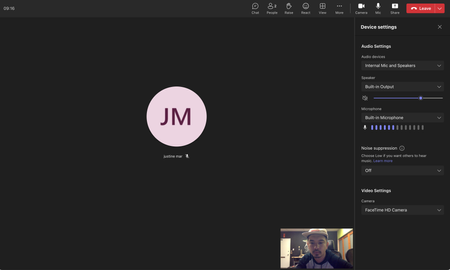
Hello, I am currently unable to un-mirror any camera feeds that go in microsoft teams. The button and option is completely missing in the options. See pic below. What is even more baffling is that I did see this option there earlier but now it is missing. I am on a Mac running macOS Big Sur 11.6 and Microsoft teams desktop app is running version 1.6.00.19353. Why is this option missing and how can I bring it back?1.9KViews0likes3Comments
Introducing a new feature on Microsoft Teams: "Save this message"
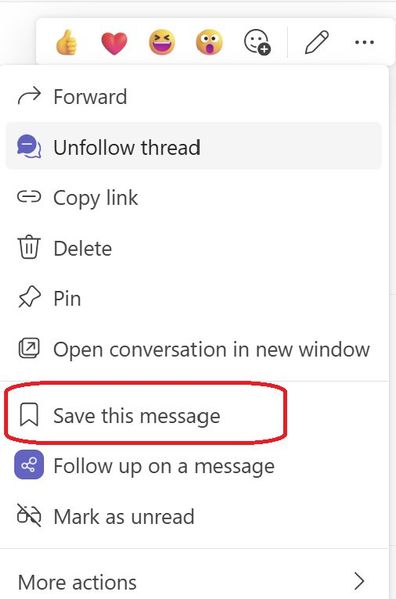
Exciting news - alongside pinning your posts/messages, you can now save them too. All your saved messages will be neatly organized under the "Saved" menu within Teams, right below the "Followed Thread" section. Look out for a special icon marking your saved messages for easy reference. And the best part? You have the flexibility to unsave messages whenever you wish. Stay organized and never lose track of important information with this handy1.3KViews1like3CommentsDocument Library Settings
Many times when someone opens a document from a teams document library, it shows the document as modified even though no actual changes were made to the document. The default at my company is that documents open in edit mode and they auto save so one solution would be to set it to open in view only mode, but my company doesn't want to change that at the company wide level. Is there any way to do this at the SharePoint library level? I also don't want to make document checkout mandatory.137Views0likes1Comment