formulas and functions
25343 Topics
Margin calculator for media budget
Hi, I need help formulating a calculator where the 'Fixed Margin' is separated out from the total budget. My calculation needs to add a buffer to the margin as the platform where this is inserted will reduce the nominal margin when you also include a flat cpm fee as it increases the total amount billed. For example, if margin was 20% of $10,000 then the remaining budget left should be $8,000. However, when you add a rate card on top and deliver x amount of media impressions, the effective margin as a percent of total cost is always going to be less than the nominal margin percentage. Example: Total cost: $10,000 Margin fee: 20% Flat CPM rate: $1.50 Impressions: 2,000,000 then this would lead to this: Media Cost $5,600 Margin Fee $1,400 Flat CPM rate ($1.5) $3,000 Total $10,000 Ideally, I would like to ensure the margin is kept at $2,000 (20%) so need help creating a formula that will raise the margin to a % that keeps your nominal margin rate whilst factoring the flat cpm fee and the impressions served.80Views0likes3Comments
Calorie Amortization Excel Template Issue
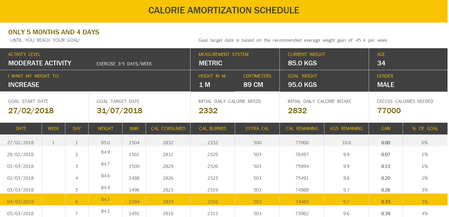
Today I came across the "Calorie Amortization" template on Excel. I started off by changing the preset information so it would fit me. I slightly altered some values from my real ones in the picture but that shouldnt change anything. The picture below shows this: So my issue comes with the weight column... It is supposed to represent my theoretical weight day by day and in this case it is supposed to go up rather than down. The formula for the weight column is: =IFERROR(IF(Maintain,"",Weight), "") Could someone explain why this is happening and how I could fix it? Its not life threatening but it also ruins the spreadsheet. Anyway, thank you and have a nice day :) EDIT: I also realised BMR goes down. BMR is calculated using the equation: (height in cm * x value) + (weight in kg * y value) - (age * z value). X,Y and Z values are not important, I am just noting that if weight goes down (as it does in the picture), BMR will also go down.Solved4.1KViews0likes4Comments
Providing info on tab, based on other tabs with parent child relationship.
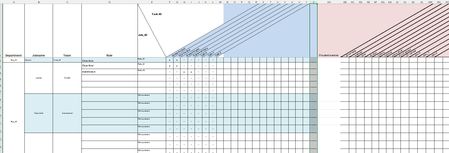
Hi, This post/question is based on a simplified verion of a security-matrix that is te be audited in the company and also audited against the real time security-tables in external system. I changed things to recognizable terms. What would be the best way to solve the task below? We have a PDF-image based on tab "FuntionRole_matrix" that is periodically audited against the actual situation. Thati is why this tab is not edited by hand but partially based on two additional tabs that are provided from another third party system. These additional tabs are "RoleTask_matrix" and "TaskTool_matrix" In Tab "FunctionRole_matrix" we manually fill the departments, job-titles per department and de roles assigned to the specific job-title. In Column D we have a picklist of all the known Roles, as found in tab "RoleTask-matrix" After choice the Role_ID is provided in column E. (via cell function: =X.ZOEKEN(D2;RoleTask_matrix!$A$2:$A$6;RoleTask_matrix!B$2:B$6;"Not found" (=V.Lookup in dutch Excel verison + semicolons different from english functions) The Top row is filled by a lookup of all the possible tasks. In the FunctionRole_matrix we provide insight in de assigned tasks within a role by a lookup-function in tab "RoleTask_matrix" (via cell function in topline: =X.ZOEKEN($D$1;RoleTask_matrix!$A$1:$A$1;RoleTask_matrix!E$1:E$1;"Not found") (and for cell F2 etc.. the X is set by =X.ZOEKEN($E2;RoleTask_matrix!$B$2:$B$6;RoleTask_matrix!E$2:E$6;"-")) Since we have to provide full insight in the relation between the jobtitle, the tassk within te job en the tools/matrials provided for the job we show the tools/matrials provided on the same line as the role in de FuntionRole_matrix. So that we can provide a signed PDF-copy of this excel-tab. The tools provided must be determined by looking for the, via lookup determined, X-es per role. When an X is detected we have to determine de task provided in the topcel of that row. With this task-ID value we need to search in the tab "TaskTool_matrix" and look for the checked tools/materials that should be provided for every jobtitle that has that task. Roles can overlap on tasks and this can also be the case for the tools/materials. We just need an X on FuntionRole_matrix kolom AB etc.. to see what has to be provided to a person in every job-title. Since there is no VBA-knowledge present i cannot bring this Excel sheet live with a button that sets all the X-es as of column AB. Personally i can do it, but withoud future support this cannot be the case. The solution needs functions in cells to provide the information. I guess it must be a combination of IF THEN ELSE with nested VLOOKUP functions. And we have to look for an X that is provided by a function in the cells. So possible some indirect value comparison needen instead of looking for character X in cell. but i have no clue about how to do it. Hope someone has the solution. Very grateful for response. I can provide the excelsheet via a PM. Seems like i cannot attach it to this post Best regards, Mike52Views0likes1CommentExcel - COUNTIF Function
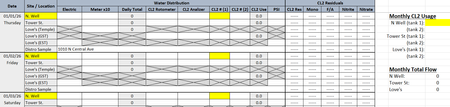
Happy Friday! I am trying to use the COUNTIF Function on a worksheet that tracks how much liquid chlorine is used at 3 different water wells each month, each well having 2 chlorine cylinders. I'm not sure if my brain is fried from reading/watching all kinds of videos for the past 3 hours and trying to follow their instructions, but any time I put in a formula, I get a pop-up saying I've entered too many arguments. Even if I enter individual cells and use only the 3 that it highlights for me (more than 3 does not highlight). I've attached a screen shot of the worksheet (Figure 1) and have highlighted the area I'm trying to figure out. As you can see, it will be for multiple dates, on multiple lines, going through to the end of the month, with the total chlorine (CL2) tallied up on the right hand side. Chlorine tanks are changed out quite often and each tank begins at 150, depleting down to 0. Figure 2 shows a screen shot of what I'm getting when trying to enter the formula. Am I misunderstanding how the formula works or am I using the wrong formula all together? Figure 1 Figure 278Views0likes2Comments
Formula for adding multiple sheets
I am trying to add multiple things across multiple sheets. example : On sheet one, I have column a date, column b check number, column c name of place, column d category, column e withdrawal amount, column f deposit amount, column g balance, column h status (cleared or pending). this same information in on sheets 2,3,4,5 and so on. I want to create a sheet that will tell me how much I have spend with each name of place (column c). let’s say sheet one looks like this 3/23 (date) 777 (check number) John Doe (name of place) 2.00 (withdrawal amount) etc. 3/23 778 John Doe Jr. 3.00 etc sheet two 3/24 666 Joe Doe Jr. 3.00 3/24 668 Joe Doe 4.00 on my total sheet with the amount I have spend with each person/place to look like this Joe Doe — 6.00 (from the 2.00+4.00) Joe Doe Jr — 6.00 (from 3.00+3.00)103Views0likes3Comments
MISSING FUNCTIONS THAT I PREVIOUSLY HAD ACCESS TO
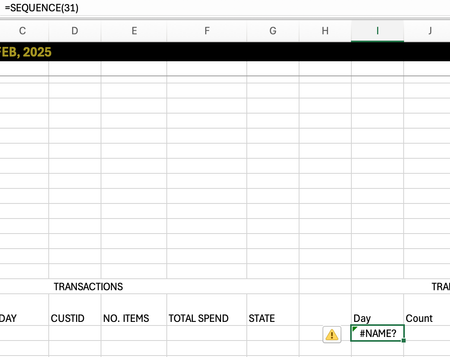
I just switched macbooks and opened my excel to discover I had a few missing functions: MAXIFS, SEQUENCE. This is not a problem regarding the software as mine is MICROSOFT365 and I used the same account previously. Is there any way I can gain these functions back! Thank you!129Views0likes2Comments
Select from multiple conditional format rules, based on value of another cell.
I have a spreadsheet tracking due dates for deliverables, depending on what department a deliverable is for, the acceptable time taken from order to delivery varies. On Column H, I have a formula that calculates how many days OVER the acceptable time a delivery is, I want a conditional format that colours that cell on a gradient from 1 to 150, going yellow to deep red. So a quick visual inspect will show which ones are going to be a major problem. The difficulty being the gradienjt scale will have to change depending on the department that deliverable is for. So in Column C I have the department name, this gives Column D data to look up in a config tab, that lets it check how many days is considered late using a basic Vlookup ona small table that is just two columns Dept Name, and acceptable days late number. =IF(C2="","",VLOOKUP(C2,Configuration!D$4:E$6,2,FALSE)) Then Column H looks at the order date(Col F) and delivery due date (Col G), and checks if the time between is over or under the acceptable range with a simple comparison and show how many days (If any) late the delivery will be. =IF(G2-F2>D2,(G2-F2)-D2,"") I want Column H to be conditionally formatted with the mentioned gradient, however the conditions for that gradient will change depending on whats in the Department Column C, some departments consider 14 days over to be acceptable (coloured yellow), some departments see 8 days as a critical issue (Coloured deep red). So my question is how I apply a different Conditional Formatting Rule to the cell in Col H, depending on the value of Col C. If thats even possible. I know I can do it with a macro, but I want to try keep this worksheet formula's only if possible as the person using it does not use VBA and wouldn't know how to troubleshoot if something went wrong, whereas I could explain a formula to them.Solved96Views0likes3Comments
Managing Blank Cells in multiple linear regression analysis.
Hello, I am performing a multiple linear regression analysis using the Analysis Toolpak in Excel 365. I have complete y-data, but the x variables are missing some data points throughout a large data set. I know I can fill in the data with the mean or potentially use a regression analysis to predict data to fill in the blanks; however, I would prefer to ignore the blank data if possible. Is there a way to do this inside the data toolpak?9Views0likes0Comments
Counting non identical columns
Could anyone explain how to count how many, or remove non-identical entries there are in a set of columns? e.g. In this table, in lines 1- 4 column A and B are identical, but lines 5 - 9, column A is the same in each but column B has a different value in line 9 than in lines 6-8. I want to find a way to count lines 1-5 as one entry and lines 5 - 9 as two entries (i.e. same code in all five lines but different date in one of them.) so the number of unique entries is 3. Line A B 1 G123456 01/01/2026 2 G123456 01/01/2026 3 G123456 01/01/2026 4 G123456 01/01/2026 5 H123456 03/01/2026 6 H123456 03/01/2026 7 H123456 03/01/2026 8 H123456 03/01/2026 9 H123456 05/01/202685Views1like2Comments