excel
44852 TopicsDrop-down list
Good afternoon! Could you please tell me what I need to do to make the drop-down list in the visible part contain more rows? I have a list of 15 rows. I need all of them to be displayed in the visible part of the drop-down list window, without scrolling the list14Views0likes0Comments
Weird bug in Excel 2024 LTSC when switching sheet direction (RTL issue)
Hey everyone, I ran into a strange bug in Excel 2024 Professional Plus LTSC (running Windows 11 25H2). Whenever I open a new workbook and change the sheet direction from Left-to-Right to Right-to-Left, I can’t properly select cells anymore. Clicking on any cell, row, or column doesn’t show the selection border — it’s like Excel doesn’t highlight anything. I have to click multiple times to make it respond. https://i.imgur.com/nAeqnRh.mp4 This only happens after changing the direction. If I keep it Left-to-Right, everything works fine. I tried reinstalling and even tested Excel 2021, and the issue doesn’t exist there. Seems like a bug specific to the 2024 LTSC version. Has anyone else seen this or found a workaround? EDIT: I've already filled a bug report at the MS Feedback Portal https://feedbackportal.microsoft.com/feedback/idea/81911365-f23c-f111-9a91-7c1e52d4091c61Views0likes1Comment
Slicers show (blank), but no blanks exist in the data model
My workbook's purpose is to function as a decision tool. Providers select services they offer using a series of slicers. Their responses filter a pivot table, which shows them which license they should apply for. Some services may be required (or not permitted) under certain licenses. Each slicer represents a service category/type, and slicer options are the specific criteria/specific services used to determine the best license. All options are mutually exclusive (i.e., none of them appear in multiple service categories). In the file, the 'status' variable indicates whether a specific service can be offered with a particular license. There are 4 statuses: Required: the provider must offer this service to qualify for X license (slicer option must be selected) Optional: the provider may offer this service but doesn't have to in order to qualify for X license (slicer option can be selected but doesn't have to be) Not applicable: the service is irrelevant to X license (selecting slicer option has no effect on recommended license) Cannot provide: the provider cannot offer this service to qualify for X license (slicer option cannot be selected) The main issue: In all slicers, (blank) shows as one of the options. There are no blanks in the reference tables. All "real" slicer options also line up with something in the license requirements table... so there aren't any mismatches in the data model that I've been able to find. This is affecting my workbook in two ways: I can't find a way to hide (blank) from the slicers, because I don't know where it's coming from. When (blank) is deselected from a slicer, the filtered pivot shows the number of criteria in each status column for the corresponding service category. Example: The population served service category has 2 valid answers (1 of which is optional and 1 of which is not allowed for License A). When (blank) is deselected from the population served slicer, the filtered table shows 1 in the optional column and 1 in the cannot provide column for License A. Other info: Allowing multiple selections is critical to the final product, so that will have to be done when the file is opened. I tried creating tables for service type, status, and service types/their corresponding options, just in case the data model didn't like the original. These tables are currently part of the data model, but they don't seem to make a difference either way. There are many combinations of services that could be offered. Some act as exclusion criteria for other licenses, so slicers shouldn't be connected to each other. Therefore, I've unchecked the 'hide items with no data' and 'visually indicate items with no data' slicer options. The final workbook will include more license types and additional functions. I removed several licenses to make the file shorter, but all service categories and options are present (since that's where the problem seems to be). I'm not sure how to attach the workbook, but has anyone had this issue before? Is there an issue in the data model somewhere? What am I missing? Any help would be much appreciated!73Views0likes6Comments
Macros en excel xlsm que están guardados en onedrive
Buenas tardes, tengo un problema con archivos xlsm que están guardados en carpetas compartidas de onedrive, si lo guardo en una carpeta compartida por mí no hay problema me sale un mensaje amarillo que dice: ADVERTENCIA DE SEGURIDAD Las macros se han deshabilitado y en ese mensaje puedo darle a habilitar contenido y funciona la macro sin problema. el problema lo tengo si ese mismo archivo está guardado en una carpeta compartida que ha creado otra persona, en ese caso me aparece un mensaje en rojo que dice: RIESGO DE SEGURIDAD Microsoft ha bloqueado la ejecución de macros porque el origen de este archivo no es de confianza y sólo aparece obtener mas información pero no puedo habilitarlo. a ver si me puede ayudar alguien y poder utilizar las macros con normalidad. he probado a añadir la carpeta a carpetas de confianza (no funciona) también intento en propiedades darle a autorizar (no aparece entonces no puedo hacerlo) también con soporte microsoft he probado a crear un archivo en editor de registro (tampoco ha funcionado) agradezco vuestra ayuda. Muchas gracias Fco javier5Views0likes0CommentsMargin calculator for media budget
Hi, I need help formulating a calculator where the 'Fixed Margin' is separated out from the total budget. My calculation needs to add a buffer to the margin as the platform where this is inserted will reduce the nominal margin when you also include a flat cpm fee as it increases the total amount billed. For example, if margin was 20% of $10,000 then the remaining budget left should be $8,000. However, when you add a rate card on top and deliver x amount of media impressions, the effective margin as a percent of total cost is always going to be less than the nominal margin percentage. Example: Total cost: $10,000 Margin fee: 20% Flat CPM rate: $1.50 Impressions: 2,000,000 then this would lead to this: Media Cost $5,600 Margin Fee $1,400 Flat CPM rate ($1.5) $3,000 Total $10,000 Ideally, I would like to ensure the margin is kept at $2,000 (20%) so need help creating a formula that will raise the margin to a % that keeps your nominal margin rate whilst factoring the flat cpm fee and the impressions served.80Views0likes3Comments
Crash of Excel
Faulting application name: EXCEL.EXE, version: 16.0.19822.20150, time stamp: 0x69cd5771 Faulting module name: EXCEL.EXE, version: 16.0.19822.20150, time stamp: 0x69cd5771 Exception code: 0xc0000005 Fault offset: 0x000000000004879a Faulting process id: 0xC24C Faulting application start time: 0x1DCD1000E36A5B4 Faulting application path: C:\Program Files\Microsoft Office\root\Office16\EXCEL.EXE Faulting module path: C:\Program Files\Microsoft Office\root\Office16\EXCEL.EXE Report Id: 0fb8fffd-6a61-48fa-b50b-79d49dc71e0e Faulting package full name: Faulting package-relative application ID: Occurs every 2-3rd day.. Kutools extension is used and crash always occurs when Grid Focus feature of Kutools is enabled.27Views0likes1Comment
Providing info on tab, based on other tabs with parent child relationship.
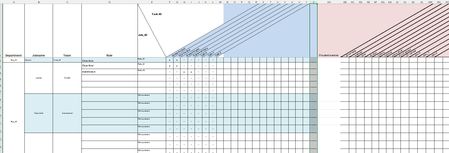
Hi, This post/question is based on a simplified verion of a security-matrix that is te be audited in the company and also audited against the real time security-tables in external system. I changed things to recognizable terms. What would be the best way to solve the task below? We have a PDF-image based on tab "FuntionRole_matrix" that is periodically audited against the actual situation. Thati is why this tab is not edited by hand but partially based on two additional tabs that are provided from another third party system. These additional tabs are "RoleTask_matrix" and "TaskTool_matrix" In Tab "FunctionRole_matrix" we manually fill the departments, job-titles per department and de roles assigned to the specific job-title. In Column D we have a picklist of all the known Roles, as found in tab "RoleTask-matrix" After choice the Role_ID is provided in column E. (via cell function: =X.ZOEKEN(D2;RoleTask_matrix!$A$2:$A$6;RoleTask_matrix!B$2:B$6;"Not found" (=V.Lookup in dutch Excel verison + semicolons different from english functions) The Top row is filled by a lookup of all the possible tasks. In the FunctionRole_matrix we provide insight in de assigned tasks within a role by a lookup-function in tab "RoleTask_matrix" (via cell function in topline: =X.ZOEKEN($D$1;RoleTask_matrix!$A$1:$A$1;RoleTask_matrix!E$1:E$1;"Not found") (and for cell F2 etc.. the X is set by =X.ZOEKEN($E2;RoleTask_matrix!$B$2:$B$6;RoleTask_matrix!E$2:E$6;"-")) Since we have to provide full insight in the relation between the jobtitle, the tassk within te job en the tools/matrials provided for the job we show the tools/matrials provided on the same line as the role in de FuntionRole_matrix. So that we can provide a signed PDF-copy of this excel-tab. The tools provided must be determined by looking for the, via lookup determined, X-es per role. When an X is detected we have to determine de task provided in the topcel of that row. With this task-ID value we need to search in the tab "TaskTool_matrix" and look for the checked tools/materials that should be provided for every jobtitle that has that task. Roles can overlap on tasks and this can also be the case for the tools/materials. We just need an X on FuntionRole_matrix kolom AB etc.. to see what has to be provided to a person in every job-title. Since there is no VBA-knowledge present i cannot bring this Excel sheet live with a button that sets all the X-es as of column AB. Personally i can do it, but withoud future support this cannot be the case. The solution needs functions in cells to provide the information. I guess it must be a combination of IF THEN ELSE with nested VLOOKUP functions. And we have to look for an X that is provided by a function in the cells. So possible some indirect value comparison needen instead of looking for character X in cell. but i have no clue about how to do it. Hope someone has the solution. Very grateful for response. I can provide the excelsheet via a PM. Seems like i cannot attach it to this post Best regards, Mike52Views0likes1CommentApi in every row of excel.
Hi Currently I have an excel file with the following columns. MFund Code I Bought at I Mutual fund name I latest Price 112092 I 100.00 I Fidelity world fund I 112.00 I 100.00 56432 I 25.00 I Stanley index fund I 20.00 I 25.00 There is a website which provides access to latest price through API. There arre many Mfundcodes so I use a text file to be read in a python program and extract the data. Following is the main part of the program. for x in f: # Add number variable to the api call x = x[:6] api = f"https://api.mfapi.in/mf/{x}/latest" # Get text data from api call idata = requests.get(api).text; # Convert json data into dictionary format d = json.loads(idata) # Get the first record of data if not d['data']: exit else: l = d['data'][0] k.write(f"{x} {l['nav']} {l['date']} \n") Later I import this text file into the excel for further calculations. I was wondering if there is a way to have these values load into the excel columns regards Jyothsna43Views0likes1CommentExcel - COUNTIF Function
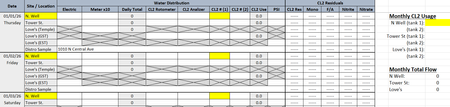
Happy Friday! I am trying to use the COUNTIF Function on a worksheet that tracks how much liquid chlorine is used at 3 different water wells each month, each well having 2 chlorine cylinders. I'm not sure if my brain is fried from reading/watching all kinds of videos for the past 3 hours and trying to follow their instructions, but any time I put in a formula, I get a pop-up saying I've entered too many arguments. Even if I enter individual cells and use only the 3 that it highlights for me (more than 3 does not highlight). I've attached a screen shot of the worksheet (Figure 1) and have highlighted the area I'm trying to figure out. As you can see, it will be for multiple dates, on multiple lines, going through to the end of the month, with the total chlorine (CL2) tallied up on the right hand side. Chlorine tanks are changed out quite often and each tank begins at 150, depleting down to 0. Figure 2 shows a screen shot of what I'm getting when trying to enter the formula. Am I misunderstanding how the formula works or am I using the wrong formula all together? Figure 1 Figure 278Views0likes2Comments
Losing borders in transition from Excel 97 to 2024 Pro Plus
I have a handy appointments calendar (.xls) that has used Excel 97 on a Windows 7 laptop for a long time. I want to run this on my latest laptop that has Excel 2024 Pro Plus on Windows 11. When I open this now, many of the cell borders, most of which are involved with conditional formatting, are either present when they should be absent or absent when they should be present. The calendar is useless as opened. I have worked to reformat the cells, but it has taken me hours to get from January to April and some aspects are still problematic, albeit acceptable. The conditional formatting process is very different between the two versions. Is there some trick to getting newer versions of Excel to properly recognize formatting from older versions? I created this calendar in Excel 97 very easily many years ago. I am not sure I could duplicate it, even from scratch, using Excel 2024.44Views0likes2Comments