Forum Discussion

Sharepoint Online, number column NOT aligned right
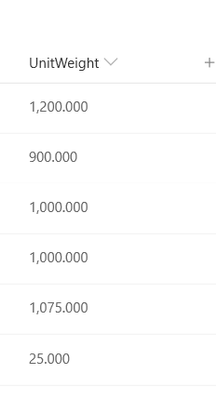
 Mar 04, 2020
Yes, you need to replace the formula:
=TEXT([Column],"###,###.00")
This type of modification doesn’t have any impact on the original column
Thanks

You rock! It works, many many thanks 🙂
For the benefit of all, here comes a summary of the steps:
- create a new calculated column with this formula: =TEXT([Column],"###,###.00")
- format this new calculated column with:
{
"$schema": "https://developer.microsoft.com/json-schemas/sp/column-formatting.schema.json",
"elmType": "div",
"style": {
"display": "table",
"width": "100%"
},
"children": [
{
"elmType": "div",
"txtContent": "@currentField",
"style": {
"display": "table-cell",
"text-align": "right",
"vertical-align": "middle"
}
}
]
}

This is great information but does it mean that the user has to enter the value in one column and then we use this calculated column to present the data right aligned?
So then the users would have to be aware of this if making any edits afterwards?
When I created a new column called "Amount" and entered the formula =TEXT([Amount],"###,###.00")
I get an error saying the column doesn't exist?
Thanks!
- FabioO365GoDJul 15, 2020Brass Contributor
Would you mind sending the screenshot showing the formula that you insert and the errors that you get?
Thanks
- Sinan621Jul 14, 2020Copper Contributor
markikav Hi, cannot help you with the error message, I am not technical expert. Your other question to make the user aware of the two columns: actually I use the the "second" column in a specific view or readers only so no issue there with having "duplicated" the columns.