Forum Discussion

sharepoint list item can not change type (over 5k items)
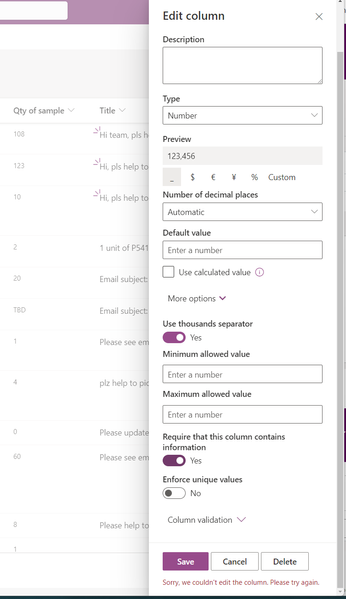

Hi NikolinoDE ,
Thank you for response.
Can you give me some docs for how to update column type in batch update? I have already clean our list down to 1957 items and clean all not number type value to number zero, but it still failed.

Here are some resources and example scripts that can help you update the column type in a batch update for a SharePoint list:
- PnP PowerShell: The Patterns and Practices (PnP) PowerShell module provides additional cmdlets and functionalities specifically designed for SharePoint Online. You can use the Set-PnPListItem cmdlet to update list item properties, including the column type. PnP PowerShell documentation can be found here: PnP PowerShell documentation
- Example Script: Here's an example PowerShell script that demonstrates how to update the column type for a SharePoint list in a batch update:
powershell code:
# Connect to SharePoint Online
Connect-PnPOnline -Url "https://yourdomain.sharepoint.com/sites/your-site"

# Get the list and retrieve all list items
$list = Get-PnPList -Identity "Your List Name"
$items = Get-PnPListItem -List $list

# Iterate through the list items and update the column type
foreach ($item in $items) {
    $item["YourColumnName"] = [int]$item["YourColumnName"]
    $item.Update()
}

# Execute the batch update
Invoke-PnPQuery
Please replace "https://yourdomain.sharepoint.com/sites/your-site" with the actual URL of your SharePoint Online site and "Your List Name" with the name or GUID of your target list. Also, update "YourColumnName" with the internal name of the column you want to update.
Additionally, for more detailed examples and guidance on using PowerShell to update SharePoint list item properties, you can refer to the official SharePoint Patterns and Practices (PnP) repository on GitHub:
In the PnP PowerShell repository, you will find various sample scripts demonstrating different scenarios, including updating list item properties, that can be customized to fit your specific requirements.
Make sure to test the script in a non-production environment before applying it to your live SharePoint list. It is recommended to consult with your organization's SharePoint administrators or IT department for any specific considerations or guidelines for using PowerShell in your environment.
Remember to always have a backup of your data before making any significant changes to your SharePoint lists. The text and the steps are the result of various AI's put together.
My answers are voluntary and without guarantee!
Hope this will help you.