Forum Discussion

bob_sacamano
Oct 11, 2021Copper Contributor
Sharepoint list, data not showing in form but in list.
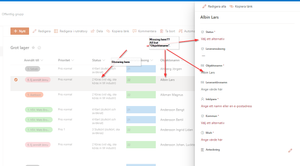
Hi! A strange thing happend today. I think it might have occured when I added a new item from "row-view". But not sure. Anyway, as can be seen in the picture below, the data from the list is...

Martin_Bilodeau
Nov 11, 2021Copper Contributor
bob_sacamano Had it happened from time to time. When i erased the browsing history in Edge, the items were visible in the SharePoint Form. So i guess i'll be doing this until a solution is found.

Nitramarbok
Nov 25, 2021Copper Contributor
I did this( cleared the cache) and it worked for a couple of minutes before it returned to the same issue. I've tested several browsers, Chrome, Edge, Firefox but all of them have the issue. I have not changed any settings for this list. I created a new view and suddenly it started to work but quickly returned to the issue. This is really frustrating.
- bob_sacamanoNov 25, 2021Copper Contributor
Nitramarbok That is also my experience. My belief is that I've accidently done something that messed up the links somehow. Because if I search the object and click on it in the "search proposals dropdown list" it Works, but if I press enter and click on one of the search results, the same problems appear.
 taylamessinaMar 31, 2022Copper Contributor
bob_sacamano Same issue here, was this ever resolved?