Forum Discussion

Restricted Link in New SPO Sharing Interface
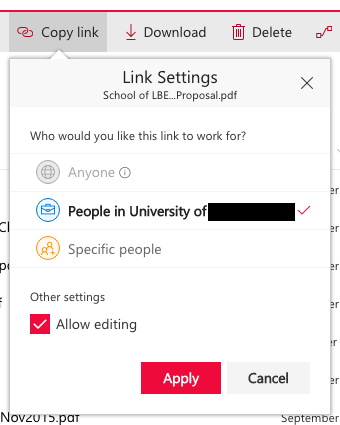
- May 22, 2017
Hi Stewart Foss,
We made a slight behavior change to the "restricted link" option by allowing users to add more people to the document at the same time. Selecting that type of link and entering no name is equivalent to the old model, though we totally agree it's a little weird.
On a SharePoint site, we actually have a 4th option called "People with existing access only" which is identical to the specific people link except that it doesn't allow you to add new people. To confirm, the screenshots above are from OneDrive for Business, correct?
We've been discussing if it makes sense to have that 4th option in ODB as well so I'll forward this thread along internally so can discuss more.
Also, Salvatore Biscari described the correct way to set the "default link" that will show up to users when they click share.
Thanks for the feedback!
Stephen Rice
OneDrive Program Manager II

 Microsoft
People with existing access was not ever available as a default sharing option (to my knowledge at least). You could set "specific people" as an option though. Thanks!
Stephen Rice
OneDrive Program Manager II

StephenRiceThans for the reply. I'd like to provide you with soma additional info; as you can see we have both options existing alongsite each other in our SharePoint Online sites/libraries. The red "people with existing acces" and the orange "specific people" (sorry for the Dutch). The red "people with existing acces" used to be the default untill now. In the admin center there are only 3 options
1) direct-specific people
2) internal-people within the organisation
3) anonymous: everyone with te link
so it seems that the change in the description of setting 1 caused the red "people with existing acces" to no longer work and shifted the default to the orange "specific people". However both of them are still visible in the libraries which is confusing for users.
- Nienke van MeursJun 20, 2018Copper Contributor
Actually on some of our sites, sharing with people that already have access is still the default
- StephenRiceJun 20, 2018
Hi Nienke van Meurs,
Very interesting! Can you check the "Members Can Share" setting for the sites that have this as the default vs. not? Similarly, can you also check the "Limited Access" mode setting? Thanks!
Stephen RiceOneDrive Program Manager II
- Nienke van MeursJun 21, 2018Copper Contributor
hello StephenRice,
I looked at 2 different sites within the same tenant:
https://vxmanagedservices.sharepoint.com/sites/P13332
https://vxmanagedservices.sharepoint.com/sites/CT-Test
Both have the same settings regarding members can share (nothing filled in; however at the "test"side at first it said someone@.. as an example) and limited acces (deactivated)
if I log on with my "normal"account the default sharing option at https://vxmanagedservices.sharepoint.com/sites/P13332 (and most other sites within the tenant) is "people who already have access" (I can also choose the other options) and at
https://vxmanagedservices.sharepoint.com/sites/CT-Test the default is "specific people"
if I log on with my admin account (with more sharing rights) the default for both is "specific people"
other than that, I think the only difference between the two is that P13332 was created by script and the test site was created by hand, but as far as I know there is nothing in the script that sets this default. I guess it must have something do do with the access rights of different site members.