Forum Discussion

Custom thumbnail images with a fallback to default ones
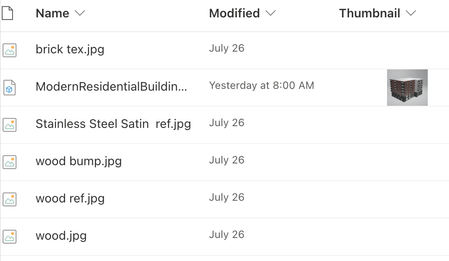
- Aug 07, 2023
gretesh Seems like Thumbnail is kind of reserved/default column name in SharePoint libraries. Try using this JSON:
{
  "$schema": "https://developer.microsoft.com/json-schemas/sp/v2/column-formatting.schema.json",
  "elmType": "div",
  "children": [
    {
      "elmType": "img",
      "attributes": {
        "src": "=getThumbnailImage([$Thumbnail], 50, 50)"
      },
      "style": {
        "display": "=if([$Thumbnail.serverRelativeUrl]=='', 'none', 'block')",
        "height": "50px"
      }
    },
    {
      "elmType": "img",
      "attributes": {
        "src": "@thumbnail.small"
      },
      "style": {
        "display": "=if([$Thumbnail.serverRelativeUrl]=='', 'block', 'none')",
        "height": "50px"
      }
    }
  ]
}
For safer side, I will suggest you to create a Image column with different name (say CustomThumbnail) and then use JSON like below in Image column:
{
  "$schema": "https://developer.microsoft.com/json-schemas/sp/v2/column-formatting.schema.json",
  "elmType": "div",
  "children": [
    {
      "elmType": "img",
      "attributes": {
        "src": "=getThumbnailImage([$CustomThumbnail], 50, 50)"
      },
      "style": {
        "display": "=if([$CustomThumbnail.serverRelativeUrl]=='', 'none', 'block')",
        "height": "50px"
      }
    },
    {
      "elmType": "img",
      "attributes": {
        "src": "@thumbnail.small"
      },
      "style": {
        "display": "=if([$CustomThumbnail.serverRelativeUrl]=='', 'block', 'none')",
        "height": "50px"
      }
    }
  ]
}
I have tested both the JSON and working fine for me.
Output:
Please click Mark as Best Response & Like if my post helped you to solve your issue. This will help others to find the correct solution easily. It also closes the item. If the post was useful in other ways, please consider giving it Like.


Thanks a lot for the quick reply, ganeshsanap! Using the if-clause only for the display settings solved it for me 🙂 I'll use this as a workaround.
- - - - - - - - - - - - - - - - - - - - - - - - - - - - - - - - - - - - - - - - - - - - - - - -
For the record, my original issue doesn't seem to be related to the fact that the column was called "Thumbnail". At least using the older snippets on a new column called "Test" (type "Image") didn't solve the issue:
{
  "$schema": "https://developer.microsoft.com/json-schemas/sp/v2/column-formatting.schema.json",
  "elmType": "img",
  "attributes": {
    "src": "=if([$Test.serverRelativeUrl]!='', getThumbnailImage([$Test], 100, 100), @thumbnail.small)"
  }
}

- greteshJun 26, 2024Copper Contributor
I used the snippet ganeshsanap suggested and with this, the thumbnails I set up back then show up both in list and tiles mode.
{
  "$schema": "https://developer.microsoft.com/json-schemas/sp/v2/column-formatting.schema.json",
  "elmType": "div",
  "children": [
    {
      "elmType": "img",
      "attributes": {
        "src": "=getThumbnailImage([$Thumbnail], 50, 50)"
      },
      "style": {
        "display": "=if([$Thumbnail.serverRelativeUrl]=='', 'none', 'block')",
        "height": "50px"
      }
    },
    {
      "elmType": "img",
      "attributes": {
        "src": "@thumbnail.small"
      },
      "style": {
        "display": "=if([$Thumbnail.serverRelativeUrl]=='', 'block', 'none')",
        "height": "50px"
      }
    }
  ]
}
Now trying adding new thumbnails both in a new folder (to test the json snippet) and in the old folder, but uploading doesn't seem to work anymore (the image gets uploaded but after I close the grid view, the uploaded image blob is shown broken - "file not found"). So I cannot test whether the old snippet still works as expected with any new uploads.