Forum Discussion

Can you set the Quick Launch Menu as to default as collapsed with Modern Pages?
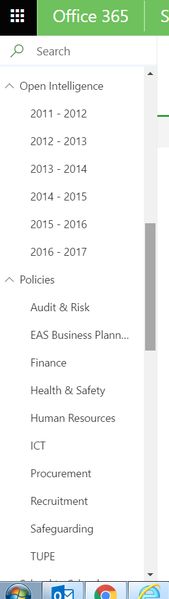

Well, this particular "feature" has caused me nothing but grief since it went live. My users (who are new to SharePoint online) are already trying to get to terms with our navigation and structure and the menus collapsing every time is causing them real issues. I also have site owners that have changed the templated navigation (against policy) so that everything at the top level so it doesn't collapse.
Please, please, please Microsoft - offer the option to enable/disable this nightmare! I agree that some will want this and that's why you changed it in the first place, but you've pleased one group of users and alienated another set.......

I assume at some point it'll be a switch at some point for expand/collapse at the site level. Until that time, is anyone aware of a script that could be plugged into the master page to solve it for now?
Thanks.
 PrashantBMay 11, 2019Copper Contributor
Yes indeed, agree... We need to have the expand and collapse configurable at site level. Every time someone clicks on a sublink the new page is loaded and the menu is collapsed again. It frustrates the user to reopen the menus again and go into sublinks.
This is something very that has to be rectified by Microsoft at the earliest. Really very difficult to live with default collapsed menus.
Regards
Prashant
 Thao Pham-AaltonenDec 06, 2018Brass ContributorAlso, I found the uservoice suggestion and voted on it: https://sharepoint.uservoice.com/forums/329214-sites-and-collaboration/suggestions/34392373-left-menu-submenu-expand-and-or-collapse-default-b
- Thao Pham-AaltonenDec 06, 2018Brass ContributorCompletely agree. We have a lot of new users on SharePoint and many do not notice or realize they can expand the menu by clicking the little icon.
 Xiangming YinAug 24, 2018Copper ContributorIt's potentially doable, but it's like an "hacking" way to implement it. Additionally, the left navigation is loaded asynchronously, your script will need to try multiple times to test the left navigation is loaded, then click the "expend" icon to expend them. I do think this is not an elegant way to implement it, I'd prefer Microsoft to provide a switch to control the left navigation is expended or collapsed.
- Damien CouriouMay 24, 2018Brass Contributor
Hi Jacob,
Sadly not...
If anyone find something, please share in this topic.
Thanks
 Jacob MynerMay 23, 2018Copper Contributor
Hi Damien,
Were you ever able to find out the JS or the function which needs to be called to expand this?
- Damien CouriouFeb 17, 2018Brass Contributor
Yes I posted a link about SPFx, but I've never been able to find what javascript should be executed or what function to call to expand it.
Let us know if you find something. THanks
- Henry StaplesFeb 16, 2018Copper Contributor
I looked into this further. Unless I'm missing something, it seems like I will have to build a small SharePoint app that does the auto-expand capability in the modern UI experience and then deploy across the collection.
