Forum Discussion

Why does default option sharing OneDrive for Business docs now give link anyone can use to edit?
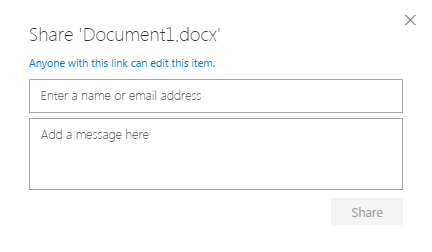

The problem with the change as it affected my organisation was as follows:
- the "Share" button/option was and is the most intuitive way to share a file
- prior to the change the dialog box arrangements meant that people had to intentionally open up sharing beyond the initially intended recipients
- following the change - because of the lack of communication to admins on precisely the implications of the change - staff sharing confidential documents using the same of similar mouse clicks shared documents in a way that broke the confidentiality protocol.
- the change to the dialog boxes/options seems to have been driven by previous inconsistencies in the "Get a link" experience but ended up breaking the more used "Share" experience.
Comments by Erin Scupham & Salvatore Biscari have been useful.
Stephen - you said "In the old sharing dialog, you can copy a restricted link but it assumes you already know who has access and that the person you want to send it to has access. In the new dialogue, we want to make sure that when a user copies or e-mails a link, the recipients will have access. So when the user "copies" a restricted link, we also give them the option to permission new users to the resource."
This is appreciated. However, it is essential that OneDrive for Business doesn't become insecure for users. In our organisation we are in the process of encouraging staff to move their content from Dropbox to OneDrive for Business because it is more secure. We need to ensure that future transitions like the one we are discussing don't have unintended consequences.

 Microsoft
Thanks for all of your feedback. Out of curiosity, did you see the message center announcement that went out on the new sharing dialog? We try and use MC as our mechanism for reaching out to IT but we don't know how visible that actually is to end users. If it's not hitting everyone, we'll continue to explore other ways to spread the message out.
One of the big pieces of feedback we've gotten on what we call the "V2" sharing dialog is that the permission options are not discoverable enough. The effect of this is that users aren't necessarily aware of how they are sharing (which is bad from both a security perspective and from a usability perspective). We've got work coming down the pipeline to address those specific issues.
From a high level point of view, we want OneDrive to be easy to share with out of the box which is why we default to the most permissive option available. To empower IT though, we want to ensure that they can control both the maximum exposure (ex: disable anonymous links entirely) as well as the default exposure (ex: make "direct" links the default method of sharing).
Hope that helps!
Stephen Rice
OneDrive Program Manager II
- Christopher-GravesMar 15, 2017Iron Contributor
Hi Stephen
That does help and I understand the imperative. As some might say "you need to square the circle" and that is not always easy.
Microsoft is a technology company now providing services to very large cohorts of users. I understand why you would want to make the different capability discoverable.
My main point is about how the majority of users in a "business" organisation would expect the default behaviour to be. I'm surprised that Microsoft has concluded that the default would be open and anyone with the link can access the file. I presume Microsoft is measuring the proportions of files shared openly and just for the people included.
I appreciate the efforts being made - this is all non-trivial stuff :-)
- StephenRiceMar 15, 2017
One of the fun challenges in sharing is that each feature we build will get used by the mom & pop shop of 5 people and also by the enterprise of 50,000 people. It gives a huge breadth of types of users we need to address.
When we looked at how we wanted to make sharing work by default, we started with what is still the biggest method of sharing for everyone today: attachments. Anonymous access links are designed to work as closely to attachments as possible (with the additional benefits of being a cloud file). For example, when I send an e-mail containing an attachment to you, there is no "restriction" on that e-mail by default. You can take the mail and forward it to anyone in the world and they can access that attachment as well. Anonymous links are meant to work the same way (You send the link to Bob, and then Bob can share it with their coworker Jill if they need to). Sending a "specific people" link is meant to mirror the scenario of IRM'ing a mail. In that case, the user is making an explicit decision that "this document is for Bob and only Bob. He can't forward it or share it without my express permission".
Of course, we want IT to feel like they have control over content which is why we provide all of the settings we have today (and are constantly building more). In a lot of cases, we give IT on/off switches for features to help control exposure. One of the things we are working on adding more of in sharing is the idea of a "default" where users can still get their work done but IT ensures that they are safe by default and make "risky" choices explicitly (instead of by accident). We can make the best end user experiences in the world but if IT turns them off or feels its not safe, then we're not doing our job right.
It's a big problem space but we've made a lot of progress in the last few years (and 2017 is shaping up to be just as big in that respect as well). I always love hearing feedback on this type of stuff because it's absolutely critical to nail both ends of the experience.
Thanks!
Stephen Rice
OneDrive Program Manager II
- Christopher-GravesMar 17, 2017Iron Contributor
A little later yesterday someone in my org. quite independently contacted my team to ask about the behaviour of attachments he'd received from someone using Outlook Web Access (OWA) to attach documents which went into the sender's OneDrive for Business "email attachments" folder.
In your last message you said: "Anonymous access links are designed to work as closely to attachments as possible (with the additional benefits of being a cloud file). For example, when I send an e-mail containing an attachment to you, there is no "restriction" on that e-mail by default. You can take the mail and forward it to anyone in the world and they can access that attachment as well. Anonymous links are meant to work the same way (You send the link to Bob, and then Bob can share it with their coworker Jill if they need to)."
However, what I have observed is that because the sender used the default option for OWA, the links appear in emails which were either opened in Outlook 2013 (not logged in to Office 365) or OWA (logged in) or another client e.g. mail on a Mac (not logged in). The behaviour when accessing the email in unauthenticated mode (not logged in) resulted in being presented with a link which opened a document with Guest contributor privileges.
That is fine if the person just wants to review the document but in this case the sender expected people to download the attachment and use it as a template. In anonymous contributor mode there is no facility to download the document - so there seems to be a major gap in the "use case" of "anonymous access links are designed to work as closely to attachments as possible"
Is there a reason for not allowing downloads on documents opened in anonymous contributor mode?