Forum Discussion

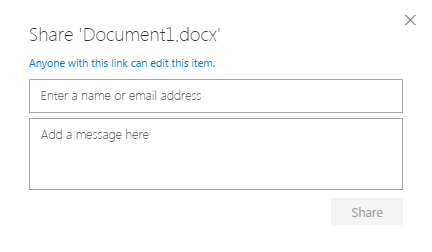
Why does default option sharing OneDrive for Business docs now give link anyone can use to edit?

 Microsoft
Hi Mike McDonald,
IT administrators can choose the default sharing link for OneDrive & SharePoint in the admin center (including having it default to view instead of edit). This will affect everyone in the organization though. Hope that helps!
Stephen Rice
OneDrive Program Manager II

Hi StephenRice,
StephenRice wrote:Hi Mike McDonald,
IT administrators can choose the default sharing link for OneDrive & SharePoint in the admin center (including having it default to view instead of edit). This will affect everyone in the organization though. Hope that helps!
Stephen RiceOneDrive Program Manager II
This is exactly what I want to do. Where in the admin center can I change the default behavior from Edit to View? I'm having trouble finding this setting. Thank you.
- escuphamDec 13, 2018Steel Contributor
Sure:
- StephenRiceDec 13, 2018
- StephenRiceDec 13, 2018
Hi escupham,
Can you share which version of Outlook you are using? That will help us troubleshoot why you are not seeing the right behavior in e-mail! Thanks!
Stephen RiceOneDrive Program Manager II
- escuphamDec 13, 2018Steel Contributor
We have our default ODfB sharing set to Direct: Specific People. This works as expected when sharing a file via OneDrive in the browser. However, when we go to send an email and attach a OneDrive file (share as a OneDrive link), the default behavior is 'Organization can edit'. We'd like it to fall in line with our Admin settings, and have recipients can edit be the default. Is it possible to set the default sharing behavior in email that way?
- MinutemanDec 13, 2018Copper Contributor
StephenRice wrote:Hi Minuteman,
To change this setting, you can go to the classic SharePoint Admin Center (the URL is normally <myorganizationname>-admin.sharepoint.com). From there, click on "Sharing" in the left nav. You are looking for a setting titled "Default Link Permission" with a two radio buttons below it. Hope that helps!
Stephen Rice
OneDrive Program Manager II
Hi StephenRice,
Thank you! That worked. When I went to Admin centers > SharePoint> Sharing, I found the setting there. I changed it from Edit to View and tested it out.
- StephenRiceDec 12, 2018
Hi Minuteman,
To change this setting, you can go to the classic SharePoint Admin Center (the URL is normally <myorganizationname>-admin.sharepoint.com). From there, click on "Sharing" in the left nav. You are looking for a setting titled "Default Link Permission" with a two radio buttons below it. Hope that helps!
Stephen Rice
OneDrive Program Manager II
