Forum Discussion

Remove files shared with me
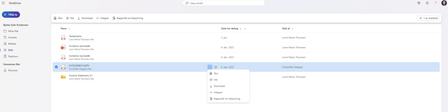

NikolinoDE I am no longer in contact with the individual(s) who shared files with me, and I am concerned about the files remaining in my 'Shared with Me' folder indefinitely. Could you please clarify whether it's possible to remove these files from my profile without affecting the owner's access or the original files themselves? My goal is simply to no longer have access to them. I would appreciate your assistance in resolving this issue.

For Desktop or Web Versions:
Unfortunately, the desktop or web versions of OneDrive currently lack the option to remove shared files from your view without contacting the owner, so far I know. This feature might be available in future updates, but for now, the mobile app remains the best way to handle this task, as mentioned by previous user.
Workaround (Web Version):
For the web version, if you still want to declutter your "Shared with Me" view, you can filter or hide files by sorting or creating separate folders for your most-used files. This won’t remove the files from the shared list, but it can help with managing them more efficiently.
I understand the frustration this inconsistency might cause, and I'd recommend keeping an eye out for updates from Microsoft in case they extend this feature to the web version. For now, the mobile app offers the best solution to remove shared files from your view.
It is also possible to suggest improvements and report them directly to Microsoft.
If you using OneDrive Web:
- Open OneDrive in your browser and sign in.
- Click on the "?" (Help & Feedback) icon, usually located in the upper right corner of the OneDrive interface.
- From the drop-down menu, select "Send feedback" or "Give feedback".
Through the Microsoft Feedback Hub (Windows 10/11):
If you're using Windows 10 or 11, you can use the Feedback Hub app, which is designed for sending suggestions and reporting issues for all Microsoft products, including OneDrive.
Open the Feedback Hub by typing "Feedback Hub" into the Windows search bar.
Click "Submit feedback" and select the "Suggestion" option.
Describe the issue in detail and select "OneDrive" as the product category.
Submit your feedback.
My answers are voluntary and without guarantee!
Hope this will help you.