Forum Discussion

Why does default option sharing OneDrive for Business docs now give link anyone can use to edit?
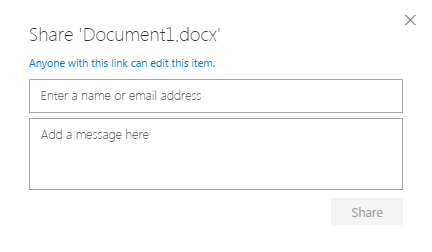

A little later yesterday someone in my org. quite independently contacted my team to ask about the behaviour of attachments he'd received from someone using Outlook Web Access (OWA) to attach documents which went into the sender's OneDrive for Business "email attachments" folder.
In your last message you said: "Anonymous access links are designed to work as closely to attachments as possible (with the additional benefits of being a cloud file). For example, when I send an e-mail containing an attachment to you, there is no "restriction" on that e-mail by default. You can take the mail and forward it to anyone in the world and they can access that attachment as well. Anonymous links are meant to work the same way (You send the link to Bob, and then Bob can share it with their coworker Jill if they need to)."
However, what I have observed is that because the sender used the default option for OWA, the links appear in emails which were either opened in Outlook 2013 (not logged in to Office 365) or OWA (logged in) or another client e.g. mail on a Mac (not logged in). The behaviour when accessing the email in unauthenticated mode (not logged in) resulted in being presented with a link which opened a document with Guest contributor privileges.
That is fine if the person just wants to review the document but in this case the sender expected people to download the attachment and use it as a template. In anonymous contributor mode there is no facility to download the document - so there seems to be a major gap in the "use case" of "anonymous access links are designed to work as closely to attachments as possible"
Is there a reason for not allowing downloads on documents opened in anonymous contributor mode?

 Microsoft
Sorry for the delay in responding to this. I had to ask around the team a bit to see what is going on. The short version is that anonymous links don't explicitly support download today. We do want to light this scenario up eventually but we have some other link improvements that are already on-going that take precedence. Thanks for the feedback!
Stephen Rice
OneDrive Program Manager II
- escuphamDec 13, 2018Steel Contributor
Sure:
- StephenRiceDec 13, 2018
- StephenRiceDec 13, 2018
Hi escupham,
Can you share which version of Outlook you are using? That will help us troubleshoot why you are not seeing the right behavior in e-mail! Thanks!
Stephen RiceOneDrive Program Manager II
- escuphamDec 13, 2018Steel Contributor
We have our default ODfB sharing set to Direct: Specific People. This works as expected when sharing a file via OneDrive in the browser. However, when we go to send an email and attach a OneDrive file (share as a OneDrive link), the default behavior is 'Organization can edit'. We'd like it to fall in line with our Admin settings, and have recipients can edit be the default. Is it possible to set the default sharing behavior in email that way?
 MinutemanDec 13, 2018Copper Contributor
StephenRice wrote:Hi Minuteman,
To change this setting, you can go to the classic SharePoint Admin Center (the URL is normally <myorganizationname>-admin.sharepoint.com). From there, click on "Sharing" in the left nav. You are looking for a setting titled "Default Link Permission" with a two radio buttons below it. Hope that helps!
Stephen Rice
OneDrive Program Manager II
Hi StephenRice,
Thank you! That worked. When I went to Admin centers > SharePoint> Sharing, I found the setting there. I changed it from Edit to View and tested it out.
- StephenRiceDec 12, 2018
Hi Minuteman,
To change this setting, you can go to the classic SharePoint Admin Center (the URL is normally <myorganizationname>-admin.sharepoint.com). From there, click on "Sharing" in the left nav. You are looking for a setting titled "Default Link Permission" with a two radio buttons below it. Hope that helps!
Stephen Rice
OneDrive Program Manager II
- MinutemanDec 12, 2018Copper Contributor
Hi StephenRice,
StephenRice wrote:Hi Mike McDonald,
IT administrators can choose the default sharing link for OneDrive & SharePoint in the admin center (including having it default to view instead of edit). This will affect everyone in the organization though. Hope that helps!
Stephen RiceOneDrive Program Manager II
This is exactly what I want to do. Where in the admin center can I change the default behavior from Edit to View? I'm having trouble finding this setting. Thank you.
- StephenRiceNov 12, 2018
Hi Mike McDonald,
That is correct, we only offer the default in our enterprise versions of Office 365. If this is something you'd like to see added to OneDrive personal, definitely submit it over at www.onedrive.uservoice.com. Thanks!
Stephen Rice
OneDrive Program Manager II
 Mike McDonaldNov 12, 2018Copper ContributorI contacted MS support and it appears that this ability/option is not available to Home users at this time. Thank you all for your assistance.
- Mike McDonaldNov 12, 2018Copper ContributorWe are actually using 365 Home. Is that setting available to Home users?
- StephenRiceNov 12, 2018
Hi Mike McDonald,
IT administrators can choose the default sharing link for OneDrive & SharePoint in the admin center (including having it default to view instead of edit). This will affect everyone in the organization though. Hope that helps!
Stephen RiceOneDrive Program Manager II
- Mike McDonaldNov 10, 2018Copper ContributorI understand I can use the web interface, but I'm referring to using the right click context menu from within Finder. Being able to create a view only link in Finder by default would eliminate steps, my boss having to always ask me "how do I do that?," and save us time.
- Nov 09, 2018Are you using the Web UI? If so, no matter if you are on a mac or on a Windows PC, you should be able to specify if the link allows to edit the document or not
- Mike McDonaldNov 09, 2018Copper Contributor
Sorry to open up an old thread, but I'm struggling on finding an answer for a non-business Office 365 account. I have a personal account and am using a Mac. When I right click and click on "Share a OneDrive link" it does create the shareable link, but it makes the file editable. Is there a way for me to make it a view only link by default?
- StephenRiceJan 02, 2018
Hi Bartosz Grobelny,
I want to make sure I understand the exact behavior you are seeing.
- You have a document that has an anonymous view link created.
- You click "Share" (to be sure, not copy link, right?)
- You click "Get a link" at the bottom of the share dialog.
- It copies an anonymous edit link (as this is the default)
Is this correct? If so, what is happening is that when you click "Get a link", you are actually copying the link that you configured (or the default) at the top of the dialogue. If you choose the anon view link before clicking on "Get a link", this should solve the issue.Hope that helps!
Stephen Rice
OneDrive Program Manager II
 Bartosz GrobelnyDec 26, 2017Copper Contributor
I have noticed even more annoying situation.
When I have a file that that I use links to share the default being "Edit - no sign in required" would not be such a big problem if it didn't create such link each time I click share button and go to "Get a link" to verify which links have been created or simply copy one of the existing links.
This is a major problem as I have few files that I want to have a "View link - no sign-in required" but each time I open a dialog to retrieve this link Edit link gets created.
- StephenRiceNov 15, 2017
Salvatore Biscari, no worries, that's what I'm here for! :)
- Salvatore BiscariNov 15, 2017Silver Contributor
Sorry, I asked because a customer of mine had problems to download a shared MP4 file (which is opened directly by Edge).
But know I have seen that right-clicking the video you have the possibility to save.
Thanks.
- StephenRiceNov 15, 2017
Chris is correct. I just tried with a PDF and download is available :) Thanks!
Stephen Rice  AnonymousNov 15, 2017You e always been able to download non office docs. It was office docs that didn’t let you download because it loaded into office online.
- Salvatore BiscariNov 15, 2017Silver Contributor
Hi StephenRice
Very good news!
Does it work only inside Office web apps (i.e. only for Office documents)?
- StephenRiceNov 14, 2017
It just hit 100% so I figured I'd be conservative ;) But glad to hear it!
- AnonymousNov 14, 2017Well, don't cut yourself short it's been live for at least a month ish now :P. Someone from the team reached out after I talked to them at Ignite about it as well, appreciated it :P. Much less complaints from people using OneDrive links as e-mail attachments now! Thanks for this!
- StephenRiceNov 14, 2017
Deleted,
Took me a few minutes to dig up this thread but I wanted to share out the good news :) Anonymous users may now download documents! 6 months and 6 days later ;)
- AnonymousMay 08, 2017
Good to know, I particularly don't think its a big deal but others do so it's nice to know that it should be here before too long. thanks!


