Forum Discussion

my-kl
May 12, 2021Brass Contributor
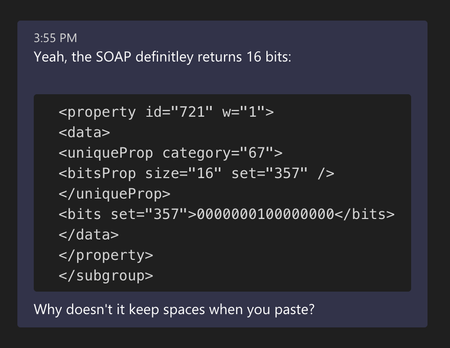
Why does Teams always strip indentation when pasting text?
It's fairly common to want to post code in teams (without using the special formatting for code snippets). The markdown like syntax for code works pretty well when typing code and it preserves ind...
 May 14, 2021
my-kl
So I got to the heart of the matter. I used the https://evercoder.github.io/clipboard-inspector/ to inspect the contents of clipboard when copying the same text from two different apps. Both have two entries. One of the entries is text/html and one is text/plain. The text/plain as you might guess is identical. The html is quite different. I then copied the html and rendered.
This is what I see from TextEditThis is what I see from Visual Studio Code
So this would appear to be an issue with my environment in Visual Studio Code (or even a defect in Code, I"m not sure)

Adam Żmuda
Oct 19, 2021Copper Contributor
I'm using PyCharm and have the same problem.
I can paste into a code block in a channel just fine, but if I paste into a conversation I lose indenting.
I can paste into a code block in a channel just fine, but if I paste into a conversation I lose indenting.

bobh_
Oct 29, 2021Copper Contributor
Turns out you can paste into a monospace block in a channel, copy the text back out and then paste into a monospace block in a chat and it works. You don't need to actually send the message to the channel.
It's a pain but it works.
It's a pain but it works.
 dbompNov 18, 2021Copper ContributorI came here looking for this very conversion. It's compressing spaces everywhere now, even in ordinary chat. (Yes, I am a two-space-after-the-period person and I don't like it messed with.) This started around November 1. I don't see anything in the release notes about the change in behavior.
- CarlosRDominNov 12, 2021Copper ContributorThe fact that this trick actually works makes me even more disappointed at a _software_ company like Microsoft and their terrible coding quality... How can they have so many features that only work on a specific type of text box? E.g. you can't add formatting ("-", ">", "```") on a call's chat but you can if you do through the MSTeams app on the _same_ chat, typing a parenthesis doesn't open the emoji popup in Team but does in Chat, the indents get removed when pasting into Chat but not into Team... Please use a centralized library for text editing and let us be productive!!