Forum Discussion

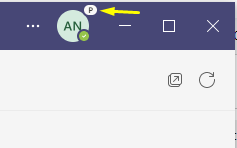
This 'P' symbol on top right of profile icon in title bar of MS Teams?
- Sep 09, 2021
AbhijitN It means you have opted into the Teams Public Preview.
Public preview in Microsoft Teams - Microsoft Teams | Microsoft Docs


- BrianJ1962Sep 09, 2021Copper Contributor
Rob Ellis
I have not rebooted the laptop or restarted Teams since last week. I use teams all day, everyday and its always open on my second screen.
I have had Developer preview since last year.
The "P" just showed up today.... I clicked on about > and it showed:
I then clicked on Public preview to see what options it had, but it instantly restarted teams and I now have nothing below "Third party notice (web)" and the "P" is gone from pic.
I find it odd that it did this automatically at some point, and started showing the Public Preview without restarting..... and that my policy was suddenly changed.. Lol
Weird that a user and click this off, but cant turn it on without ITs help...
I signed up for Public Preview about a week and a half..... ago- Sep 09, 2021An official post about it https://techcommunity.microsoft.com/t5/microsoft-teams-public-preview/microsoft-teams-public-preview-indicator-p-on-avatar/m-p/2734037