Forum Discussion

How to change default meeting option for who can present org wide?
- Jul 22, 2020Take a look at meeting policies: https://docs.microsoft.com/en-us/microsoftteams/meeting-policies-in-teams This is something you can configure with PowerShell


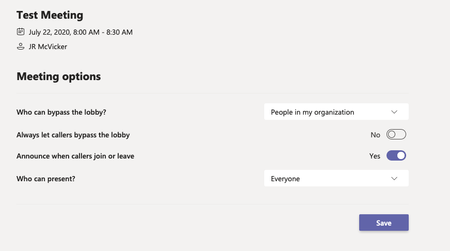
Morning Juan. Here is the change that I made yesterday. I just created a test meeting and checked the meeting options and it still is showing everyone for who can present. Any other suggestions?
- JR_McVickerJul 23, 2020Copper Contributor
Actually I think I just discovered my issue. I was editing the Global meeting policy and incorrectly assumed that all of our users were assigned that policy. I did a little spot checking and it seems everyone in our department is assigned https://admin.teams.microsoft.com/policies/meetings/edit/UmVzdHJpY3RlZEFub255bW91c0FjY2Vzcw== and I forgot that I assigned my self a test policy. Oops. Now I'm waiting for the changes and will test again.
 Ad_de_RooJan 22, 2021Copper Contributor
I have the same issue. Did you ever find why the users are assigned the https://admin.teams.microsoft.com/policies/meetings/edit/UmVzdHJpY3RlZEFub255bW91c0FjY2Vzcw== policy instead of the Global policy? In my global policy the option for who can present is set to OrganizerOnlyUserOverride, but the assigned policy https://admin.teams.microsoft.com/policies/meetings/edit/UmVzdHJpY3RlZEFub255bW91c0FjY2Vzcw== policy, which everybody is assigned to, sets to everybody is presenter, and this policy is not editable.. My solution was to make a custom policy and assign this to the usersgroups as an alternative Global policy.. to override the https://admin.teams.microsoft.com/policies/meetings/edit/UmVzdHJpY3RlZEFub255bW91c0FjY2Vzcw== policy
 ChristianBergstromJan 22, 2021Silver Contributor
Ad_de_Roo Hello, Teams includes a built-in policy named 'RestrictedAnonymousAccess' which contains pre-defined settings. The predefined settings in the meeting policy can't be edited or changed by admins. It's very common that users in organizations are assigned to this policy (causing issues).
The policy should not be used and this is an example of how you can remove it
https://docs.microsoft.com/en-us/microsoftteams/meeting-policies-restricted-anonymous-access