Forum Discussion

Magger777
Feb 09, 2023Copper Contributor
Issues with WIN32APP USER Installation behavior
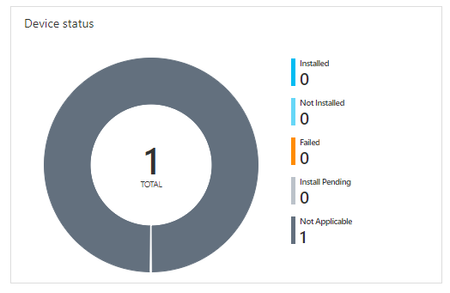
Hello everyone, whenever I set the installation behavior of an WIN32APP to user it won't start and sets it to "Not Applicable". I wanted to copy files to %APPDATA% thats why i choose USER....

Feb 09, 2023
In that blog i was refering to the detection rules and the %appdata% variable...
but still the not applicable message.
1. How did you assigned it ? user group or device group?
2. Device aadj/aadr or haadj? (assuming you are not using sccm)
Also maybe the IME log should show you some thing

Magger777
Feb 09, 2023Copper Contributor
1. It is assigned by device group.
2. Hybrid Azure AD Joined
System Installations work fine btw.
I've pulled the IME but I just can't find the CMTrace Tool on my device. Can you tell me how to install?
2. Hybrid Azure AD Joined
System Installations work fine btw.
I've pulled the IME but I just can't find the CMTrace Tool on my device. Can you tell me how to install?
- Feb 09, 2023you could always open it with notepad ? or download it here
https://call4cloud.nl/wp-content/uploads/2022/07/cmtrace.zip- Magger777Feb 09, 2023Copper Contributor
Thanks for the link and you help so far!
I don't know what exactly I'am looking for.
When I'm looking for the name of the APP the following appears:[Win32App] ExecManager: processing targeted app (name='Standards', id='9dbd8baa-c16f-44cf-9753-ec5c18276d56') with intent=3, appApplicabilityStateDueToAssginmentFilters= for user session 1 [Win32App][ReevaluationScheduleManager] Subgraph reevaluation interval is not expired. Hash = nOIKFUd68iR0SQh0kKE3X6Qb0yEtcoj2+MOirU69whc= IntuneManagementExtension 09.02.2023 14:49:34 13 (0x000D)There are also some red marked notifications:
System.Exception: GetAADJoinInfo - Failed to get Azure AD Join information using NetGetAadJoinInformation.  hr:1
   at Microsoft.Management.Services.IntuneWindowsAgent.AgentCommon.AADJoinHelper.GetAADJoinInfo()	IntuneManagementExtension	09.02.2023 14:49:32	13 (0x000D)
Failed to check if device is WPJ, ex is System.Exception: GetAADJoinInfo - Failed to get Azure AD Join information using NetGetAadJoinInformation.  hr:1
   at Microsoft.Management.Services.IntuneWindowsAgent.AgentCommon.AADJoinHelper.GetAADJoinInfo()
   at Microsoft.Management.Services.IntuneWindowsAgent.AgentCommon.AADJoinHelper.IsDeviceWPJ()	IntuneManagementExtension	09.02.2023 14:49:32	13 (0x000D)
GetRegistryValue encountered an exception: System.NullReferenceException: Object reference not set to an instance of an object. at Microsoft.Management.Services.IntuneWindowsAgent.AgentCommon.RegistryHelper.GetRegistryValue(String key, String valueName, String defaultValue, Boolean check32BitOn64) IntuneManagementExtension 09.02.2023 14:49:34 13 (0x000D)let me know if there is something else I could look for.
- Magger777Feb 13, 2023Copper ContributorDoes anyone have other suggestions?