Forum Discussion

iOS - Missing enrollment profile for device added after 1st setup
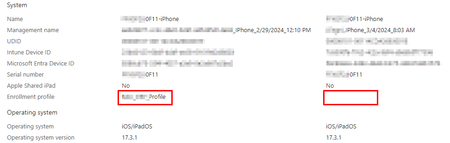

What is achieved here with the categories I am not really getting it. Categories will not make any difference. The point is that only devices that are enrolled through ABM in Intune will have the Enrollment Profile field filled in otherwise it will be blanc. But this doesn't really make a difference right? Why do you want this field filled?
By the way once a iOS device is registered through ABM (directly through Intune or other MDM and later migrated to Intune without factory reset) the device stays Supervised, and all Supervised settings will apply until the next factory reset. So if you retire a device that was registered through ABM and after this register this device through the Company Portal (manual registration) it is still Supervised.
With backup/restore main issue you run into is when the mdm profile is present in a backup. So when you made the backup of the device when it was registered in MDM. If you restore during ABM enrollment this will fail and you will get an error stating that and mdm profile is already present on the device and will stop enrolment. You can stop managed apps from being part of backups to iCloud by the way: https://techcommunity.microsoft.com/t5/intune-customer-success/changes-to-applications-backup-and-restore-behavior-on-ios/ba-p/3692064

If you happen to read part of the initial issue, it included how to deal with personal devices. If you want to assign profiles to BYOD devices, how are you going to determine what those devices are? That is the reason that Categories resolves that problem. The only other way is lumping them into a single group based on them not being Corporate devices which limits you to a single group. This is great if you have 20 devices, but when you scale it up, it falls short later.
- LuciusMar 06, 2024Copper Contributor
Hi SebastiaanSmits , thanks for your answer,
Maybe I made the wrong question, but I found some differences between devices enrolled from scratch and restored from a backup, and I though was due to something related to the enrollment profile.
And the devices enrolled later are not really supervised. Ownership is Corporate but it's all.
As example user have the possibility to remove the device and the management profile for devices manually enrolled, no matter if they're included in ABM or not, where they have not this option available for ABM devices enrolled from scratch that show the enrollment profile.
Also the behavior of the Wipe function act differently, devices manually enrolled are wiped but they're still linked to the user AppleID.
Another example, I apply a name template to all the ABM-enrolled devices, this is not applied to others.About the backup with an existing MDM profile we're aware of that, I'll anyhow have a look on the link you posted.
JutManGraham , I had a look on the categories but looks like they're not used in our environment.
And when I created a test one it was immediately asked to pick up one on any kind of devices, not iPhones only. So it's not a suitable options at the moment.
I also tried enabling the enrollment based on user choice but if user choose to indicate a private device and ask to protect company app only it start asking to use a managed AppleID, and it's not our case.- SebastiaanSmitsMar 07, 2024Steel ContributorYes that is correct the devices need to be enrolled using ABM to get the enrollment profile and for example use the feature that users are unable to remove the MDM profile from the device. Indeed only way to get is to Factory Reset the device or new device out of the box going through ABM enrollment..
If you attach devices to ABM once already enrolled this will have no effect.
