Forum Discussion

MS Forms for Quiz missing field and buttons
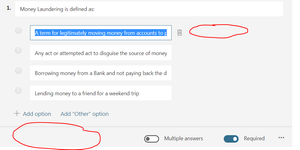

Hi Kirill
I've just had a good look at your picture and it looks like that you may have actually created a FORM instead of a QUIZ.
Try creating a QUIZ and you should get the options:
Form - Choice question. Looks the same as your screen shot.
Quiz - Choice question. This is what you are after.
Hope this helps?
Cheers
Damien
 CoreenaMar 07, 2019Copper Contributor
Hello ,
When I go to forms.office.com I can create a form or a quiz , but when I launch the forms app in my Teams site there is not start screen to choose quiz it launches into the name your form screen. Do you have any idea how I can fix this ?
- Damien_RosarioMar 08, 2019Silver Contributor
Hi Coreena
When you create a new Form from within a Channel (click + next to the tabs in a Channel), you should see this option after hitting install.
If you do not see this, please outline the steps you are taking to create the Form in Teams.
Cheers
Damien
- CoreenaMar 13, 2019Copper Contributor
hello
Thank you the screenshot you have shown is what I see, but when I select new and give it a name it automatically opens a Form not a quiz. When I go to Forms.office.com I get an option to select a form or select a quiz . I attached a screen shot perhaps you cannot create quizzes in Teams.
 Kirill KarmiMar 27, 2018Copper Contributor
Thank you, Damien, I have just created another one and it worked. Still no sure what happened though. Doesn't give me a warm and fuzzy :-)
- Damien_RosarioMar 27, 2018Silver ContributorForm and Quiz look similar so it's an easy mistake to make if you have clicked onto the wrong one.
Glad to hear it's all resolved.
Best wishes!
Damien