Forum Discussion

Forms Pro : Personalization of surveys - how to capture the custom data in the survey results ?
 May 08, 2019
Bertrand D arbonneau, the personalized data - in this case, Project ID, will be shown in the Response screen -> Personalized data section. Also it is persisted in CDS survey response in a field called "Context Data". If you need any further assistance, please feel free to email at prateeks@microsoft.com; welee@microsoft.com.

MKRU44 I cant find the section for personlized data (see screenshot)

naday84 I have exactly the same situation... I have no idea is there any way to fix it
- Megan_V_WalkerOct 28, 2019Iron Contributor
@naday84 MKRU44 - you personalise the survey using the Personalisation option from the survey menu itself:
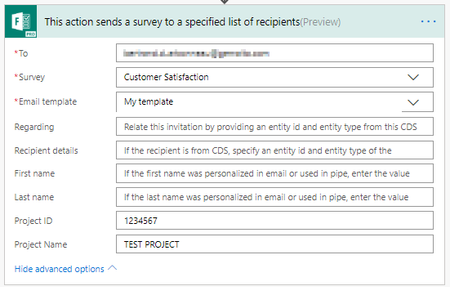
You will then ONLY see the Personalized data tab when looking at an individual response IF you have set up Personalized values and then used Flow to pass these values in to the Survey Invitation.
- naday84Oct 28, 2019Copper Contributor
Thank You for the prompt responce, Megan_V_Walker, so I have pass the values pack to the invitation! so I can capture that records in the anlytics view? did you post any thing about how to do that?
- Megan_V_WalkerOct 28, 2019Iron Contributor
naday84 - you are welcome. Check out this post: https://meganvwalker.com/updating-records-from-responses-using-piped-variable-parameters/ and review the part where I show setting up the parameters in Forms Pro, then the step in Microsoft Flow where I added the Forms Pro Create an Invitation step. Hopefully that makes sense. If you have those two set up correctly, then you should see the Personlized data tab in your individual responses in Forms Pro.
- MKRU44Oct 28, 2019Copper Contributor
Megan_V_Walker thank you for your answer! I am huge fan of your blog - it was huge help during my work. I used flow and I set up "Personalisation" option. I have no idea what I have done wrong
- Megan_V_WalkerOct 28, 2019Iron Contributor
MKRU44 - thank you! Good to know my blog has helped. Have you got a screenshot you can share of your Flow and the Survey Invitation step? I would need to see how you have passed the values in to the piping variables you set up. Also, this post might help. There is a lot of additional info, but the step that shows how to create the invitation and then the step about half way down the post that talks about Context Variables should help explain how things work. If your FLOW is correct, and you are indeed passing parameters through the Invitation, you should see the data in the Personalized data tab in Forms Pro. https://meganvwalker.com/updating-records-from-responses-using-piped-variable-parameters/
