Forum Discussion

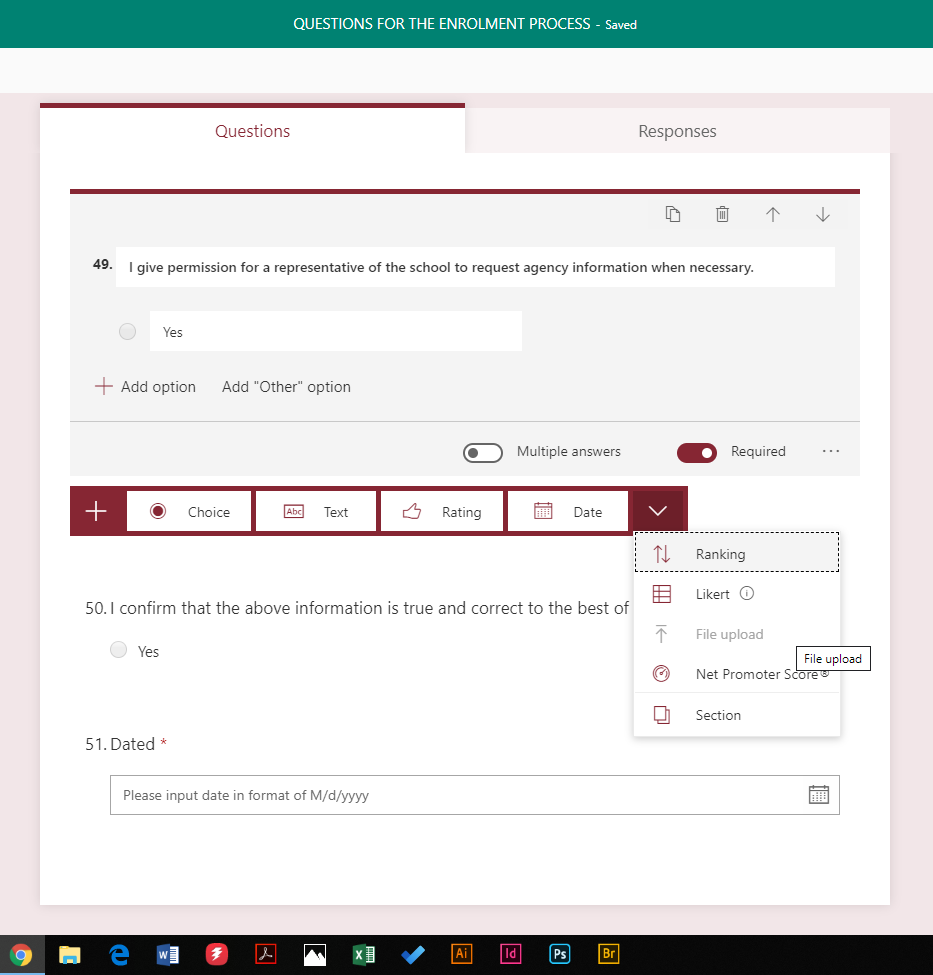
Can't use the file upload option, I can see it there but it is "greyed" out. WHY? Please help!
- Feb 12, 2020Hi,
Is the form set to share with anyone (including people outside your organisation)? AFAIK, it greys out in that scenario. Only when the form is set to use internally (with people inside your organisation) it is usable. Can you confirm? This should be in the form settings!
Let me know how you get on. Hope this answers your question!
Best, Chris

Hi Chris,
I found the cause. The form on live system was created by a colleague. He can add the upload file option. The form is share with me. I can change all other question except add the upload function. When I tested it in the test environment, I did it with a form which was created by my own. There it worked it fine. I did not recognize it when I wanted to add it to the live system. May be, this works as designed. But it is not what I wanted.
My colleague is back to the university and not available now. The form he created is used in the whole company. So, I have two choices. I ask him to add the upload function or I will create a new form and to send it out to all users. Both not a good solution.
From my point of view, Microsoft should make it possible, that users who the form is shared with, change all questions included the upload. Forms also should have the option to store the uploaded files to a share Point, not only the one drive of the user who created the form.
Best Regard Heiner

I have raised a uservoice for you here
https://microsoftforms.uservoice.com/forums/386451-welcome-to-microsoft-forms-suggestion-box/suggestions/40275757-allow-others-who-you-share-the-form-with-to-enable
Best, Chris
 mohamedkastero86Jun 09, 2022Copper ContributorThis userVoice instance is no longer available.
pretty annoying as I had the same expectation that a form shared with me Should treat me as an owner, I believe Microsoft need to do lots of work on MS form product to improve functionality.- emgjkeysSep 13, 2022Copper ContributorI found that it depends where you create the form from and whether you are working on a site you have group membership or ownership of. If you are an owner or member of a site and are interacting with that site and then create a form on another tab the permissions are set that the site is the form owner and the upload file is greyed out. I closed all tabs open to a site and created a fresh form and it wasnt greyed out.
- Jun 13, 2022
Here we go
Add Upload attachment feature for uploading a document, image, etc. · Community (microsoft.com)
As responded by Microsoft
Thanks for your patience for the long wait on file upload. File upload v1 – for internal survey, has been enabled on full production. It would be great if you could provide feedback for us. This survey may take you about 3 minutes to finish. https://aka.ms/fileuploadfeedback We are working with SharePoint team to enable file upload v2 – for external survey, we will reach out your soon for more feedback.
The link above does not work, so the feedback is concluded, however it does posit that new functionality for the upload functionality is being actively worked on. If the uservoice above doesn't cover it, then as Rob says above, you can always open another one.
Hope that helps
Best, Chris
 filipas1999Jun 11, 2024Copper Contributorthe link is dead brother 😞
- RobElliottJun 10, 2022Silver Contributor
mohamedkastero86 the uservoice sites have all closed and been replaced by the Feedback Portal which for Microsoft Forms is at https://feedbackportal.microsoft.com/feedback/forum/0ab9de26-ff1b-ec11-b6e7-0022481f8472
Rob
Los Gallardos
Intranet, SharePoint and Power Platform Manager (and classic 1967 Morris Traveller driver)