A Moment That Made Me Pause
I was recently building an Agent service with the GitHub Copilot SDK. After getting it up and running, I went back through the execution logs and something jumped out at me:
In a single conversation turn, the Agent had executed a shell command, read several files, and pulled down a third-party MCP server from npm via npx — all on its own.
I didn't hard-code any of that. The model decided at runtime to run those commands, read those files, and install that package.
That's when it hit me: a significant chunk of the code running inside this container was written on the fly — by the model, not by me.
This is fundamentally different from a traditional web service. With a regular app, every line of code is written by a human, reviewed, and tested before it reaches production. But an AI Agent? Part of its behavior is generated at runtime. You don't know in advance what it's going to execute.
So the question becomes: is the container we put it in actually strong enough?
How Container Isolation Actually Works (And Where It Falls Short)
Let me use an analogy.
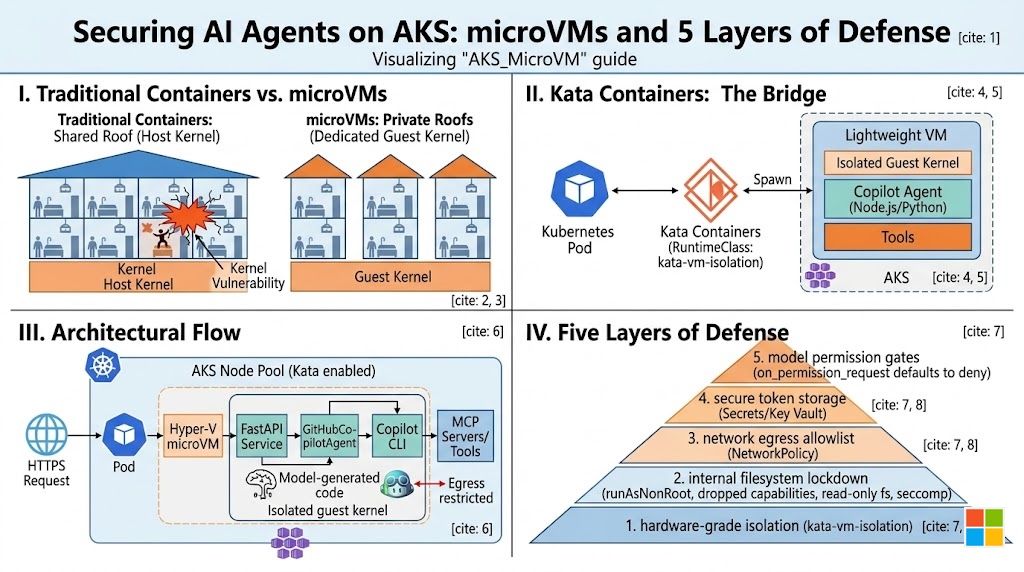
Think of a traditional container as an apartment in a building. Each apartment has its own walls — namespaces and cgroups keep things separated. From the inside, it feels like you have your own place.
But every apartment shares the same roof — the host Linux kernel.
Most of the time, this is fine. But if someone finds a crack in the roof — a kernel vulnerability — they can climb up from their apartment, walk across the roof, and drop into any other apartment in the building. That's a container escape.
For a standard web service, this risk is manageable — the code inside your container is predictable. But an AI Agent is different. The code running inside the container is inherently unpredictable — it's not an external attacker you're worried about, it's the tenant itself.
Docker laid this out clearly in Comparing Sandboxing Approaches for AI Agents:
AI Agents are a class of workload that inherently requires stronger sandboxing. The shared-kernel model of traditional containers isn't enough.
So what is enough?
Meet the microVM: A Private Roof for Every Apartment
Sticking with the building analogy — if the problem is a shared roof, the fix is obvious: give every apartment its own roof.
You still live in an apartment (container). The building is still managed the same way (Kubernetes). But the ceiling above your head is now yours alone. Even if you punch through it, you only reach your own roof — not your neighbor's.
That's the core idea behind a microVM.
Koyeb published a great explainer called What Is a microVM. Here's the essence:
- It's a virtual machine — with its own independent guest kernel, fully isolated from the host kernel. This is where the security comes from.
- But it's a stripped-down VM — only the bare essentials: CPU, memory, network, block storage. No USB controllers, no sound cards, no GPU passthrough.
- So it's fast and light — millisecond boot times, small memory footprint, close to the container experience.
One line summary: microVM = VM-grade isolation + near-container-grade lightness.
How Does Kubernetes Use microVMs? Enter Kata Containers
Knowing microVMs are great is one thing — but Kubernetes schedules Pods and containers, not VMs. How do you bridge these two worlds?
That's exactly what Kata Containers does. Their tagline nails it:
"The speed of containers, the security of VMs."
Kata acts as a translation layer between Kubernetes and microVMs:
- From Kubernetes' perspective, it's still a standard Pod — scheduled, managed, and monitored normally.
- Under the hood, that Pod is actually running inside a lightweight VM with its own kernel.
You don't change your application code. You don't change your CI/CD pipeline. You just tell Kubernetes: "Run this Pod with Kata's RuntimeClass." Kata handles the rest.
On AKS, Microsoft has integrated Kata out of the box under the name Pod Sandboxing. The hypervisor is Microsoft Hyper-V (not QEMU), and the RuntimeClass is called kata-vm-isolation. You create a special node pool, and AKS sets everything up automatically.
Now Let's Look at a Real Example
Enough theory — let me walk you through something concrete. I built a sample called AKS_MicroVM that does one thing:
Run a GitHub Copilot SDK Agent service on AKS, enforced to run inside kata-vm-isolation — a microVM sandbox.
Here's the architecture:
HTTPS request comes in
  └─ AKS Node Pool (KataVmIsolation enabled)
      └─ Pod (runtimeClassName: kata-vm-isolation)
          └─ Dedicated Hyper-V microVM
              └─ FastAPI service (Python / uvicorn)
                  └─ GitHubCopilotAgent
                      └─ Copilot CLI (Node.js)
                          └─ MCP servers / tools
              Isolated guest kernel + seccomp + cgroup
          Egress restricted by NetworkPolicy
From the outside, it's just an ordinary AKS Pod. On the inside, the app runs in its own micro virtual machine with a dedicated kernel.
Project Structure
The entire sample is just these files:
app/                       ← Agent service (Python)
  main.py                  ← FastAPI endpoints
  agent.py                 ← Copilot Agent wrapper
  tools.py                 ← Example function tools
  requirements.txt

Dockerfile                 ← Python 3.12 + Node 20 + Copilot CLI

k8s/                       ← Kubernetes manifests
  namespace.yaml
  runtimeclass.yaml        ← Reference (AKS auto-creates this)
  secret.example.yaml      ← Token placeholder
  deployment.yaml          ← The key file: enforces kata-vm-isolation
  service.yaml
  networkpolicy.yaml       ← Locks down ingress/egress

infra/                     ← Infrastructure scripts
  01-create-aks.sh         ← Create the cluster
  02-build-push.sh         ← Build image, push to ACR
  03-deploy.sh             ← Deploy everything
Three shell scripts to set up infrastructure, six YAML files to deploy the service. That's it.
Not Just a microVM: Five Layers of Defense
I want to emphasize this: the sample doesn't just slap on a microVM and call it a day. It stacks five layers of protection:
| What you're worried about | How this layer addresses it |
|---|---|
| Malicious code escaping the container | kata-vm-isolation → dedicated microVM with its own kernel |
| Privilege escalation inside the container | runAsNonRoot + drop ALL caps + read-only filesystem + seccomp |
| Agent phoning home to unauthorized endpoints | NetworkPolicy allowlist — only Copilot/GitHub/MCP egress permitted |
| Token leakage | K8s Secret injection (upgradeable to Key Vault via CSI) |
| Model instructing the Agent to do something dangerous | on_permission_request defaults to deny; only allowlisted operations proceed |
The microVM is the outermost wall — hardware-grade isolation. But inside that wall, there are still guards, access controls, and surveillance cameras. You need all of them.
Six Steps to Deploy
# ① Create an AKS cluster with Kata support
bash infra/01-create-aks.sh

# ② Verify the RuntimeClass is ready
kubectl get runtimeclass kata-vm-isolation

# ③ Build the image and push to ACR (script auto-detects your ACR)
bash infra/02-build-push.sh

# ④ Add your GitHub Copilot token
#    Edit k8s/secret.example.yaml → rename to secret.yaml (don't commit it!)

# ⑤ Deploy everything
bash infra/03-deploy.sh

# ⑥ Access via API server proxy
kubectl proxy --port=8001
Then chat with the Agent:
curl -s -X POST \
  http://localhost:8001/api/v1/namespaces/copilot-agent/services/copilot-agent:80/proxy/chat \
  -H 'content-type: application/json' \
  -d '{"message":"Briefly introduce Kata Containers."}'
Want streaming output? Use the stream endpoint:
curl -N -X POST \
  http://localhost:8001/api/v1/namespaces/copilot-agent/services/copilot-agent:80/proxy/chat/stream \
  -H 'content-type: application/json' \
  -d '{"message":"List 3 Linux kernel hardening tips","stream":true}'
How to Verify It's Actually Running in a microVM
One command:
kubectl -n copilot-agent exec deploy/copilot-agent -- uname -r
If the kernel version differs from the node's kernel — your Pod is running in its own guest kernel, not sharing the host's. Proof done.
Gotchas I Hit So You Don't Have To
kubectl port-forward doesn't work with Kata Pods. This is the easiest trap to fall into. The app listener runs inside the microVM, but port-forward connects to the empty sandbox netns on the host — you'll get connection refused. Use kubectl proxy instead.
Token environment variable names. The Copilot CLI expects GH_TOKEN or GITHUB_TOKEN — not a custom name. The Deployment already injects both from the same Secret.
Read-only filesystem needs emptyDir mounts. The container runs with readOnlyRootFilesystem: true, but the Copilot CLI needs to write to /home/agent/.cache at startup. The Deployment mounts emptyDir volumes at .cache, .copilot, and /tmp — miss one and the CLI won't start.
Keep on_permission_request on deny-by-default. The Agent's tool calls go through a permission gate that defaults to deny, with an allowlist for approved operations. Don't switch this to approve-all in production — ever.
Wrapping Up: The Thread That Ties It All Together
Let me trace the logic one more time:
① Scenario: AI Agents inherently run model-generated, untrusted code inside containers
② Problem: Traditional containers share the host kernel — one escape compromises the entire node
③ Insight: We need hardware-grade isolation, stronger than namespaces alone
④ Solution: microVMs — a dedicated guest kernel for every Pod
⑤ Integration: Kata Containers brings microVM support to Kubernetes natively; AKS Pod Sandboxing makes it turnkey
⑥ Practice: The AKS_MicroVM sample — six steps to deploy, five layers of defense
In the age of AI Agents, a container isn't just a box for your application — it's a box for uncertainty. It needs a stronger shell. The microVM is that shell.
Full source code: https://github.com/kinfey/Multi-AI-Agents-Cloud-Native/tree/main/code/AKS_MicroVM
Further reading:

 Microsoft