Forum Discussion

sync-generic-failure in Azure AD Connect Server
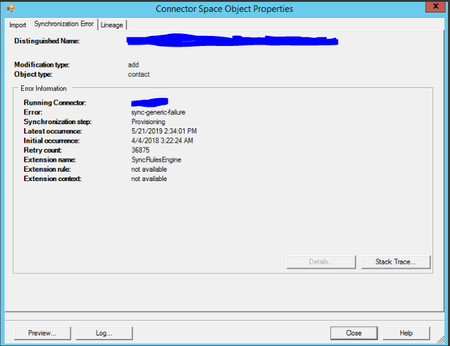

Some things to try from the interweb :
* run a full import on the external connector (O365), wait for the to complete. Then run a full import on the domain connector.
Then a full sync on each connector running the O365 one first then and Export and then a Delta Sync.
* Could you reinstall your Azure AD connector to see if the issue persists?
Also, make sure you enable port 443
 IntuneSupportMay 22, 2019Copper Contributor
I asked the customer to do a full sync but errors are still there.
In addition, they are not configured for a password write back.
Thanks.
 AliceIoanffaMay 23, 2019Copper Contributor
Do you have an OU in your On Prem AD that you do not Sync to Azure AD?
If not, create an OU and update the Azure AD Connect configuration to not include that OU.
Then:
- Move the On Prem object to that excluded OU
- Run a delta sync using PowerShell
- Import-Module ADSync # only needed if the ADSync module is not loaded
- Start-ADSyncSyncCycle -PolicyType Delta
- Then move the object back to its original location, and run another delta sync
- AliceIoanffaMay 23, 2019Copper Contributor
If they are external contact make sure the mail attribute is correctly populated and also make sure in the instalation guide you selected for the users to be matched with the mail attribute, as per the Contact topic in the article: https://docs.microsoft.com/en-us/azure/active-directory/hybrid/concept-azure-ad-connect-sync-user-and-contacts
- IntuneSupportMay 21, 2019Copper Contributor
Will check this and get back.
The error only appears to external contacts in AD.
Thanks.