Forum Discussion

Server side inbox rule : Use rules to create an out of office message
Hi,
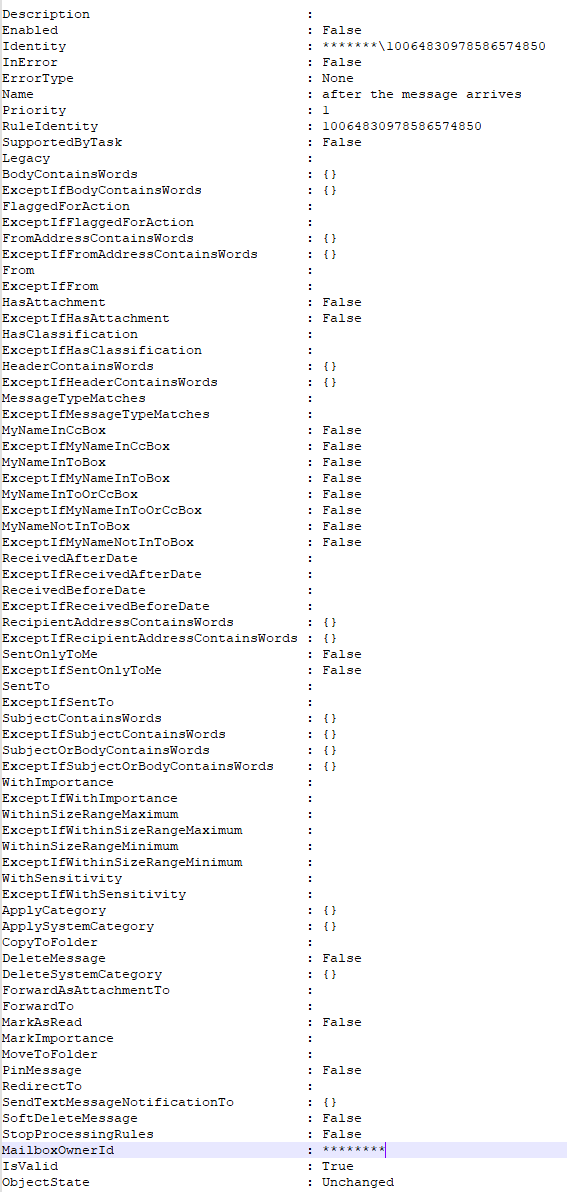
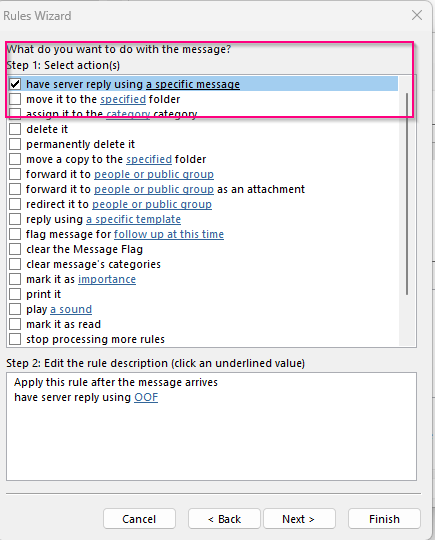
I used this documentation (https://support.microsoft.com/en-us/office/use-rules-to-create-an-out-of-office-message-9f124e4a-749e-4288-a266-2d009686b403). The only difference that I did was that I use : have server repay using a specific message. Then connect to Exchange online us command get-inboxrule. Issue is that I don’t see any parameters. And you can not create a rule because there is no action “An Inbox rule must include at least one action.” There, or I can not find any option to set “have server repay using a specific message” and which message etc..
I would like to automate this to push this rule to several users.
Get-MailboxAutoReplyConfiguration show only default auto replay text..
The rule works and I can edit/update template. But no PowerShell
3 Replies
- You cannot configure such Inbox rule with PowerShell only, you'll have to leverage EWS methods.
 Mali_StaneCopper ContributorDo you have a sample script? But i will look in to it..