Forum Discussion

Authentication Failure for IMAP and POP3 using Client Credential flow for OAuth2.0 | Java
 Jul 29, 2022
Hi. I had the same problem, but I think I made some progress.
I read documentation few times, tried few times from the start with same error. I even have tried using client and object ids instead of email as username, in lack of better ideas.
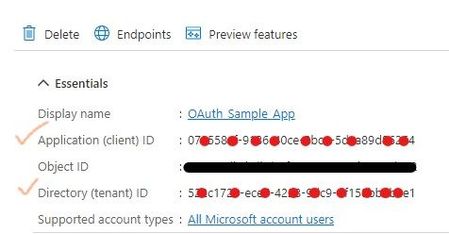
So this is where I think I have made mistake previous times.When you are at the part that you need to register service principal, you need to execute
New-ServicePrincipal -AppId <APPLICATION_ID> -ServiceId <OBJECT_ID> [-Organization <ORGANIZATION_ID>]here I put enterprise application object id as ServiceId argument. And that is ok.
But on
Add-MailboxPermission -Identity "email address removed for privacy reasons" -User
<SERVICE_PRINCIPAL_ID> -AccessRights FullAccess
I have put my registered application object id as User argument. I also tried setting object id of enterprise application, but it did not have success.
I also tried New-ServicePrincipal but with registered app object id as service id, but it gave me the same result.
When I executed
Get-ServicePrincipal -Organization <ORGANIZATION_ID> | flI did not pay attention to ServiceId property, even with documentation specifying it and saying it will be different.
Now I cleared everything and started fresh.
I executed all the steps again, but on the step when I need to add mail permission, I list service principals, and then use `ServiceId` value from the output, as argument for user.
With that, I was able to authorise.
Unfortunately, now I receive `C3 BAD User is authenticated but not connected.` when I try to list inbox. But it is step forward.
I am not sure if you made the same error as me, but maybe it will help you in some way.
I will post info, when I find fix for the new error if somebody comes across same issue.

What once was a simple process, has now become infinitely more complicated! [cut this post because it contained potentially misleading info]
- DestryHinesJul 27, 2022Copper ContributorI have the Microsoft Graph -> IMAP.AccessAsUser.All app permission but I *think* that only applies if you're accessing email from the Graph API (https://graph.microsoft.com) and not when using regular IMAP at https://outlook.office365.com. For that I added the IMAP.AccessAsApp permissions
the "Office 365 Exchange Online", which I think is the right resource.- jamboJul 27, 2022Brass ContributorIf I may ask, where did you add it? I don't see Office 365 Exchange Online API in the Azure app registration editor.
- DestryHinesJul 27, 2022Copper ContributorIn API Permissions, I click on "+Add a permission". Then in the popup on the right (at the top), select "APIs my organization uses". In there, type "office 365" in the search and you should see "Office 365 Exchange Online".