deployment
540 Topics
Getting Windows 11 Pro OEM embedded key to upgrade to Enterprise via E5 license.
I am having problems getting Windows 11 Pro 24H2 to upgrade to Enterprise edition using the E5 license method. I have review all the step propose by Microsoft with regards to deploying Windows Enterprise License. https://learn.microsoft.com/en-us/windows/deployment/deploy-enterprise-licenses?pivots=windows-11 The machine is Entra Hybrid Join and shows up in Azure. The login user has a license for E5 assigned to him/her and is signed into their Work and School account. The Device State of Microsoft Entra Join shows Yes for AzureAdJoined. Under Activation shows "window is activated with a digital License", but within activation setting it shows windows 11 Pro instead of Enterprise along with system information and via command prompt Winevr. Schedule task for licenseacquisition Subscription show it has run successfully. I am not sure what else I should looked for in term of why Our laptop are not switching to Enterprise with E5 License, perhaps someone with some tips or come across something like this let me know.225Views0likes4CommentsSave the date: Windows Office Hours - February 19, 2026
Join us for our upcoming Windows Office Hours on February 19, from 8:00–9:00 AM PT! A wide range of product experts, servicing specialists, and engineers from across Windows, Microsoft Intune, Configuration Manager, Windows 365, Windows Autopilot, security, public sector, FastTrack, and more will be online and ready to help. They’ll be in the chat to offer guidance, explore best practices, and answer any questions you bring. Want to learn more about how Windows Office Hours works? Visit the Windows IT Pro Blog for a full overview. If you’re unable to join live at 8:00 AM PT, you can still participate—just post your questions on the Windows Office Hours: February 19th event page up to two days beforehand.84Views0likes1Comment
Windows 11 Random Restarts During Installation and OOBE. Stable in Linux and Windows Desktop
System Specs Motherboard: ASRock B450M Pro4-F (BIOS P10.43 Beta, AGESA ComboAM4v2 1.2.0.F) CPU: AMD Ryzen 5 5500 GPU: NVIDIA GeForce RTX 3060 RAM: 2x 16GB (tested and verified stable, no errors) Storage: Samsung 970 EVO 1TB NVMe OS: Windows 11 Pro 25H2 Problem This PC previously ran Windows without issues for 5-6 years. I recently decided to do a fresh Windows 11 install, and my system randomly restarts during Windows 11 (and Windows 10) installation at various stages. Sometimes at 15%, sometimes at 48%, sometimes during the OOBE setup when clicking "Next." There is no BSOD, no error message. The screen just goes black and the system reboots. The system is completely stable when idle at OOBE screens (it can sit for hours without issue), and it is fully stable once Windows is actually running on the desktop. Linux (Zorin OS) runs perfectly stable in every scenario: live USB, installation, and normal use. No crashes whatsoever. What I've Tested and Ruled Out Hardware RAM: Ran memory diagnostics, no errors found. Also tried using each stick individually (1 stick at a time), same issue with both. SSD: SMART health check shows no issues Multiple GPUs tested: Tried a different GPU, same random restarts during installation Multiple USB drives: Tried different USB drives for installation media, same result CMOS battery: Considered but system clock is accurate and BIOS settings persist BIOS Updated BIOS from P7.40 to P8.01 to P10.43 Beta (latest available with AGESA ComboAM4v2 1.2.0.F and updated fTPM) Disabled fTPM (Advanced > CPU Configuration > AMD fTPM Switch > Disabled), no change Tested multiple BIOS versions, restarts occur on all of them Software Tried both Windows 10 and Windows 11 installation, both experience the same random restarts Tried different Windows 11 ISOs, same behavior Linux is completely stable. Zorin OS runs without any issues, which rules out fundamental hardware failure Workaround That Got Windows Installed Since the Windows installer (Windows PE) kept crashing, I bypassed it entirely by applying the Windows image directly from Linux using wimlib: Booted Zorin OS live USB Partitioned the NVMe drive (GPT: 512MB EFI, 16MB MSR, 930GB NTFS) Used wimapply to apply install.wim (Index 6, Pro) directly to the NTFS partition Copied the EFI bootloader files manually Created BCD store from a Windows PE command prompt using bcdboot Windows booted successfully, but OOBE still caused random restarts when progressing through setup. I used Ctrl+Shift+F3 to enter Audit Mode, installed GPU and chipset drivers, and created a local user account manually via command line. Current State Windows 11 Pro is installed and the desktop is functional, but I'm stuck in Audit Mode with broken UWP/AppX app provisioning: Start Menu opens but taskbar icon clicks don't work Windows Search doesn't work Notification panel doesn't open Built-in apps like Notepad don't launch Creating a new user profile doesn't fix it (system-level issue) sfc /scannow finds no integrity violations DISM /RestoreHealth fails with error 0x800f0915 even with the ISO as source (version mismatch, Windows Update patched the system past the base ISO build) Re-registering AppX packages produces errors about missing paths Cannot run in-place repair upgrade because setup.exe refuses to run in Audit Mode Cannot fully exit Audit Mode. Registry values are set correctly but Windows keeps booting into Audit Mode (ImageState was IMAGE_STATE_SPECIALIZE_RESEAL_TO_AUDIT, changed to IMAGE_STATE_COMPLETE but Audit Mode persists) Sysprep /oobe /reboot triggers OOBE which crashes again with random restarts No unattend.xml files found on the system Key Observation The random restarts happen exclusively in: Windows PE (the installer environment) Windows OOBE (first-time setup screens, specifically when advancing through steps) The system is completely stable in: Linux (any distribution, any scenario) Windows desktop (Audit Mode, normal use) Windows OOBE when idle (sitting on a screen without clicking) This pattern suggests a driver or ACPI compatibility issue specific to the Windows pre-boot/setup environment on the B450 + Ryzen 5500 combination, not a hardware defect. Questions Has anyone experienced similar random restarts specifically during Windows installation/OOBE on B450 boards with Ryzen 5000 series CPUs? Is there a known incompatibility between Windows PE/OOBE and certain B450 + Zen 3 configurations? Is there a way to force Windows out of Audit Mode when all registry approaches have failed and OOBE causes crashes?15Views0likes0Comments
Remote Desktop on Win11 Pro toggle unable to turn on
Hello all, I noticed that the feature of "Remote Desktop" in Settings on Windows 11 Pro edition (version 23H2), is not staying in the "ON" position after trying to toggle it. It displays a message I can confirm it and it switches back to the "OFF" position. Troubleshooting steps done: Reset the NIC (which is not the issue) Taken the workstation off the domain to confirm if it was a domain restriction but will not turn on even as a local admin account (which is not the issue) I have disabled third-party AV (which is not the issue) I have disabled the Windows firewall (which is not the issue) I have allowed the port 3389 (which is not the issue) And last, there is no GPO policy It was working before and three days ago unable to RDP to my workstation. Anybody has run into this issue before and fixed it? Thanks7.1KViews0likes10Comments
How Can I Upgrade Windows 10 to Windows 11 on unsupported hardware?
Windows 10 will be ended of official support very soon and no secure update since then. This is the main reason why I want to upgrade Windows 10 to Windows 11 on this Dell XPS 13 laptop (9350). The hardware specs are: Processor: Intel Core i5-6200 Graphics adapter: Intel HD Graphics 520 Memory: 8 GB DDR3 Mainboard: Intel Skylake-U Premium PCH Storage: Samsung NVMe SSD 256 GB Currently, this old laptop runs Windows 10 Pro very well but it is not supported by Windows 11 after checking with PC Health tool. Is there any way to upgrade Windows 10 to Windows 11 on unsupported hardware without losing data? ThanksSolved15KViews1like11CommentsWhat should I do about severe lag after updating to Windows 11?
After a system update, severe lag occurs: programs start slowly and frequently become unresponsive. Conventional cleanup methods have been tried but are ineffective, and rolling back the version is not possible. How should this be resolved?177Views0likes2Comments
How to simplify Windows 11 computer settings for my grandmother
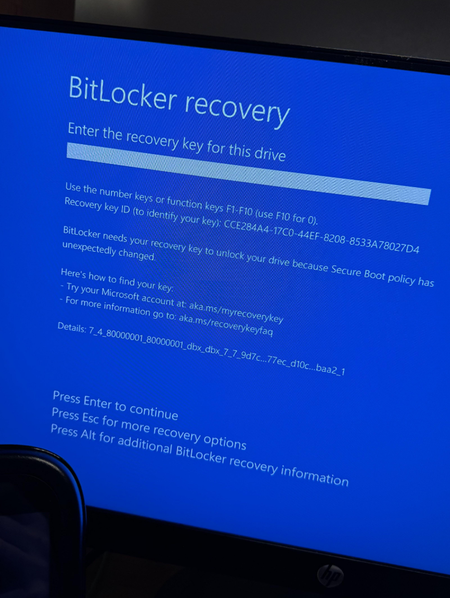
My grandmother uses an HP 24-cr0114 computer mainly for playing simple old-fashioned games, logging into her local bank's website, and browsing the web. She accidentally activated BitLocker encryption again (the recovery key has been found) and often forgets her login password (causing her bank account to be frequently reset). I hope to set up the computer as follows: Auto-login after startup without entering a password. Completely disable BitLocker encryption to avoid accidental activation and lockout. Keep the overall operation as simple and intuitive as possible, similar to her usage habits from many years ago. I am looking for specific, secure configuration steps and suggestions.131Views0likes5CommentsDo you use User Account Control in Windows 11?
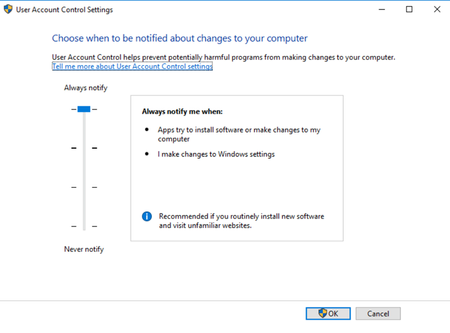
I personally prefer to disable User Account Control after installing a new system, mainly because I find its pop-up prompts too frequent and disruptive to work, and also partly because I feel it may create a "false sense of security." While I fully understand that more security measures do indeed provide greater safety, I still make this choice. I’d like to know what others do and think: Do you typically keep UAC enabled on your own computer? I hope to hear about the pros and cons of tolerating UAC prompts, as well as the specific reasons and habits behind everyone's choice to enable or disable it.124Views0likes4Comments