chat
240 Topics
Copilot Studio in Teams sometimes wraps user input with HTML tags (e.g., <div>)
I’m using Copilot Studio deployed to Microsoft Teams, and I noticed that user messages are occasionally received with HTML tags. For example, when a user sends "get me the onboarding status", sometimes it displays in the dialog box as "<div>get me the onboarding status</div>" This does not happen consistently. I’m not sure whether this is caused by how Teams renders or sends messages (e.g., HTML vs plain text), or if it is something specific to Copilot Studio. Is this expected behavior for the Teams channel? Any clarification or recommended handling would be appreciated.331Views0likes5CommentsCopilot Studio bot in Teams occasionally sends duplicate responses
I’m using a Copilot Studio bot deployed in Microsoft Teams, and I’m experiencing an intermittent issue where a single user message occasionally triggers two identical responses. This does not happen consistently, and there is no intentional duplicate logic in my bot design. I’m not sure whether this is caused by duplicate message delivery from Teams (e.g., retries or at-least-once delivery behavior), or something within Copilot Studio itself. Is this a known behavior for the Teams channel or Copilot Studio? Are there any recommended ways to detect or prevent duplicate responses at the bot level? Any insights or best practices would be appreciated.470Views0likes3Comments
Issue with Teams 'Add a User to Group Chat' API call?
I am getting a very strange error when trying to add a new user to an existing group chat using a GraphQL call. I have looked through the documentation, asked AI, and even contacted Microsoft support and no one can seem to explain why this API call is failing. Below is the API call that I am making. I can find no reason that I should be receiving the error message '#microsoft.graph.aadUserConversationMember' To get the basic questions out of the way.... Yes, the account making the API call DOES have permission to add users to the channel (and can do so using the frontend as normal.) Yes, the thread in question is a group chat, so adding members to that chat should be a valid command. Yes, ALL members in the group chat currently have the type '#microsoft.graph.aadUserConversationMember', so it is definitely a valid type for users in this channel. Yes, I have tried both the beta and stable channel; each gives the same error message. Yes, the invited user is internal to our organization, and is a valid target for the invite (invites work through frontend as well.) No, I cannot use the 'add member to channel' endpoint, because the chat is a group chat, not a channel. I can only assume, at this point, that the error message is a red herring and there's something else wrong with my API call?Why am I receiving this error message when trying to add a member to a pre-existing group chat? Thanks in advance for any assistance. POST to URL: https://graph.microsoft.com/beta/chats/[[THREAD_ID]]@thread.v2/members BODY: { "@odXXX.type": "#microsoft.graph.aadUserConversationMember", "roles": [], "email address removed for privacy reasons": "https://graph.microsoft.com/v1.0/users/[[USER_ID]]" } ERROR MESSAGE: {"error":{"code":"BadRequest","message":"The provided '#microsoft.graph.aadUserConversationMember' for 'odXXX.type' is not valid for this operation.","innerError":{"date":"2026-01-29T18:10:32","request-id":"<PII:moderator removed>","client-request-id":"<PII:moderator removed>"}}}472Views0likes9Comments
Bot not receiving message events in shared channels (RSC)
Hi folks, Running into an issue with a bot in Microsoft Teams shared channels. I've configured RSC permissions to listen for new messages. This works as expected in standard channels - I receive events for every new message. However, in shared channels, the behavior is different: I only receive events when the bot is explicitly tagged Regular messages in the channel don’t trigger any events Permissions currently granted: Channel.ReadBasic.All (Application) ChannelMember.Read.All (Application) ChannelMessage.Read.All (Application) Has anyone faced this with shared channels? Is this expected behavior or am I missing something in setup? Thanks!242Views0likes5Comments
How do I send a message to myself with PowerAutomate?
I am developing a PowerAutomate flow, I want to use the function "post message in chat or channel", I can send messages to anyone in "one to one" private chats but not on the private chat I have with myself. Has somebody found a way to message himself via power automate? I can't create it as a "new chat" in PA because it says users cannot be duplicate. Then I figured out I had to find the ID of the chat with myself. I tried using the microsoft graph api to retrieve the id from "me/chats" but the chat with myself is not shown. I tried many different filters and expansions with no success. I also tried analyzing the id itself and discovered that, in the case of "one to one" chats, it's made of {the sender id} and {the receiver id} I then tried constructing an id that contains 19:{myuserid}_{myuserid}@{domain} but it responds that there is no record. I tried many combinations, thanks for the help.18KViews0likes3Comments
When I install my app to a second channel in Teams, the this.onMessage will nto trigger
I have a bot which when installed to a channel will read messages using this.onMessage, if I add another channel to the same team it will also read the messages without installing the bot on that channel. However if a user installs the bot again, to the second channel which some users do, the second channel will not trigger the onMessage listener except when using the @botname command. I cant log errors anything because it just wont trigger. I feel like the context gets screwed up, all the other listeners fire on other channel Any help please?Solved139Views0likes3Comments
App Validation Issue - Bot must send a proactive welcome message in personal scope
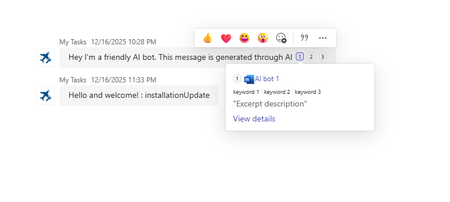
I'm working on a bot application for MS Teams using the Python SDK and encountered a challenge with app validation and the proactive welcome message requirement. What Happened: Initially, our bot handled the welcome message through on_installation_update, but app validation failed with the error: "Bot must send a proactive welcome message in personal scope." To satisfy validation, we added on_members_added_activity to send the welcome message for personal scope, which resolved the validation error. However, this created a new problem: on_members_added_activity is being triggered when we call the Graph API to query chats or users: {graph_url}/me/chats $filter=chatType eq 'oneOnOne' and installedApps/any(a:a/teamsApp/id eq '{teams_app_id}') {graph_url}/users/{user_id}/chats $filter=chatType eq 'oneOnOne' and installedApps/any(a:a/teamsApp/id eq '{teams_app_id}') According to a Stack Overflow discussion (https://stackoverflow.com/questions/57496329/proactive-messaging-bot-in-teams-without-mentioning-the-bot-beforehand), this appears to be a known issue: calling this API triggers a conversation update event even though there were no actual updates, resulting in duplicate events and duplicate welcome messages. Questions: What is the official/recommended way to handle known issue: calling this API triggers a conversation update event? Whats the recommended way to read personal chat history of a user? Should we be using a different approach for this app validation requirement? Any guidance or pointers to official documentation would be greatly appreciated!439Views0likes5CommentsAdd Teams Chat Member API call inexplicably Failing
I have tried every possible permutation of this API call that I can imagine. Nothing works. I already started a thread on this, but now it appears to be glitched and I can no longer reply to message sin that thread for some reason. What can I do to contact Microsoft Support and speak directly to their API team? The responses I have gotten all appear to be AI generated and NONE ARE CORRECT. I really need help, from a human, that actually might understand what's going on here. Please help. "#microsoft.graph.aadUserConversationMember' for 'odata.type' is not valid for this operation." <- I am receiving this error despite the fact that we already have several users in this channel with that same type. This API call is intended to invite a user to an existing group chat. This should really be a very simple thing. 1. ALL users in the group chat already have type = '#microsoft.graph.aadUserConversationMember' so the error message doesn't even make sense. 2. This IS a Group chat. NOT a channel. NOT a one on one chat. 3. The Inviter has permission to invite users to this groupchat through the frontend. (and in fact can do so using the frontend.) Why is this API call failing? I have tried scrubbing the API call of special characters, I have tried using the beta endpoint, I have tried several different formats for the input. ERROR: {"error":{"code":"BadRequest","message":"The provided '#microsoft.graph.aadUserConversationMember' for 'odata.type' is not valid for this operation.","innerError":{"date":"2026-02-10T19:11:28","request-id":"XXXXX","client-request-id":"XXXXXX"}}} POST URL: https://graph.microsoft.com/v1.0/chats/IDHERE/members BODY: { "chatType": "group", "\u0040odata.type": "#microsoft.graph.aadUserConversationMember", "user\u0040odata.bind": "https://graph.microsoft.com/v1.0/users/IDHERE", "roles": [] }270Views1like4CommentsApproval card not working when posted in a Power Virtual Agent Bot
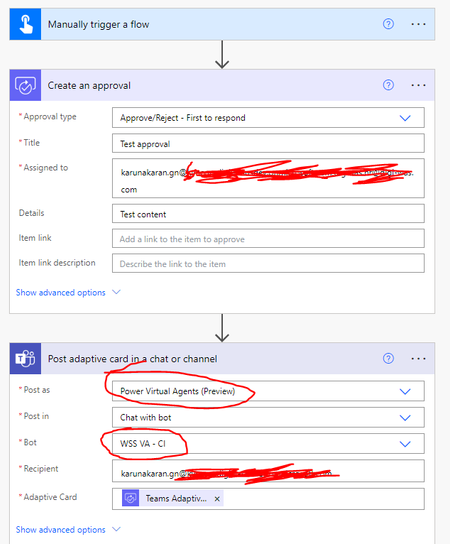
In My flow I am posting the approval card to a Power Virtual agent Bot, I see the approval being posted properly but, response (Approve/reject) button click is not reaching 'Waiting for an approval'. Please suggest. Same works fine when approval is posted to 'Flow bot'.861Views0likes2Comments