developer
1387 Topics
ad-hoc call transcripts via graph api endpoint
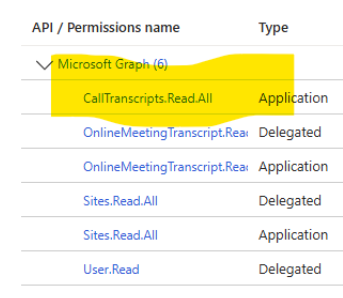
I have an app with the below permissions. I can successfully get list of transcripts and transcript content for online meetings. But when I try to get list for ad-hoc calls, I get the 400 Bad Request error. Any suggestions on how to get ad hoc call transcripts? Permissions Error:41Views0likes2Comments
[Adaptive Card] Issue with rendering images and ToggleVisibility
I am using a simple accordion style adaptive card with a collapsible section: { "type": "AdaptiveCard", "$schema": "https://adaptivecards.io/schemas/adaptive-card.json", "version": "1.5", "body": [ { "type": "Container", "items": [ { "type": "ColumnSet", "columns": [ { "type": "Column", "items": [ { "type": "TextBlock", "text": "Title", "wrap": true, "size": "Medium" } ], "width": "stretch" }, { "type": "Column", "id": "chevronDown", "spacing": "Small", "verticalContentAlignment": "Center", "items": [ { "type": "Image", "url": "https://adaptivecards.io/content/down.png", "width": "20px", "altText": "collapsed" } ], "width": "auto" }, { "type": "Column", "id": "chevronUp", "spacing": "Small", "verticalContentAlignment": "Center", "items": [ { "type": "Image", "url": "https://adaptivecards.io/content/up.png", "width": "20px", "altText": "expanded" } ], "width": "auto", "isVisible": false } ], "selectAction": { "type": "Action.ToggleVisibility", "targetElements": [ "cardContent", "chevronUp", "chevronDown" ] } }, { "type": "Container", "id": "cardContent", "isVisible": false, "items": [ { "type": "Container", "items": [ { "type": "TextBlock", "text": "Text" } ] } ] } ], "separator": true, "spacing": "Medium" } ] } On the initial load, the image (down arrow) gets rendered properly. If I click on it, the collapsed section opens (and the down arrow gets hidden and replaced by the up arrow). However, if I collapse the accordion again, the following happens: And it stays like this until I restart the Teams client. Looking at the devtools network tab for the web client the following behavior can be observed: During the initial load (1) the down.png gets fetched and stored in memory. You can also see the result on the right. If I extend the component (2), the up.png gets fetched and stored in memory. If I then collapse the section again (3), the call to memory for the down arrow fails with GET blob:https://teams.microsoft.com/51e89b2e-7da4-4c80-bf98-a6ee4d257052 net::ERR_FILE_NOT_FOUND It happens in both the standalone client and the web version. Also for multiple users (so it is not just some caching issue on my side). It seems to me that toggling the visibility somehow removes the images from memory. But it only happens for images that are initially visible (it doesn't happen for the up arrow in my case).199Views0likes2CommentsCreate Bot without Developer Studio
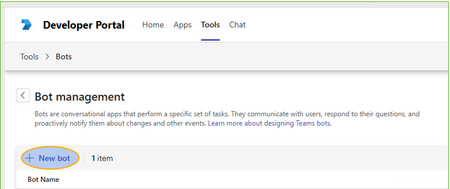
Hi, We have a bit hard policies and users are not able to use the Developer Studio by they own to make new Bot: If you press [New Bot] you can give the name, but then [Create Bot] start hanging and does nothing. Previously on Azure had a user setting which block or allow users to register apps. Now I need our tenant admins or application administrators (?) to setup the bot(s) manually. Does anybody knows if the bot registration for Teams is possible to do without developer studio? The Developer Studio shows only your own Bots, so they cannot do that for me using Developer Studio.46Views0likes3Comments
Web Notifications API from Personal Tab app doesn't work
I have a client-side web application that we're trying to get to run as a Teams personal tab app. I have the app working as a teams app, as long as we "open in new window" so that the app doesn't get put to sleep as it needs a permanently up session with something else. Our app uses Web Notifications API (https://developer.mozilla.org/en-US/docs/Web/API/Notification) to create desktop notificiations, but this does not seem to work when running as a Teams tab app popped out into a new window. No notifications are displayed. Permissions have been requested correctly and given and Windows is set to allow notifications, but these web notifications never make it out of teams to the desktop. There are no errors in the browser console to say the web notifications are not supported in Teams. Is this not supported as a teams app? The inbuilt activity feed is useless for our purpose (for a few reasons), so please don't suggest I use graph to make use of that instead.48Views0likes2Comments
SSO for a Python Teams Bot (M365 Agents SDK + FastAPI) — Single-Tenant, Multi-Tenant, and UAMI
We're building, a Teams bot (Python / FastAPI) that uses the M365 Agents SDK (microsoft-agents-hosting-fastapi + microsoft-agents-authentication-msal, v0.8.0) with a CloudAdapter and MsalConnectionManager. The bot is currently scoped to personal only and runs behind an Azure Bot resource. We are trying to implement SSO to authenticate users, so far we are not successful. The main blocker is that we failed to authenticate users from tenant different than the Azure Bot resource of our app. If anyone has successfully managed to authenticate users on Teams using a setup similar than ours please do share your experience. We would love to learn from your experience. So far this was our main source of documentation: https://learn.microsoft.com/en-us/microsoftteams/platform/bots/how-to/authentication/bot-sso-overview Many thanks35Views0likes1Comment
Possibly check blocked state instead of exception
Once a user blocked the bot, and when a message is sent to that user, the exception(Forbidden) was thrown. Is there any possible way to check whether the user has blocked or not, instead of catching the exception? So maybe something like if(user.hasblocked()) {}....?628Views1like3Comments
Bot not receiving message events in shared channels (RSC)
Hi folks, Running into an issue with a bot in Microsoft Teams shared channels. I've configured RSC permissions to listen for new messages. This works as expected in standard channels - I receive events for every new message. However, in shared channels, the behavior is different: I only receive events when the bot is explicitly tagged Regular messages in the channel don’t trigger any events Permissions currently granted: Channel.ReadBasic.All (Application) ChannelMember.Read.All (Application) ChannelMessage.Read.All (Application) Has anyone faced this with shared channels? Is this expected behavior or am I missing something in setup? Thanks!178Views0likes5Comments
Question about barCode.scanBarCode
Dear sir I'm developing Teams mobile application, static tab(Personal app Tab). We need a QR scan feature. However I can't use that. barCode.isSupported() is always false. Is there any restriction on static tab app? Here are my conditions. -. "import { app, authentication, barCode } from '@microsoft/teams-js';" . version : 2.37.0 -. manifest.json : "devicePermissions": ["media"], -. app.initialize() is sucessfully done. I can see the barCode object Unfortunatly, barCode.isSupported() shows false. Android, iOS has the same result. Can you advise how I can use the barCode camera.? Many thanks77Views0likes3Comments
Get all AA/CQ with Resource Accounts
Hello Is it possible to have a script that pulls out all AA/CQ with resource accounts. I would like to pull it to find out which of the AA/CQ do not have resource account. If there is no resource account the field would be empty. Regards JFM_12Solved106Views0likes4Comments