planner
642 Topics
Understanding Planner plan options
Hello! First time posting because I'm not an M365 admin at my company so apparently cannot contact Microsoft directly. We are a small company with about 25 employees and have started using Planner to capture actions from meetings. The biggest concern with this is how to recover task cards that are accidentally deleted. Looking at the Planner 3 plan, it looks like that covers task history. If we have the board owner on a Planner 3 plan, can regular users create, assign, add checklist items, and comment on task cards? Though if I'm understanding correctly, task history does not provide a recovery option if a task is accidentally deleted. It seems that we need a third party tool to be able to recover deleted tasks. Is that an accurate understanding, or does Microsoft have a native way to recover tasks? Thank you!Solved47Views0likes4Comments
Timeline zoom
Hello, Is there a way to lower the zoom level in the Timeline view to less than 1 week? I have a couple projects with multiple dependent task per day but if I use the maximum zoom level in the Timeline view I don’t get a good overview of the different task in for example a 4 day period. I was expecting a Gantt chart like view, like what you have in Microsoft Project, in where you can zoom to a minute level granularity even.96Views0likes1CommentPlanner - Plan 1 - Welcome message
Hi, we're using Teams for managing our projects. We have Team "Projects" and there are many channels inside this Team. Each channel represent our project (we are HVAC company). With the basic Planner, I used to create channel "Mr. Newman" - inside that channel we have all files related to that project, we have discussions about that project and we also have Planner assigned to that project. Which works well. Since we are growing, I wanted to test the Planner Plan 1 (I like the Goals, timelines etc), however, there is a huge problem that when I create the Planner now (the premium one), it sends an E-mail to everyone. I don't want that. All of the employees are getting emails that they have been added to the planner "Mr. Newman" etc. and they are asking what should they do with that? How do I turn that off? Thanks, Jakub109Views0likes1Comment
Improve Resource Capacity and Baseline Governance in Planner Premium
Microsoft Planner Premium works well for assigning individual users to tasks within a single plan. However, significant limitations appear when organizations move from managing isolated plans to managing programs and portfolios. For Planner Premium to become a truly enterprise-ready project and portfolio management solution, Microsoft should urgently address the following three areas. 1. Cross-plan resource capacity management When a person is assigned to several tasks or multiple plans, Planner Premium can accumulate more work than the person’s actual daily, weekly, or monthly capacity. Although effort can be adjusted manually in the Assignments view, this becomes extremely difficult when managing many tasks, resources, projects, and concurrent assignments. Organizations need a consolidated capacity management capability across all plans, programs, and portfolios. Planner Premium should allow organizations to: Define each person’s available capacity. Allocate people using percentages, such as 20%, 50%, or 75%. Consolidate assignments across multiple plans. Detect overallocations before they affect delivery. Compare demand versus capacity by day, week, and month. Consider vacations, absences, calendars, and reduced availability. Generate warnings or optionally prevent assignments that exceed capacity. Support resource-leveling and workload redistribution. The People view is useful within an individual plan, but portfolio managers need visibility across the entire portfolio. Without cross-plan capacity management, portfolio planning remains incomplete because organizations cannot reliably determine whether they have enough available resources to deliver their commitments. 2. Generic resources and role-based planning Project plans are often created before the final team members are known. At the planning stage, organizations may know that they need a SAP consultant, solution architect, developer, business analyst, or infrastructure specialist, but they may not yet know the specific person who will perform the work. Planner Premium should support generic resources or role-based placeholders that can be assigned to tasks before a named person is confirmed. These resources should include information such as: Required role or profile. Skills and experience level. Required capacity. Planned participation period. Estimated cost or rate. Business unit or location. Staffing status. Once the appropriate person is identified, the generic resource should be replaceable without losing the planned tasks, dates, effort distribution, cost information, or dependencies. This is essential for resource forecasting, staffing requests, project approval, and early-stage portfolio planning. 3. Baseline security and separation of duties The project baseline is the approved reference used to measure schedule and effort deviations. For this reason, baseline creation, replacement, and deletion should not remain freely available to every user who can edit the plan. In many organizations, the project manager maintains the schedule, while the PMO, portfolio administrator, sponsor, or governance committee controls baseline approval. Allowing the same person to modify both the current schedule and the baseline against which performance is measured creates a clear conflict of interest. Planner Premium should introduce optional baseline governance capabilities, including: A dedicated Portfolio Administrator or PMO role. Separate permissions to create, replace, or delete baselines. A baseline change request and approval workflow. Mandatory justification for baseline changes. Complete audit history. Protection or locking of approved baselines. Comparison between the original baseline, current approved baseline, and current schedule. Integration with formal project change-management processes. This should be configurable. Smaller organizations may prefer a simple model, while organizations with mature governance processes need stronger controls and separation of duties. Why this is urgent Microsoft Planner Premium is increasingly being positioned as a solution for project and portfolio management. However, portfolio management requires more than consolidating project status, dates, and progress. It also requires: Visibility of resource demand and availability across multiple plans. The ability to plan resources before individual people are confirmed. Governance controls that protect approved project baselines. These are not minor enhancements. They are foundational capabilities for enterprise project, program, and portfolio management. Microsoft has a major opportunity to make Planner Premium considerably more valuable for PMOs and organizations managing multiple concurrent projects. I strongly encourage the Microsoft Planner product team to prioritize: Enterprise resource capacity management. Percentage-based allocation. Generic resources. Cross-plan workload consolidation. Portfolio-level resource forecasting. Controlled baseline permissions and approvals. These improvements would significantly reduce manual work, prevent resource overcommitment, strengthen governance, and make Planner Premium a much more credible enterprise PPM platform.18Views0likes0Comments
Is using Planner for tracking OKRs a good idea?
So our team has been trying to use Planner to track OKRs. We set up buckets for each objective and tasks for key results. It kinda works for a small team but now that leadership wants to roll it out company wide, its getting messy. Theres no way to show progress rollups from team-level OKRs to company-level ones, no percentage tracking on key results, and managers cant see a consolidated view across teams. Has anyone found a decent way to make Planner work for OKR tracking at scale?113Views1like2Comments
Planner Plan 3 Subscription Cancelation and refund.
Hello. I have Microsoft planner plan 3 subscription which expired and has been automatically renewed which is against my intention , I tried to communicate with Microsoft support through email , live chat , phone call but without any positive progress , on phone they have an AI agent which is wasting of time , in live chat they just pass you to another departments and share wrong email address . I have been trying to fix this issue since the first day of subscription renewal but so far nothing . The subscription is under a twin alias email which I don't have access to and there is no admin , the email is under onmicrosoft domain. I need a urgent quick help for this issue so that I can get refund .42Views0likes1CommentIncrease the maximum number of Goals in Microsoft Planner Premium
Hi Microsoft Planner community, In the new Microsoft Planner Premium, it seems that a plan can currently have a maximum of 10 Goals. For our team, this limit is too low. We use Goals to structure our work around multiple sprint objectives, epics, deliverables, and larger initiatives. Since our Planner board supports several workstreams at the same time, 10 Goals is not sufficient for proper planning and reporting. Could Microsoft please explain why the limit is set to 10 Goals? And is there any possibility to increase this limit, for example to 30 Goals per plan? This would make the Goals feature much more useful for teams that manage multiple initiatives, projects, or quarterly deliverables within one Planner Premium plan. Thanks in advance!83Views0likes1Comment
Planner Integration with Loop Tasks
Need some guidance - We are starting to use Planner to keep track of a large number of tasks. Currently planner is setup with: Approx 10 buckets (in kanban view), and a list of tasks below each. We are using this mainly just for tasks, so the Timeline view isn't needed. We want to connect tasks recorded in Teams meetings, and in Loop to our main Planner. Whats the best work around for this? When using Loop, and we create a task and we connect it to Planner, it will create a new Plan and put the tasks under that. To me, this is dysfunctional, because we want all tasks to be under the main Plan in Planner. I like to use the GRID view of the Plan, which enables me to make subtasks under the main tasks, but others prefer to use the kanban view. However you can't see the subtasks that are under the "main task" like in Grid view. There's lots of videos showing how these parts of Teams work together, but in reality, it doesn't really work that well when it scatters tasks created in different parts to different Planners. Any suggestions would be helpful, and thank you in advance for your help. Jim3.5KViews5likes8CommentsLinks in Tasks assignments emails not working (Named environment)
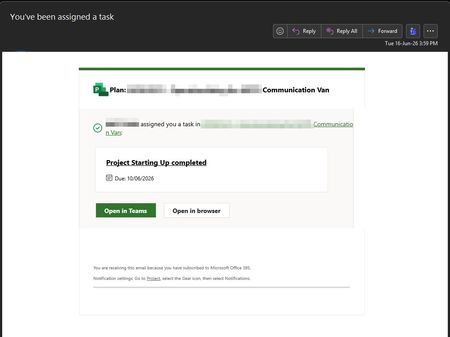
Hello! We have implemented Project for the web accelerator in a named environment (non-default). In a Plan the Project Manager assigns a task to a member of the O365 Group for that Project (Email notifications do not work if there is no O365 Group associated with the Project beforehand). The assignee receives the email with 4 links: Only the "Open in Teams" works, the rest linking to the Plan or the Task does not have the appid in the named environment so it fails with a correlation error that we cannot investigate further. Is the missing appid in the links a BUG in the Project Service Core managed solution provided by Microsoft (1.0.0.87 / 1.0.166.34262)? Is there a way to get the links working correctly with no errors? Thanks129Views2likes2Comments