security
5349 Topics
Why Samsung Drivers Auto-Install on Lenovo ThinkPad P1 G6 with Windows 11
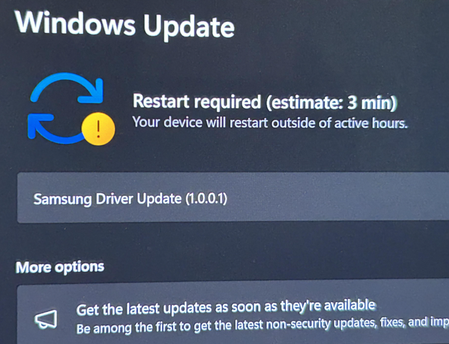
When using Windows 11 on a Lenovo ThinkPad P1 6th Generation laptop, the system automatically downloads and prompts to install "Samsung"-branded drivers. It is currently unclear whether this phenomenon arises from internal Samsung components in the device requiring driver support or whether the system preemptively pushes universal drivers in anticipation of potential connections to Samsung phones. Is this update mandatory and absolutely necessary? We kindly request clarification on the origin of this "mysterious driver" and an assessment of its necessity for installation.32Views0likes1CommentMicrosoft finally admits almost all major Windows 11 core features are broken
A major new Windows 11 update has introduced widespread stability issues affecting core system functionality. Many users, including myself, are now experiencing frequent and disruptive problems like File Explorer crashes, slow performance, taskbar glitches, and Bluetooth failures, which together make the operating system frustratingly unreliable for daily use.40KViews5likes20CommentsHybrid Identity Admin Questions
Hi All I hope you are well. Anyway, we are migrating our Entra Connect Sync server to it's own dedicated server. With regards to the Hybrid Identity admin role, do we: Include MFA on this account Configure as Eligible or Permanent in PIM Info appreciated Stuart13Views0likes0Comments
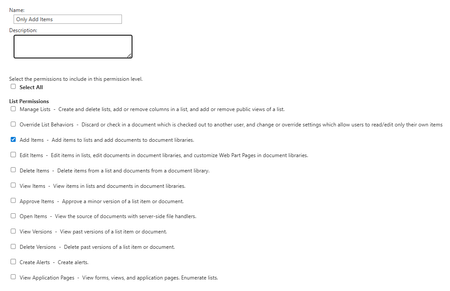
Add items Permission level
Hi, I'd like to know a way to set permissions on a list so that users in the SharePoint site - Members group can't see existing items in the list that don't have unique permissions assigned. They can only add new items in this list. Once an item is created, a workflow would be triggered that would add a unique permission only for that item. The problem is that when creating a Permission Level with only the ability to add items, the user loses access to the custom item creation form.47Views0likes2CommentsSupport tip: Upcoming Microsoft Intune network changes
12/18/25 Update - This post has been updated to include a new Azure Front Door (AFD) Connectivity Diagnostics Tool to help validate Intune network connectivity after firewall updates. We know many customers don’t always check their service change messages in the Microsoft 365 admin center or the corresponding Message Center content in the Microsoft Intune admin center, so in this blog post we’re highlighting an important upcoming change to Intune network service endpoints. Starting on or shortly after December 2, 2025, Intune will also use Azure Front Door IP addresses to improve security and simplify firewall management. If your organization uses outbound traffic policies based on IP addresses or service tags, you’ll want to review and update your firewall rules to avoid service disruptions. We’ll keep you updated if the timeline shifts. In the meantime, here’s the service change communication that posted to all Intune customers: MC1147982 - Action Required: Update firewall configurations to include new Intune network endpoints As part of Microsoft’s ongoing Secure Future Initiative (SFI), starting on or shortly after December 2, 2025, the network service endpoints for Microsoft Intune will also use Azure Front Door IP addresses. This improvement supports better alignment with modern security practices and over time will make it easier for organizations using multiple Microsoft products to manage and maintain their firewall configurations. As a result, customers may be required to add these network (firewall) configurations in third-party applications to enable proper function of Intune device and app management. This change will affect customers using a firewall allowlist that allows outbound traffic based on IP addresses or Azure service tags. Do not remove any existing network endpoints required for Microsoft Intune. Additional network endpoints are documented as part of the Azure Front Door and service tags information referenced in the files linked below: Public clouds: Download Azure IP Ranges and Service Tags – Public Cloud from Official Microsoft Download Center Government clouds: Download Azure IP Ranges and Service Tags – US Government Cloud from Official Microsoft Download Center The additional ranges are those listed in the JSON files linked above and can be found by searching for “AzureFrontDoor.MicrosoftSecurity”. How this will affect your organization If you have configured an outbound traffic policy for Intune IP address ranges or Azure service tags for your firewalls, routers, proxy servers, client-based firewalls, VPN or network security groups, you will need to update them to include the new Azure Front Door ranges with the “AzureFrontDoor.MicrosoftSecurity” tag. Intune requires internet access for devices under Intune management, whether for mobile device management or mobile application management. If your outbound traffic policy doesn’t include the new Azure Front Door IP address ranges, users may face login issues, devices might lose connectivity with Intune, and access to apps like the Intune Company Portal or those protected by app protection policies could be disrupted. What you need to do to prepare Ensure that your firewall rules are updated and added to your firewall’s allowlist with the additional IP addresses documented under Azure Front Door by December 2, 2025. Alternatively, you may add the service tag “AzureFrontDoor.MicrosoftSecurity” to your firewall rules to allow outbound traffic on port 443 for the addresses in the tag. If you are not the IT admin who can make this change, notify your networking team. If you are responsible for configuring internet traffic, refer to the following documentation for more details: Azure Front Door Azure service tags Intune network endpoints US government network endpoints for Intune If you have a helpdesk, inform them about this upcoming change. If you need additional assistance, contact Microsoft Intune Support and refer to this Message Center post. Note: The above post went to all customers in our public cloud. Customers in Microsoft Intune for US Government GCC High and DoD received the following post (the only difference is the focus on US government network endpoints): MC1147978 - Action Required: Update firewall configurations to include additional Intune network endpoints Note: The previously available PowerShell scripts for retrieving Microsoft Intune endpoint IP addresses and FQDNs no longer returns accurate data from the Office 365 Endpoint service. Instead, use the consolidated list provided in the Intune endpoints documentation. Using the original scripts or endpoint lists from the Office 365 Endpoint service is insufficient and may lead to incorrect configurations. For network best practices, make sure to check out the blog: Support tip: Aligning network policy with Intune and Zero Trust. New: Azure Front Door Connectivity Diagnostics Tool for Intune To help you validate or troubleshoot the recent Intune network changes, we’ve published a lightweight Azure Front Door (AFD) Connectivity Diagnostics Tool. The script tests DNS resolution, outbound TCP connectivity on ports 80 and 443, and HTTPS reachability to the AFD IP ranges used by Intune, directly from an Intune-managed device. This is useful for environments that rely on IP-based firewall, proxy, or VPN rules. Important: This script only tests Azure Front Door (AFD) endpoints. It does not validate connectivity to non-AFD Intune endpoints, including existing Intune IPs, service FQDNs, or related services such as Windows Notification Service (WNS) or Windows Autopilot. If you have any questions, leave a comment below or reach out to us on X @IntuneSuppTeam or @MSIntune. You can also connect with us on LinkedIn. Post updates: 11/13/25: Added a note to use the consolidated list of Intune endpoints. 12/18/25: We’ve published a new Azure Front Door (AFD) Connectivity Diagnostics Tool to help validate and troubleshoot Intune connectivity after updating firewall rules.437KViews10likes25CommentsSecurity Review for Microsoft Edge version 144
We have reviewed the new settings in Microsoft Edge version 144 and determined that there are no additional security settings that require enforcement. The Microsoft Edge version 139 security baseline continues to be our recommended configuration which can be downloaded from the Microsoft Security Compliance Toolkit. Microsoft Edge version 144 introduced 2 new Computer and User settings; we have included a spreadsheet listing the new settings to make it easier for you to find. As a friendly reminder, all available settings for Microsoft Edge are documented here, and all available settings for Microsoft Edge Update are documented here. Please continue to give us feedback through the Security Baselines Discussion site or this post.