Forum Discussion

Why does REDUCE Function gives VALUE Error
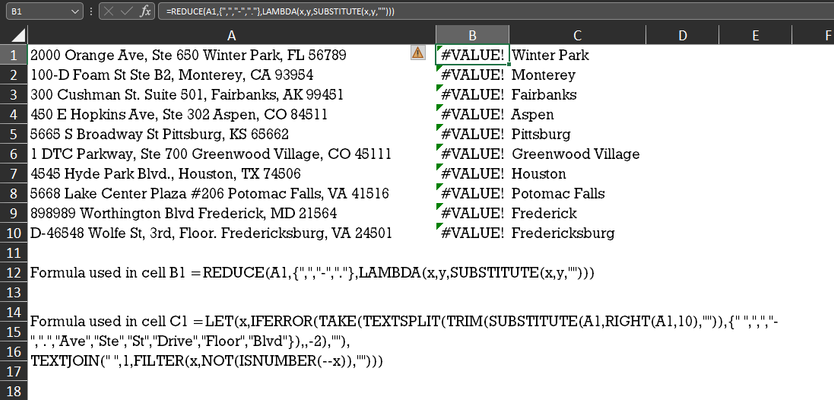


Okay, but you said an error is on Excel Desktop and you don't use Excel for web
- SergeiBaklanSep 01, 2022Diamond Contributor
If a is the text - when not.
 Patrick2788Aug 31, 2022Silver ContributorVery interesting. It looks like a *1 works, too.
- SergeiBaklanAug 31, 2022Diamond Contributor
As a comment, just + before reference/name is enough. Like
=EDATE( +range, n)
=T( +range )
- Patrick2788Aug 31, 2022Silver Contributor
- Mayukh_BhattacharyaAug 31, 2022Iron ContributorThank you very much, 😃
- SergeiBaklanAug 31, 2022Diamond Contributor
Mayukh_Bhattacharya , you are welcome. Without knowing your environment I don't know what it was as well.
Nothing to do to close. If you have no more questions or comments related to the topic do nothing here. And you are welcome to open new thread if you have another new questions to community.
- Mayukh_BhattacharyaAug 31, 2022Iron ContributorSir, even though its working now, but I am not able to figure what was the issue, anyways when its working, better not to take any more stress on it. Thank you very much for your time patience and effort. Sir how do i close the post.
- SergeiBaklanAug 31, 2022Diamond Contributor
Glad to know you sorted this out, thank you for the update.
- Mayukh_BhattacharyaAug 31, 2022Iron Contributor
SergeiBaklan Sir, strange same formula is working now, but not able to understand why it was not working then
- Mayukh_BhattacharyaAug 31, 2022Iron Contributor
SergeiBaklan Sir see this image its working but not working for those strings which I posted earlier, also MS Support guy was not able to help.
- Mayukh_BhattacharyaAug 31, 2022Iron ContributorOk Sir, I found out, that I can use REDUCE() Function anywhere, i.e. I have used that specific formula in other workbooks and as well as in new workbook as well, but it is not working for this specific texts strings. For those US Addresses