Forum Discussion

Transpose the table on VBA with missing values for the dates
- Nov 29, 2020
MarieParis As said, it's difficult to help if I don't see the entire "picture". That is, all you want to achieve. The pivot table is created with the macro, and it's created in the cell you indicate.
Now that the PT is in place, and if based on a structured table, you should not have to press the button anymore. And that is what I really meant earlier. You don't need a macro to do the transposing of your data. Create the PT once and refresh it (Data ribbon, Refresh All) when data is added to the table. The "transposed" table will be "recalculated" instantly. Should you want that step to be automated, then you can have a macro (and a button) that does the refreshing for you. But it would be practically the same as pressing the refresh button in the Data ribbon.
I apologise if I'm not clear.
(Picture taken on a Mac, but it looks similar on a Excel for Windows)

MarieParis The code I recorded builds a pivot table that has a structured table as its source. Structured tables expand automatically and when you create a pivot table, you can refer to the table name. Then there is no need to go look for the last cell in the data range. The data in the file you uploaded is not structured. It has no column headers and it has a blank row. I would be surprised if my code would work on this data set at all. But, I can't be sure until I see the code below the Error message-box.

Riny_van_Eekelen Thank you! It's works!
I have the last question, please:
I run first time my macro: my table is created
When I run the second time: I have the error message beacause my table is already exist and can't overwrite it.
How to put an alerte message and stop the macro?
- Riny_van_EekelenNov 29, 2020Platinum Contributor
MarieParis As said, it's difficult to help if I don't see the entire "picture". That is, all you want to achieve. The pivot table is created with the macro, and it's created in the cell you indicate.
Now that the PT is in place, and if based on a structured table, you should not have to press the button anymore. And that is what I really meant earlier. You don't need a macro to do the transposing of your data. Create the PT once and refresh it (Data ribbon, Refresh All) when data is added to the table. The "transposed" table will be "recalculated" instantly. Should you want that step to be automated, then you can have a macro (and a button) that does the refreshing for you. But it would be practically the same as pressing the refresh button in the Data ribbon.
I apologise if I'm not clear.
(Picture taken on a Mac, but it looks similar on a Excel for Windows)
- MarieParisNov 29, 2020Copper ContributorThank you,
I understood! :). I think that Refresh All at the end of executation of my query is better.
Have a nice evening!- Riny_van_EekelenNov 29, 2020Platinum Contributor
MarieParis Great! Always good to hear that it works.
- MarieParisNov 29, 2020Copper Contributor
Riny_van_Eekelen Soory, I will explain you the fonctionality of my macro:
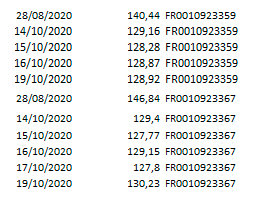
Step 1: I'm connecting to my row data, pressing on the button, and I have my data to transpose. This data can evolve, so I must refresh it once a week:
Step 2: I transpose this data: I added the macro of pivoting to the macro of the button.
When I click to the button I make the data query and pivoting.