Forum Discussion

sorting date column oldest to newest

Thanks Haytham!
This is what I got, close but not 100% - I still need to clean it up...
any suggestions how to take it from here?
I really appreciate your help - thanks again!

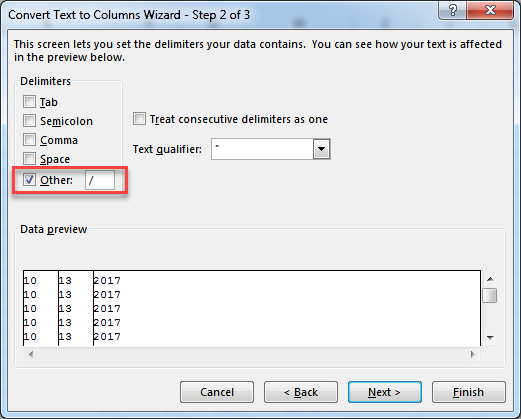
This little option is the cause of this problem, I forgot to tell you about it:
You should have cleared this check box!
If you can undo the process, undo it, and take into account to clear this option.
If you can't, follow this workaround:
Next to the first cell contains 2017 use this function as shown in the below screenshot:
=DATE(YEAR,MONTH,DAY)
Then copy it down using the https://support.office.com/en-us/article/Fill-a-formula-down-into-adjacent-cells-041edfe2-05bc-40e6-b933-ef48c3f308c6 to get the same result in the above screenshot.
After that, highlight the range, https://support.office.com/en-us/article/Paste-values-not-formulas-12687B4D-C79F-4137-B0CC-947C229C55B9
Then delete the previously separated values on multiple columns, and move the dates to the right place.
Hope that makes sense.
- Celia CaloDec 06, 2017Copper Contributor
YEY!!!!
I got it... THANK YOU SO MUCH Haytham.
For all your help and patience.
The only thing I was doing wrong was selecting the D/M/Y option instead of M/D/Y to match the rest of the sheet.
It's now working and I'm able to sort newest to oldest etc.
Hooray!
- Haytham AmairahDec 05, 2017Silver Contributor
Highlight them and apply these steps, step by step:
Step 1
Go to Data >> Data Tools >> Text to Columns.
Step 2
In Text to Columns window click Next.
Step 3
Clear the check mark from the below option (You may find it already cleared)
Then click Next.
Step 4
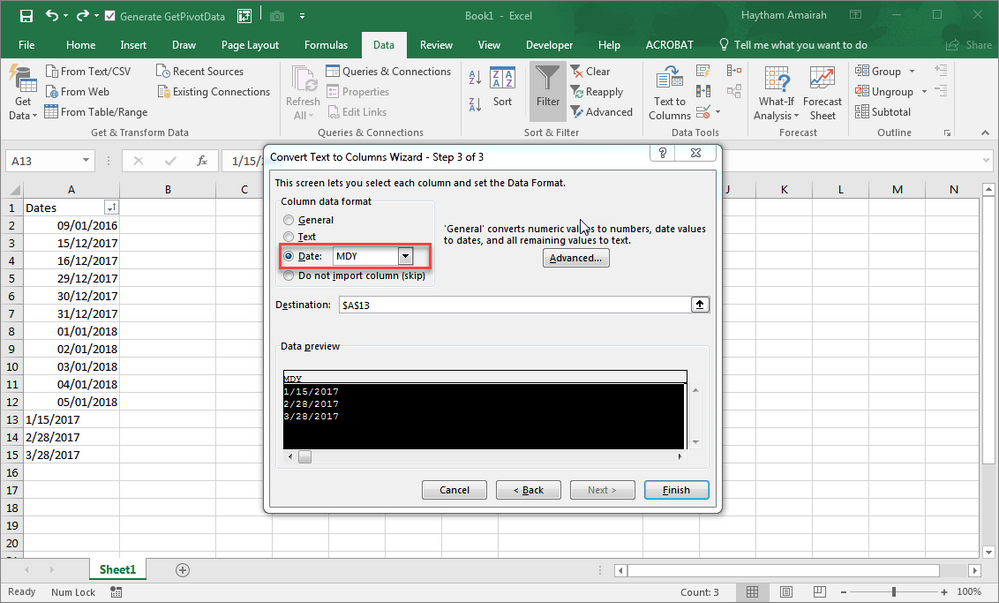
Select Date from the Column data format group box, and select the date format of text dates that you have previously highlighted., If its format is US format (MDY), select it and hit Finish as shown in the below screenshot:
- Celia CaloDec 05, 2017Copper Contributor
Done!
It worked but the cells are still text and not date format
so I can't sort them new --> old...Any ideas?
Thanks,
Celia