Forum Discussion

stanoh
Feb 17, 2020Copper Contributor
Solving Name conflict in excel
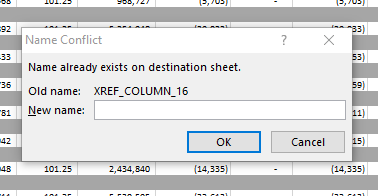
How do you solve name conflict in excel worksheet when copying worksheets?
- Feb 18, 2020
Depends on their use I guess. Whether or not you want to keep the name definition of your target workbook when pasting there will also depend on the structure of both source and target. This is one of the drawbacks of copying formulas from one workbook to another where both workbooks contain range names. It can be quite a challenge to figure out which range names should be kept. My Name Manager available for free through https://jkp-ads.com/officemarketplacenm-en.asp shows all range names in a file, including the hidden ones.

stanoh
Feb 18, 2020Copper Contributor
Thanks i did get the results as shown, unfortunately i wasn't able to move the worksheet to the new workbook. Unfortunately no other excel operation can go on unless i close excel using the task manager and stop all excel tasks running, a solution would be welcome.

JKPieterse
Feb 18, 2020Silver Contributor
You could simply click the Yes to All button I showed above. You can get back to that dialog by cancelling the one you displayed in your first message.
- stanohFeb 18, 2020Copper ContributorTried that and didn't work had to repeat the whole stuff again by ending excel application. it only works when i move to a blank/new book not to the second workbook...thanks anyways
- JKPieterseFeb 18, 2020Silver ContributorI would advise you to check Name Manager (from the Formula tab of the ribbon) for both files. See if all range names are expected to be in that file or not.
- stanohFeb 18, 2020Copper Contributor
Thanks i will, should they be the same or not to ensure no conflict.