Forum Discussion

ROUNDUP Function not working
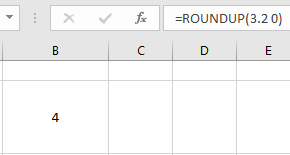

In your screenshot, comma is the decimal separator.
So you should use semicolon between the arguments of the function:
=ROUNDUP(C7;0)

 JimjdhfNteSep 14, 2023Copper Contributor
Thank you HansVogelaar. I correct this.
- HansVogelaarSep 14, 2023MVP
On your computer, the list separator is the same as the decimal symbol: you use comma for both. That causes the conflict.
Either use comma as decimal symbol and semicolon as list separator, or point as decimal symbol and comma as list separator.
- JimjdhfNteSep 14, 2023Copper Contributor
Hi SergeiBaklan. Everything looks to be fine now after I opened your file. Even the separator between in the formula is appearing now.
Thank you for being so helpful.
- JimjdhfNteSep 14, 2023Copper Contributor
- SergeiBaklanSep 14, 2023Diamond Contributor
Try to open attached file, it has nothing but
and check how formula looks like in your environment.
- HansVogelaarSep 14, 2023MVP
Press the Windows key+R to activate the Run dialog.
Type control international and press Enter or click OK.
Click Additional settings...
This is what I see on my PC:
What is the Decimal symbol on your computer?
And what is the Digit grouping symbol?
And the List separator?
- JimjdhfNteSep 14, 2023Copper Contributor
- HansVogelaarSep 14, 2023MVP
What happens if you use semicolon ; instead of comma?
- JimjdhfNteSep 14, 2023Copper Contributor
Urban_Champion Hi. Round up is not working at all on my PC. The formula does not have a separator between the number and the rounding digits.
A comma gives the error as in the picture above. Please help
